Dev Terminal, hosted for software teams

From the Agile card to Done

The tech lead gives a card to a team of AI agents and steps in only when an agent asks them something. On the phone, the developer opens the tab left on the laptop last night and finds it exactly as it was. The tester logs in from the terminal to the team’s QA machine.

From 249 lei per month, excl. VAT.

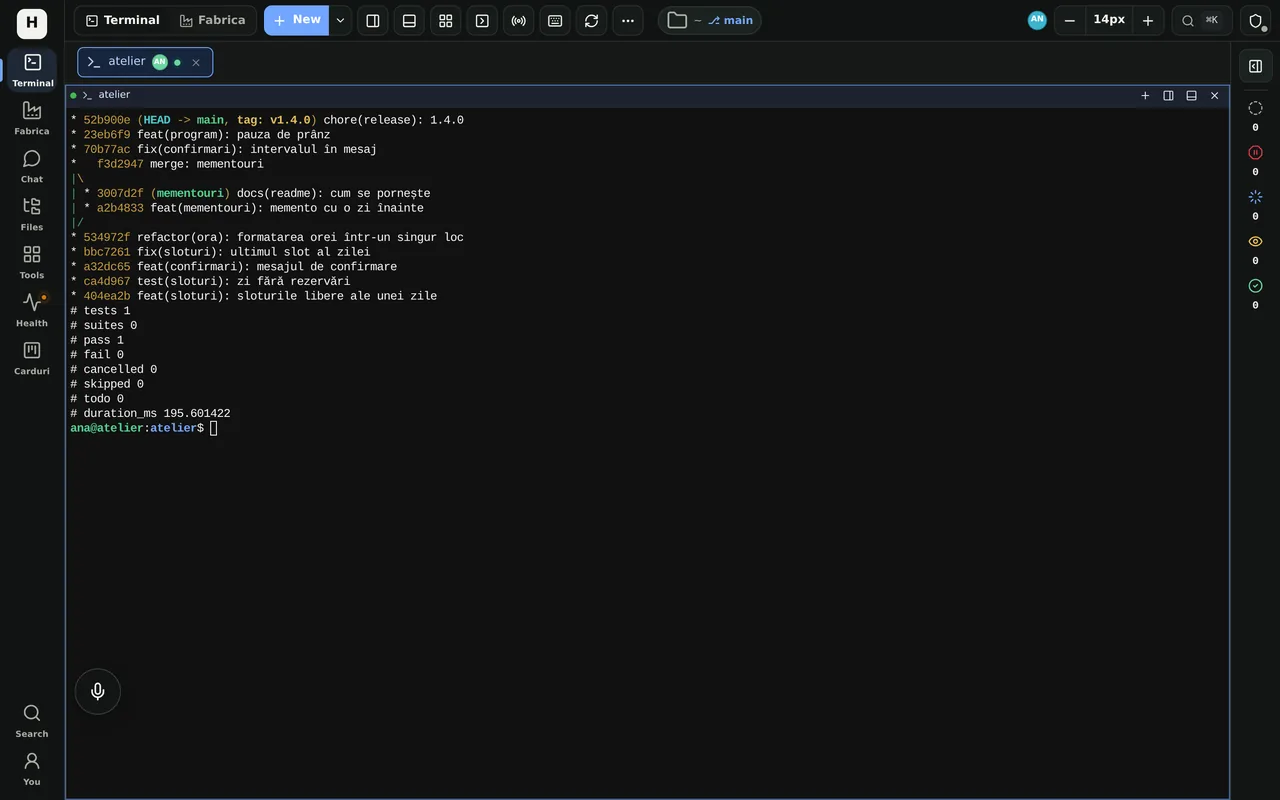
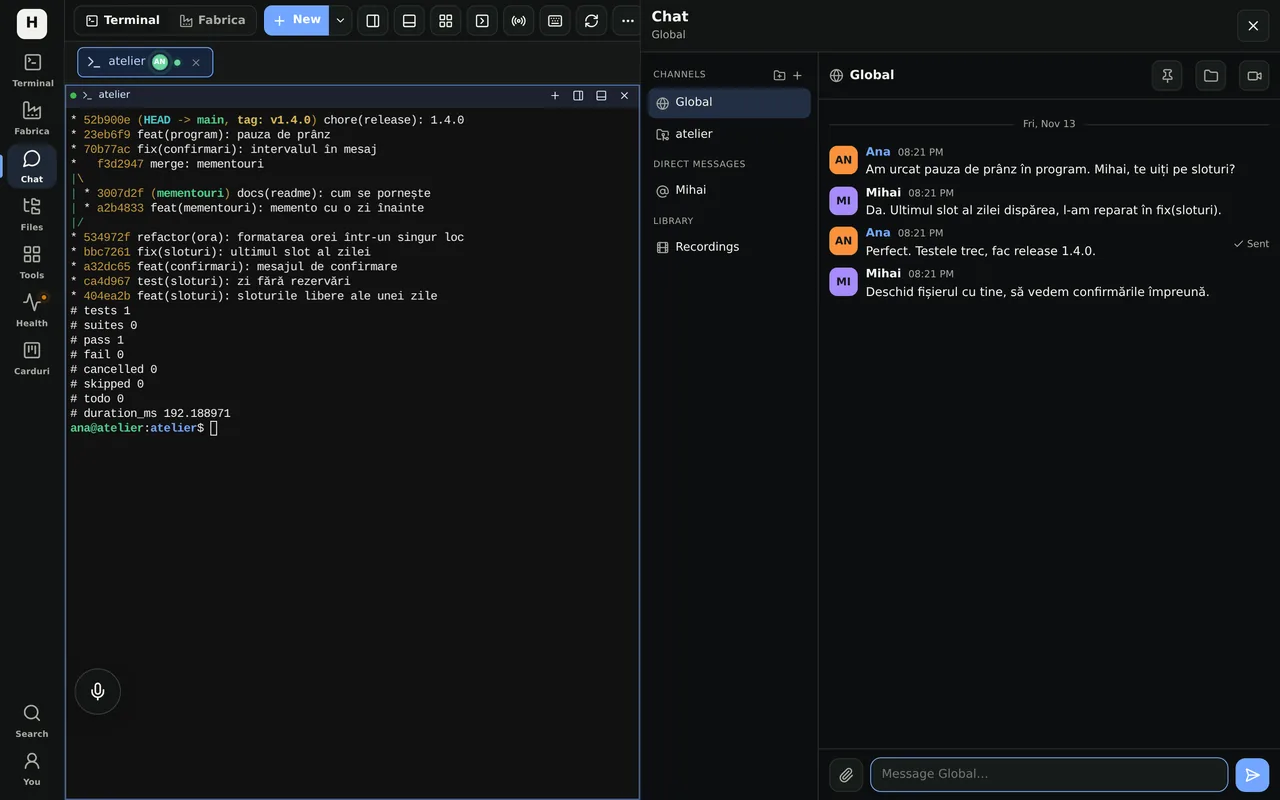
Dev Terminal: a project’s tab, with the git history and the test results
Unlimited usersYou pay for the resource package, however many people work on it.
Agile includedYour card board, on the same machine, linked to the Factory.
One Linux account per personEach person’s tabs and files run as them, without administrator rights.

The Factory

The next stage starts on its own, on the server

You give the card to a team of agents and answer when you are asked. The agent ends the stage with a verdict, and the server starts the next stage, even when your laptop is closed.

Each stage ends with PASS, REJECTED or BLOCKED.

A rejected card goes back to execution, with the reason in writing.

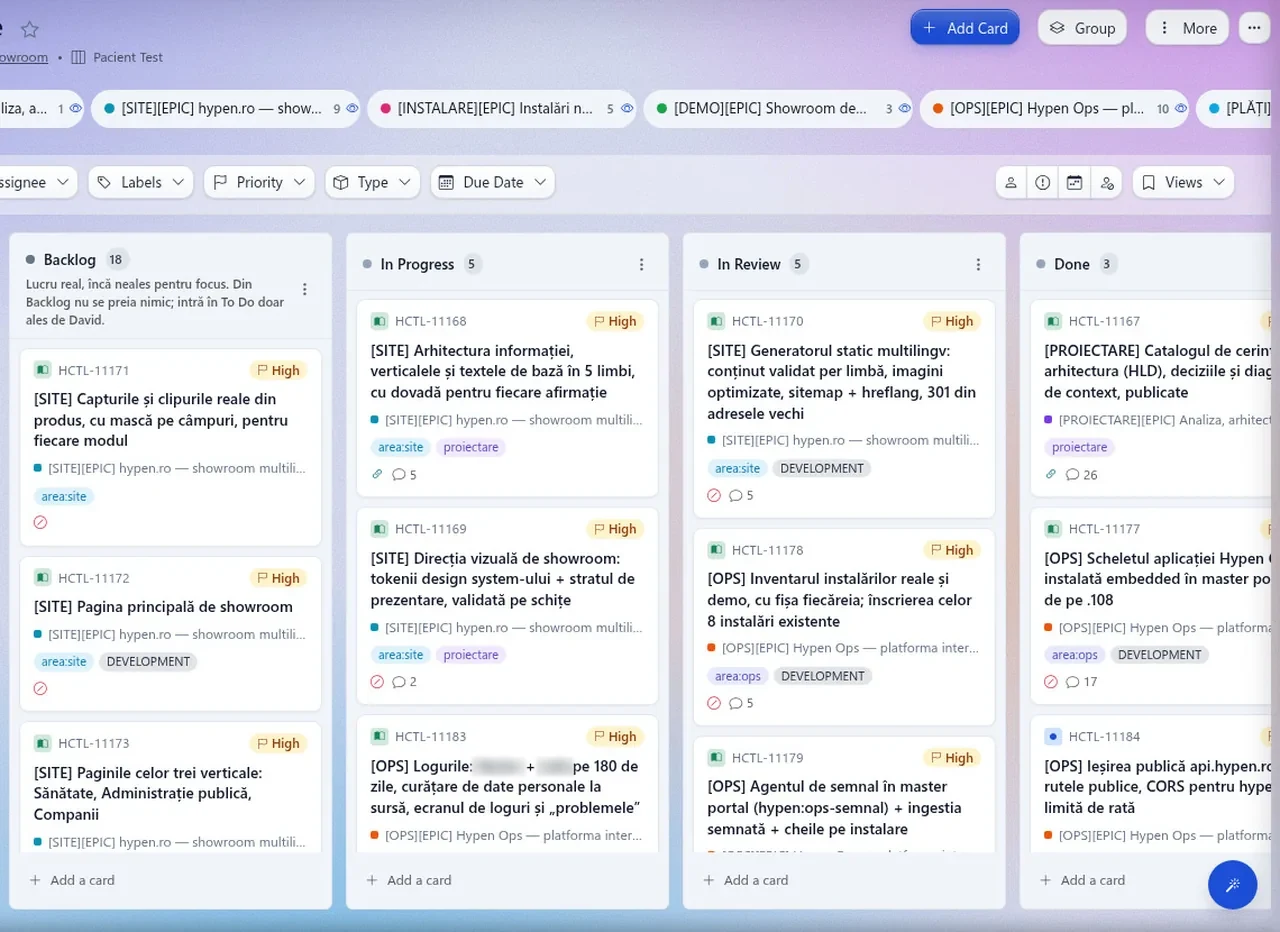
Agile: the hypen.ro project’s cards, in the Backlog, In Progress, In Review and Done columns
This site’s Agile board, with the cards in columns.

A card, from Agile to Done

What happens to a card after you give it to the team

  1. Cardfrom your Agile
  2. PlanPASS
  3. ExecutionPASS
  4. Teststhe project’s test commandPASS
  5. ReviewREJECTED
  6. Donedelivered

REJECTED The card goes back to Execution, with the reason written by the reviewer, and goes through the stages again until it is accepted.

BLOCKED You get a question, with the options explained: Retry Close Leave as is

How it works

What the Factory does without you starting it by hand

The stages start one after another

The server reads the verdict from the handover note and starts the next stage. The Pause button stops the whole chain.

Cards wait in a queue

The package decides how many agents work at once: one on Start, two on Team, four on Factory. The other cards start in the order you gave them.

One worktree per card

Each card has its own copy of the code, a git worktree created by the Factory and deleted after the card is closed.

One coordinator per project

A master agent starts when the project has cards in progress and stops after 30 minutes without any. Every 30 minutes, the Factory asks it for the agents’ status.

Review by another user

The review verdict is written in Agile by the reviewer, a user separate from the one who implemented the card.

Dependencies from Agile

A card blocked by another card that is not in Done waits. Every 3 hours, the Factory takes the cards from To Do by itself and gives them to the teams with free capacity.

Who it is for

What Dev Terminal solves for each person on the team

The question each person asks and what they do in Dev Terminal to find the answer.

The team lead

How do I give the agents work without watching over them?

You give the card from Agile to a team of agents. The stages start one after another on the server. When an agent has a question, you find it in “Waiting for you”, with the options explained, and you answer on the card’s row.

The CTO

Who sees the code and what can a person do on the server?

Each person is a Linux account without administrator rights, and their tabs and files run as them. Accounts can reach the internet, but not private networks. The installation is handed over to you after it passes the isolation test.

The team administrator

How does a new person join and how much does one more seat cost?

You create their account from the users panel. Users are unlimited: you pay for the resource package, and the agents work on your Claude accounts.

The developer

Can I pick up on my phone what I left open on my laptop?

The tab is a session on the server and stays running. On the phone you have a bar with Esc, Tab and arrow keys, and the terminal takes the size of the screen you are working on.

The tester

Where do I try today’s build?

On the package’s QA machines, with ssh qa-1 from the terminal, and on the Android emulator, with adb connect. Each client sees only its own machines.

The project manager

Where do cards get stuck and how long does one take?

The Factory statistics show the first-time pass rate, the returns by stage and the time to closure. Every wait has a deadline, and a card that sits too long is flagged, with the reason.

What you get

All the features, grouped by the team’s work

Every feature below works on the hosted instance you receive.

The terminal

Developers, system administrators

  • Tabs stay running Each tab is a tmux session on the server. You close the laptop and find it exactly as you left it, from any device.
  • Shell or Claude Code A new tab starts a shell or a Claude Code session.
  • Updates do not close tabs When we restart the service, the browser reconnects to the same sessions on its own.
  • Split screen Several tabs side by side, with adjustable sizes. You can type the same command into all of them at once.
  • Tab groups and order Groups with a name and colour, for example by project. You move, rename or hide a tab without stopping it.
  • Locked, secret or read-only tab A locked tab cannot be closed, a secret one does not appear to colleagues, and on a read-only one colleagues can only watch. The admin can open secret tabs, and each opening is recorded in the log.
  • Search and shortcuts Ctrl/⌘+Shift+F searches in the terminal, Ctrl/⌘+Shift+O opens a file by name, and the command palette (⌘K) finds any action, panel or tab.
  • The path in an error A click on a path:line shown in the terminal opens the file in the editor, at that line.
  • The tab’s context Next to the terminal you see the folder, the git branch and the uncommitted changes.
  • History and selection You read a tab’s entire history and copy from it. What you copy stays on your tab; colleagues do not see it.
  • Notes on a tab Coloured notes, stuck on the tab. On the phone they appear as a list.
  • Saved commands Frequently used commands, saved per project or for the whole team. You run them or insert them into the terminal.
  • Direct links and focus mode You send a colleague a link to a tab. Focus mode hides everything around the terminal.

Files and the editor

Developers

  • The file space You browse, search, create, rename, move and delete files from the browser. What you delete goes to the bin first.
  • Upload Large files are uploaded in chunks, with progress. A file dragged onto the terminal lands in its folder, and the path appears on the command line.
  • Download Any file in your space.
  • The code editor Syntax highlighting, search, folding and several files open at once, with a light or dark theme.
  • Editing together Two people in the same file see each other typing, each with their own cursor. The file on disk remains the reference version.
  • Preview Rendered Markdown. PDF, Word (DOCX) and Excel open in the browser, without downloading.

Discussions

The whole team

  • Channels A global channel, one channel for each git repository and direct messages. You create public or private channels, with members, invitation by link and categories.
  • Threads and reactions Replies in threads, reactions, editing, deletion and pinned messages.
  • Attachments Images appear in the message, documents as links, and each channel has its list of files.
  • Mentions A mention or a direct message brings a notification and a badge, even with the discussions closed.
  • Who is online You see the colleagues who are connected and the tab each of them is working on.
  • Watching the same terminal Several colleagues follow the same tab in real time. On a read-only tab, they can only watch.
  • Video calls Coming soon.

The Factory: teams and the chain

The tech lead

  • Agent teams You create teams from the “Alfa” template, with the stages from analysis to ready, or from “Quick fix”, a shorter one. For each stage you choose the Claude model and the effort.
  • Assignment You give cards to teams one at a time or in bulk, with priority and risk. A risky card cannot go on “Quick fix”.
  • The chain of stages Each stage ends with the verdict PASS, REJECTED or BLOCKED, and the server starts the next stage. The Pause button stops the whole chain.
  • The loop until acceptance A rejected card goes back to execution, with the reason written by the reviewer. A review rejected in Agile reopens the card.
  • The queue The package decides how many agents work at once: one on Start, two on Team, four on Factory. The other cards wait, in the order you gave them.
  • Dependencies A card blocked in Agile by another card that is not in Done does not start, even when the blocking card is with another team or in another project.
  • Auto-distribution Every 3 hours, the Factory takes the cards in To Do that have no team and gives them to the teams with free capacity, according to the priority in Agile.
  • One worktree per card Each card has its own copy of the code, created by the Factory and deleted after the card is closed.
  • The project’s tests The agents run the tests with the project’s test command, provided when we link it.
  • Separate review The review verdict is written in Agile by the reviewer, a user separate from the one who implemented the card.
  • Delivery The last stage pushes the code to the repository, checks that it got there and moves the card to Done.
  • The link with Agile Comments and moves in Agile arrive immediately. Cards closed or rejected there leave the Factory on their own.

The Factory: questions and tracking

The tech lead, the project manager

  • “Waiting for you” The agents’ questions, with the options explained and the consequences of each. You answer on the card’s row, and the card moves on.
  • The stalled agent An agent that sits for 15 minutes without a handover note is nudged once, then the stage restarts. If it still does not hand over, you get the question: Retry, Close or Leave as is.
  • The project master A coordinator agent starts when the project has cards in progress and stops after 30 minutes without any. Every 30 minutes, the Factory asks it for the agents’ status.
  • Lessons on a card You write a lesson on a card, and the next agents receive it in their instructions.
  • Deadlines Every wait has a deadline and a way out. Parked cards and circular dependencies are flagged.
  • Infrastructure steps A step proposed by an agent is recorded with its target and deadline and waits for a person’s approval. Recording it runs nothing.
  • Statistics First-time pass rate, returns by stage, time to closure and starts by model, with the widgets you choose.
  • The card bar Next to the terminal you see the projects, the cards by stage, the current step and the tab that is working. You link a tab to a card.

Claude and the test machines

Developers, testers

  • Each person’s Claude account Claude Code is installed on the machine. Each person logs in from their own terminal, with their own account; we do not impose a model or effort.
  • The Factory’s Claude account The Factory works on a separate service account, with a Claude token provided by you or with an API key.
  • QA machines One on Start, three on Team, four on Factory. You log in to them from the terminal, with ssh qa-1, and their list is kept on the server, with the command for each.
  • Android emulators One on Team, three on Factory. You connect to them from the terminal, with adb connect.
  • Extra resources QA machines, emulators, memory and disk are added as monthly add-ons.

On phone and tablet

Anyone who also works on the move

  • The installable app Dev Terminal installs on the phone’s screen and receives files through “Share” from other apps.
  • The keys missing on the phone A bar with Esc, Tab and arrow keys, a tab switcher and swiping between tabs.
  • Terminal size The same tab, open on the phone and on the laptop, takes the size of the device you last worked on.
  • Notifications Direct messages, mentions and the terminal bell arrive as notifications, even with the app closed.
  • Settings follow you The font, the theme and the panel widths are stored on the server, per person, so they look the same on any device.

Administration

The team administrator, the CTO

  • Users The admin creates, modifies, deactivates and deletes accounts and resets passwords. The roles are admin and user.
  • One Linux account per person On the machine, each person is an account without administrator rights. Their tabs and files run as them.
  • The network filter Accounts can reach the internet, but not private networks, except your test machines.
  • The Health panel Checks the application and its integrations, with the time of each check.
  • Maintenance notice Before a restart you see a banner in the interface and a message in the open terminals.
  • New version A page left open since yesterday realises it is running old code and shows you the notice.

Coming soon: iOS on Mac. We are preparing dedicated machines for clients and will announce it here when it can be ordered.

A working day

An ordinary day in a team that works in Dev Terminal

The times are indicative. Each step is an action that the team takes in Dev Terminal.

  1. 08:45

    Overnight questions

    The Factory worked overnight. The tech lead opens “Waiting for you”, picks one of the options proposed by an agent, and the card moves on.

  2. 09:00

    The day’s cards

    The same person gives three new cards to the agent team, in bulk, with priority. Those that do not fit right now wait in the queue.

  3. 09:15

    Yesterday’s tabs

    A developer opens the laptop and finds yesterday’s tabs running, with their history. Claude Code runs in one of them, logged in with their account.

  4. 11:00

    Two people, one file

    Two colleagues work in the same file and see each other’s cursors. They coordinate in the project channel, open next to the terminal.

  5. 13:30

    The test on the QA machine

    The tester logs in from the terminal to qa-1 and runs the build. They try the Android app on the package’s emulator.

  6. 15:00

    A rejected card

    The review rejects a card. The card goes back to execution on its own, with the reason in writing, without anyone restarting it.

  7. 18:30

    On the move

    A mention arrives as a notification on the phone. The developer opens the installed app and replies.

  8. Evening

    Delivery

    The accepted card goes through delivery: the code is pushed to the repository, and the card reaches Done.

Agile included

The card board in every package

Each package has its own Agile instance, a card board similar to Jira, on the same machine as Dev Terminal. Cards have columns, priorities, labels and epics. The Factory takes the cards from here, writes the verdicts back and takes into account the cards that block one another.

Agile: the hypen.ro project’s cards in columns, with priority, labels and epics

Persistent sessions

The tab stays running

Each tab is a tmux session on the server. You close the laptop, open the phone and continue in the same tab, with the whole history. On the phone you have the bar with Esc and Tab, and Dev Terminal installs on the home screen, like an app.

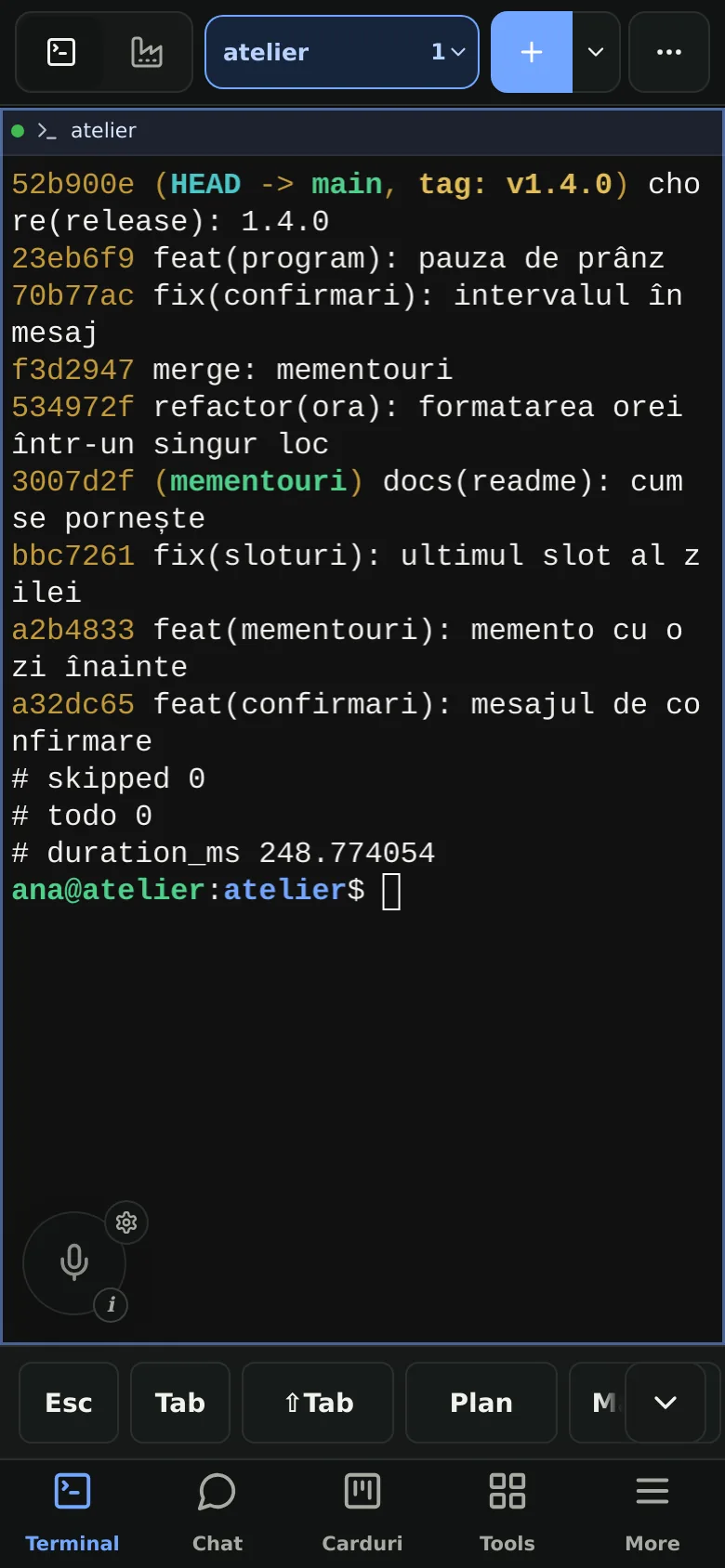
Dev Terminal on the phone: the same tab, with the Esc and Tab key bar

Files and editor

Shared editing, in real time

You open the file from the file space or with a click on the path shown in an error in the terminal. Two colleagues type in the same file and see each other’s cursors. The file on disk remains the reference version.

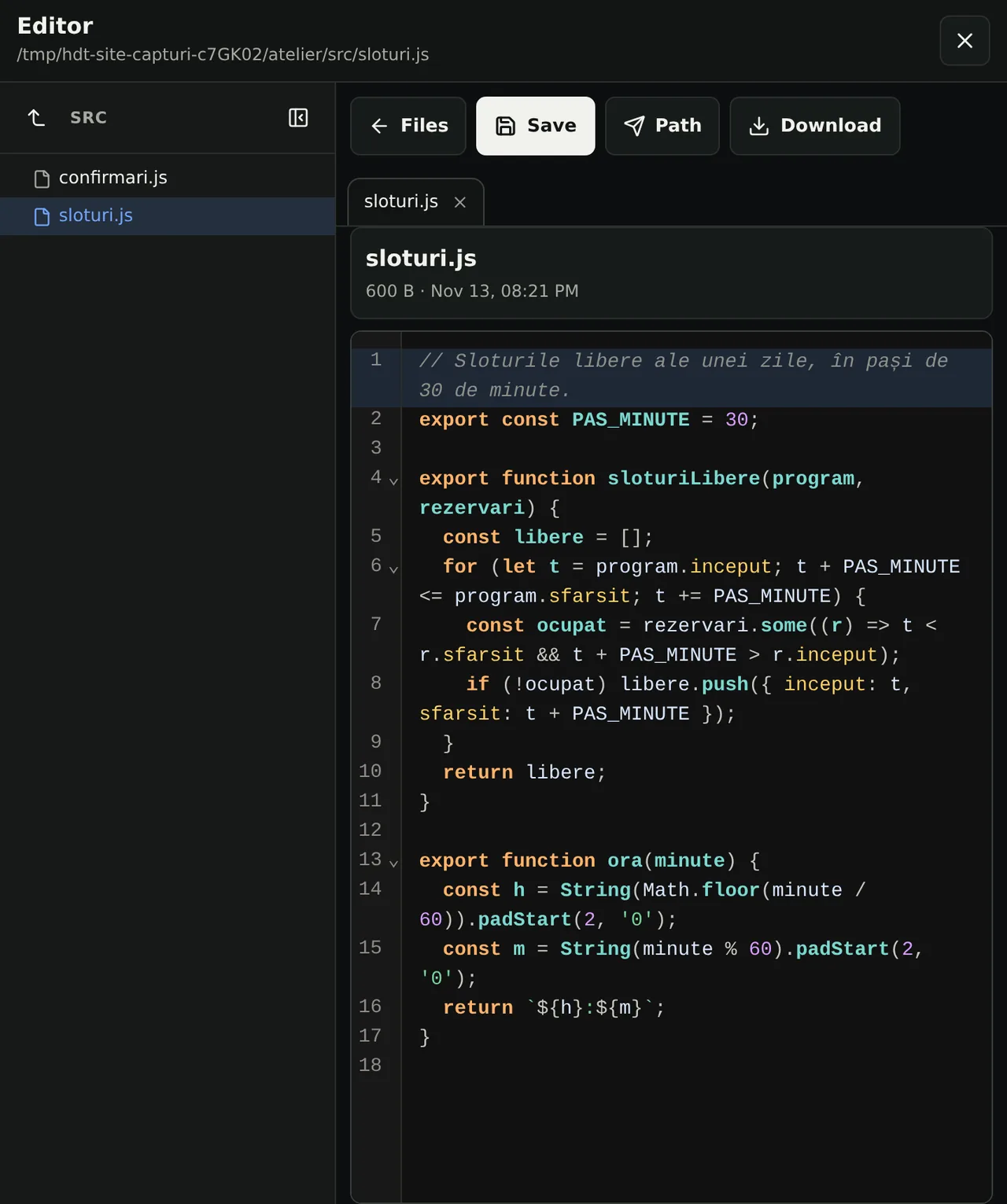
The Dev Terminal code editor, with the project’s files

Discussions

The team’s discussions, next to the terminal

Each git repository has its own channel, and colleagues also message each other directly. A mention arrives as a notification on the phone. Video calls are coming soon.

The team’s discussions next to the terminal, in Dev Terminal

Tools

The test machines and the tools in the terminal

QA machines, from the terminal

The package comes with virtual test machines: one on Start, three on Team, four on Factory. You connect to them from the terminal, and each client sees only its own.

Android emulators

The Team package has one emulator, the Factory package has three. You connect to them from the terminal. iOS on Mac: coming soon.

Saved commands

Frequently used commands are saved per project or for the whole team and run from the terminal.

Notifications on the phone

Direct messages, mentions and the terminal bell arrive as notifications, even with the app closed.

Data and access

Where the instance runs and who sees what

Where your code is stored, what each account can do and what we check before handover.

The machine
A virtual machine sized to the package, in our infrastructure. Dev Terminal, Agile and the Factory run on it.
Accounts
Each person is a Linux account without administrator rights. Their tabs run as them, and sudo gives no extra rights either to them or to any agent started from their terminal.
Files
The file panel works with the person’s rights: what their account cannot read does not appear in the browser either. The Dev Terminal code and settings belong to the root account, which none of your people has.
The Factory
The agents work on a separate service account and do not enter people’s files.
The network
Accounts can reach the internet, but not private networks, except your QA machines and emulators.
Passwords
On handover you receive the e-mail with the Dev Terminal and Agile addresses and a single-use link for each administrator password. The e-mail contains no password.
The isolation test
Before handover we check the HTTPS address, the Factory’s link with Agile and the isolation: the accounts without rights, the network filter, the service files. Each check gives PASS or FAIL, and handover comes after PASS.
Video calls
Coming soon.

How to start

First steps until you work in Dev Terminal

  1. You choose the package

    You pay online, by card, monthly or annually. If you want to see Dev Terminal at work first, request a presentation.

  2. We start the machine

    We install Dev Terminal, Agile, the Factory, and the package’s QA machines and emulators. After the isolation test you receive the e-mail with the addresses and the password links.

  3. You link the projects

    You give us the git repository address and the test command, and we link the project to a board in your Agile. Each person logs in to the terminal with their own Claude account, and the Factory receives its token.

Packages

The packages, by machine resources

Unlimited users on every package. The package determines the machine’s resources and how many Factory agents work at once: one on Start, two on Team, four on Factory. The agents work on your Claude accounts.

Start

249 lei / month

excl. VAT · 301.29 lei incl. 21% VAT

  • 8 GB RAM
  • 4 cores
  • 100 GB disk
  • one QA machine
  • no Android emulator

Unlimited users

Agile included, your own instance

Buy

Team

599 lei / month

excl. VAT · 724.79 lei incl. 21% VAT

  • 16 GB RAM
  • 6 cores
  • 200 GB disk
  • 3 QA machines
  • one Android emulator

Unlimited users

Agile included, your own instance

Buy

Factory

1,290 lei / month

excl. VAT · 1,560.90 lei incl. 21% VAT

  • 32 GB RAM
  • 16 cores
  • 500 GB disk
  • 4 QA machines
  • 3 Android emulators

Unlimited users

Agile included, your own instance

Buy

Add-ons, per month

  • +100 GB disk49 lei / month
  • +8 GB RAM99 lei / month
  • +1 QA machine79 lei / month
  • +1 Android emulator149 lei / month

iOS on Mac (dedicated account)

  • iOS builds and simulators, on one of our Macs.

Coming soon.

We are preparing dedicated machines for clients and will announce it here when it can be ordered.

Monthly prices, excl. VAT. Paid annually, a year costs as much as 10 months.

Buy the subscription online

You see the final price and pay by card. The platform is installed after payment. If you have questions, talk to the team first.