Urbex, urban planning and the town hall registry office

From request to the issued authorisation

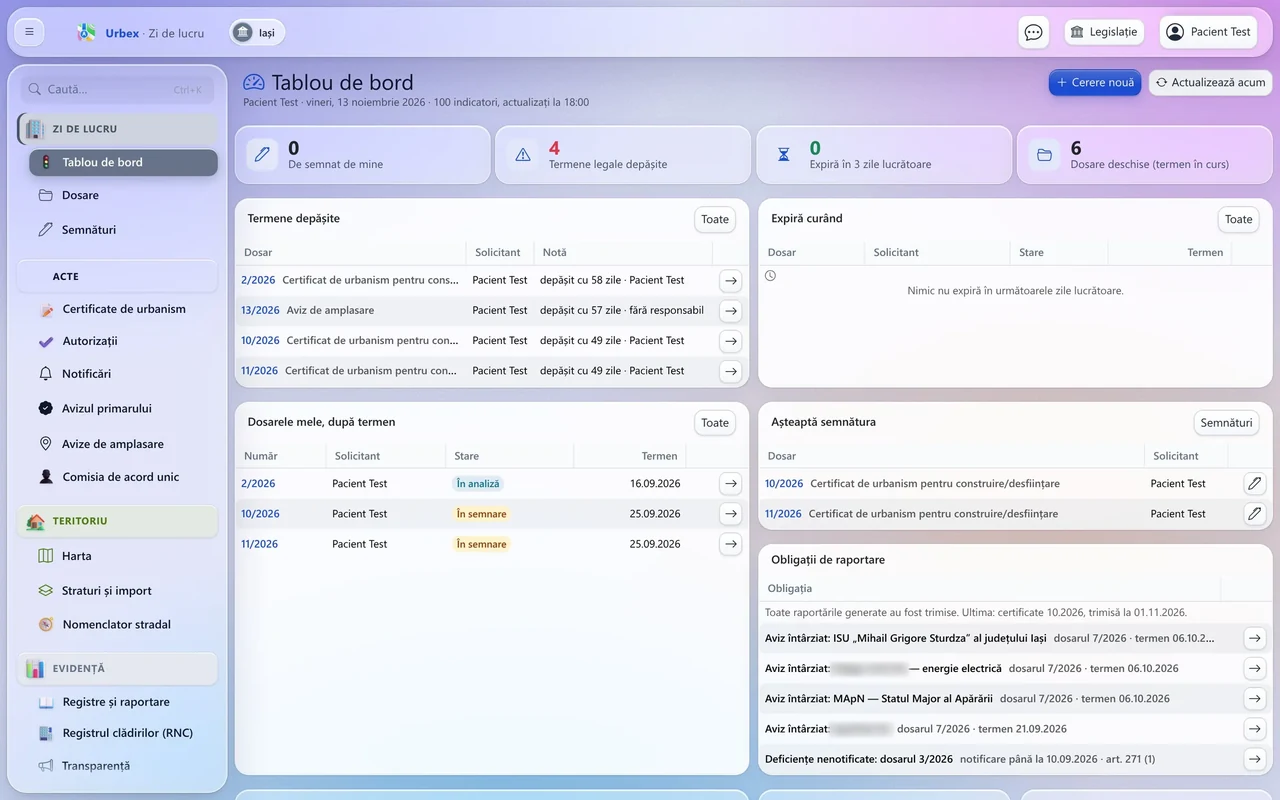
The registrar records the request on the form from the order, and the legal deadline appears on the file, counted in working days. The chief architect sees in the morning the files that are expiring and the documents awaiting their signature. The citizen requests the information certificate online and tracks their file with the code received.

Urbex: chief architect’s dashboard, with deadlines exceeded, what expires soon and what awaits signature
Deadlines in working daysEach file has the deadline from the article of law, counted with legal holidays. Clarifications suspend it where the law provides for that.
Forms of the Order of the Ministry of Development, Public Works and Administration 975/2026The requests have the fields of the forms from the order, and the documents are generated in PDF based on its templates.
Registers and public lists, from documentsThe four registers and the monthly lists are completed from the documents issued. The registers are sent monthly by email to ISC and to the county.

Map of regulations

Urban planning certificate, completed from the map

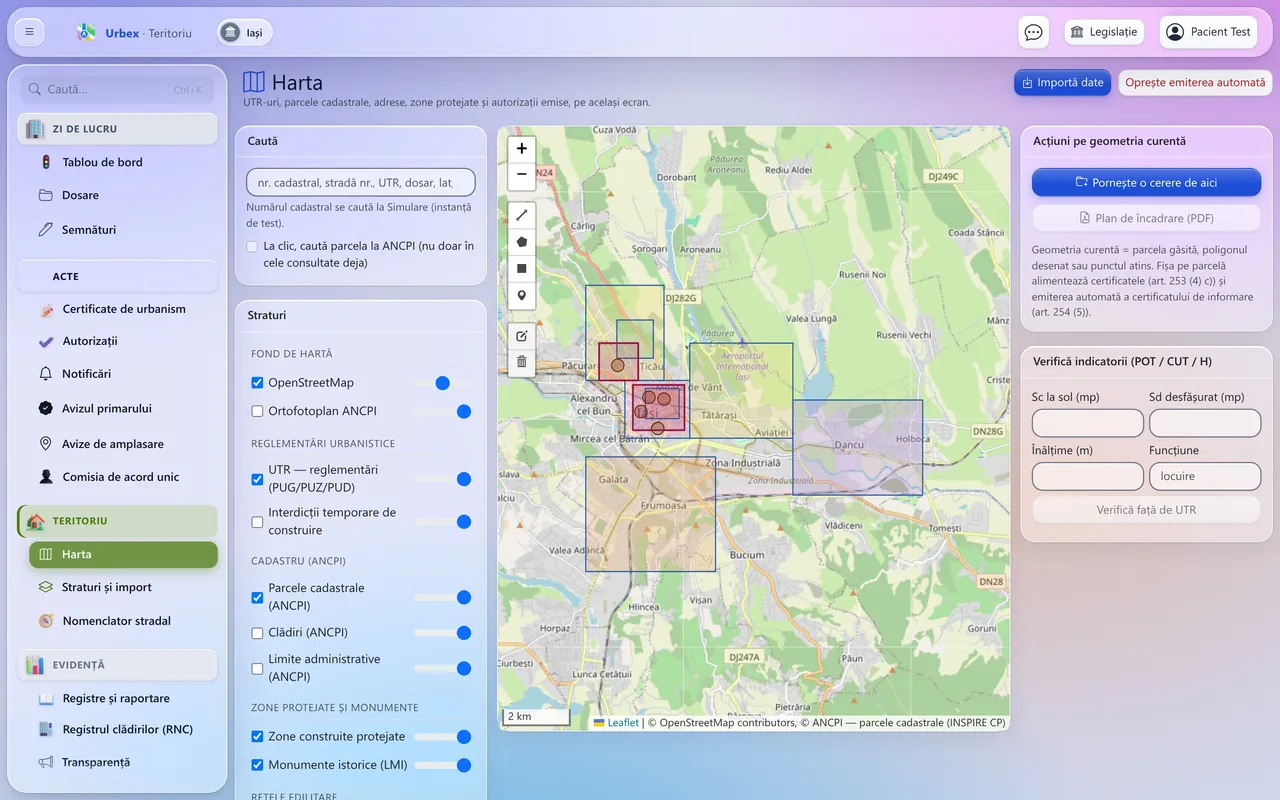
The regulation zones from the General Urban Plan, Zonal Urban Plan and Detailed Urban Plan sit on the map, with their indicators. When the inspector prepares the certificate, the “Complete from map” button brings the regime of the zone, and the approvals are proposed from the map layers. For the information certificate, the town hall can start automatic issuance.

Each parcel has the regulations of the zone in which it is located.

The information certificate is issued automatically, with the electronic seal of the town hall, according to Law 169/2026 (art. 254 para. 8).

Urbex: map with regulation zones, cadastral parcels, protected areas and the button for automatic issuance of the information certificate
Map of regulations in Urbex, with zones, parcels, protected areas and monuments.

Who it is for

What Urbex solves for urban planning, registry and management

The question each person asks and what they do in Urbex to find the answer.

Chief architect

Which files have exceeded the deadline and what do I have to sign today?

The dashboard shows them overdue files, those expiring within three working days and the documents awaiting their signature. The compliance report shows which documents were issued on time and which approvals from the single agreement commission were delayed.

Urban planning inspector

What is missing from the file and which approvals go into the certificate?

The file sheet shows, for each annex required by the form, what is present, what is missing and what is not the case. At the certificate, the “Complete from map” button brings the regime of the zone, and the approvals are proposed from the map layers: monuments, protected areas, risk zones.

Registry office

Do I have to write again the data of someone who has already submitted a request?

Known applicants and properties are found at registration, and previously typed designers and contractors appear as suggestions. The request receives a number from the register and the legal deadline, then it automatically enters the general register of incoming-outgoing documents.

Mayor

What do I have to sign and which complaints have remained open?

The documents awaiting their signature sit in the “To sign” list, on the phone or on the computer. On the construction discipline dashboard they see the open complaints, the reports still within the appeal period and the overdue summonses.

General secretary

Have the fees been paid before we issue the document?

The fee grid from the local council decision stays in the application, on versions, and the fees of each file are calculated from it. The authorisation is not issued with unpaid fees, and the rule can be extended to any document. Fee reconciliation for the Court of Accounts comes out in CSV.

Citizen and designer

What procedure does my work require and at what stage is the file?

The guide on the public page asks a few questions about the work and states which procedure applies, with the article of law. The information certificate is requested online, without an account, and the stage of the file is seen with the request number and access code. From the public account, the designer submits the authorisation request with the documentation signed electronically.

Modules

All modules, grouped by the work of the town hall

Grouped by who uses them. Each person sees what their role allows, and the citizen uses the public page and their account.

Counter and registry office

Registry office, secretary general

  • Registration of the application You choose one of the 17 types of application and complete the fields of the form from Order 975/2026, with the submission channel: counter, online, email or post. The application receives a number from the register and the legal deadline.
  • Known data Applicants and properties that have already passed through the town hall can be looked up. Designers and contractors typed once then appear as suggestions.
  • Documents of the file Each document is uploaded to the annex required by the form and downloaded from the file sheet.
  • Copy conforming to the original Certification of the title deed is recorded in the file, only after payment of fees.
  • General register of entries and exits Allocation, resolution, handling and filing, with SHA-256-fingerprinted attachments, CSV export and PDF register. The file enters the register upon registration, and the issued document leaves it automatically.
  • Series and departments Single register or separate series, default response deadline and town hall departments.
  • Dispatch Undispatched outgoing documents, numbered dispatch list and handover book per department, in PDF.
  • Electronic archive The closed file becomes an archival unit: documents, acts converted to PDF/A, index and inventory, with the code and retention period from the archival nomenclature. Handover to the physical archive has a minutes record.
  • Archive in FlexiDocs If the town hall also uses FlexiDocs, the archived file is sent there, to the chosen folder.

Urban planning certificates

Urban planning department, chief architect

  • Certificate for information Application F_CU_01 and certificate F_CU_05, signed by the chief architect, with a deadline of 5 working days.
  • Automatic issuance With automatic issuance enabled, when the property falls within a regulatory zone on the map, the certificate for information is prepared from the zone data and issued without an operator, with the electronic seal of the town hall, in accordance with Law 169/2026 (art. 254 para. 8). Otherwise, the file goes to urban planning.
  • Certificate for cadastral operations Application F_CU_02 and certificate F_CU_06. Subdivision into more than 3 plots requires PUZ, and the certificate with PUZ is issued only once.
  • Certificate for construction or demolition Application F_CU_04 and certificate F_CU_07_0, for buildings, engineering works and special constructions, signed by the mayor, the secretary general and the chief architect.
  • Preparation sheet The legal, economic and technical regime and the indicators. “Complete from map” brings the zone regime. The permits and mandatory mentions are proposed from the map layers, with the exceptions of the law, for example the DSP permit for the single-family dwelling.
  • The GIS extract and the location plan The extract with the utility networks loaded by the town hall on the map is attached as an annex. The location plan in the area is output in PDF, with the plot, zones, north and scale.
  • The certificate conditional on PUZ or PUD The certificate is suspended until the documentation is approved and resumes after it, with the completion annex F_CU_07_1. The permits obtained in the PUZ or PUD phase are taken over with the legal mention.
  • Extension The extension requests F_CU_03 and F_A_02, with verification of the deadline in which they can be submitted, and the signed extension act.
  • Issuance and communication PDF preview, sending for signature, the number from the category register, communication to the applicant and download of the act.

Building and demolition permits

Urban planning, chief architect, signatories

  • The request with the technical annex The request F_A_01, with one technical annex per property, up to 7 properties. POT and CUT are calculated from areas, and the sections are verified against each other.
  • Amendment and regularisation The requests F_AM_01 and F_AR_01, the authorisations F_AM_02 and F_AR_02. At submission the conditions of the law are verified, including whether the dwelling can be regularised.
  • Preparation Completeness, indicators and confirmation of the documentation, from which the 30 days run. On request, the emergency regime of 7 working days, with the special fee calculated.
  • Clarifications They are requested only once and suspend the deadline until the reply. If the documentation is not completed in time, the applicant receives the invitation to withdraw.
  • Rejection The rejection act reasoned in law and in fact, with the report approved by the mayor and endorsed by the general secretary.
  • Checks before signing The application refuses signing or issuance when the conditions of the law are missing: verification of the project at consequence classes CC2–CC4, the right to sign on the documentation, the agricultural circuit, the conditions of regularisation.
  • The four signatories The drafter, the chief architect, the general secretary and the mayor sign. The authorisation F_A_04 receives a number from the register of authorisations and is not issued with unpaid fees.
  • Consultation at the headquarters The register of consultations requested by the applicant or to which they are invited, with the deadline of 10 working days.
  • Change of holder The new holder takes over the authorisation, the certificate or the permits, and the old one remains in the history.
  • Organisation of execution Site organisation, authorised together with the work or separately, with the memorandum and the site plan.
  • Road administrator agreement It is requested from the file of the issued authorisation, for connections, and enters the town hall's register of opinions.

Single agreement commission and approvals

Chief architect, commission secretariat, endorsers

  • Commission circuit Each permit has its own clock of 30 days. Incomplete documentation is notified in 5 working days, clarifications have 60 days for the beneficiary and 15 for the decision, and the single agreement is issued numbered. The list of permits is proposed according to the law.
  • Tacit permit The declaration F_A_03 is generated pre-filled for the beneficiary. After they upload it, the uncommunicated permit is marked tacit.
  • Endorsers in the application The commission member has their own role and gives a favourable opinion, a conditional one or a reasoned unfavourable one.
  • Single agreement after payment The commission does not issue the single agreement as long as the fees for the opinions are unpaid.
  • Commission members Commission configuration and activation or deactivation of members.
  • Opinions issued by the town hall Register of opinion requests addressed to the town hall, a single round of completions, the opinion in PDF, tacit approval on time and the half-yearly analysis.
  • The mayor's opinion Request F_A_05 and opinion F_A_06, for works authorised by the county council.
  • Location opinion Request F_05 and opinion F_06, signed by the mayor, the general secretary and the chief architect, with its register.
  • SNAOPSN communications The zones communicated by the defence, public order and national security institutions become mandatory mentions in the certificates for the affected sites.

Notification in the simplified procedure

Registry office, urban planning, chief architect

  • Notification F-NOT_01 On registration, the application checks whether the work falls under the simplified procedure. Receipt confirmation F-NOT_02 is issued automatically.
  • Town hall decisions Clarifications (F-NOT_03), the information that an authorisation is needed (F-NOT_04) and the reasoned rejection (F-NOT_05). The notifications are signed by the chief architect.
  • Tacit approval The notification without decision after 15 working days is tacitly approved, every night at 00:15. Extract F-NOT_06 is downloaded from the file.
  • Ministry of Culture agreement In protected areas, the date of the request and receipt of the agreement is recorded, with the deadline after which the agreement becomes tacit.
  • Completion and acceptance Completion notification F-NOT_07, the town hall representative, the acceptance report, the copy for ISC and the proof for land registration. A notification received by a town hall without jurisdiction is retransmitted ex officio.
  • Works without formalities Register of prior notifications and declarations for temporary annexes, with the declaration in PDF and deregistration.

Execution of works

Urban planning, registry office, chief architect

  • Commencement of works The holder's notifications to the town hall (F_A_08) and to ISC (F_A_09), pre-filled, with proof of payment of ISC quotas.
  • Suspension and extension Suspension, resumption and extension of the execution period, with the limits from the law verified by the application.
  • Site registers The developer's quarterly reports, with the schedule of deadlines, site instructions, archaeological discoveries with the postponement of deadlines and periods neutralised by litigation or force majeure.
  • Identification panel The panel PDF F=02, generated from the authorisation data.
  • Completion Notifications F_A_10 and F_A_11, with the actual value of the works.
  • Acceptance of works The acceptance report, the final value and the regularisation of the authorisation fee and ISC quotas.
  • Attestation of the building The certificate of attestation of the building, for the land register, and that of the execution stage, signed by the chief architect and the mayor. Order 975/2026 does not give them a model, so the forms are those of the application.
  • Validity Every night, the application records the authorisations that have lost their validity and the deadlines exceeded in the authorisation and commission circuit.

Discipline in construction

Urbanism, chief architect, mayor

  • Reports From the citizen, ex officio, from the local police, from ISC or from another institution, related to the property and its files. The photographs keep the GPS coordinates.
  • Field control The control form on the phone, the official report in PDF and the notification to the criminal authorities.
  • Official report of contravention Form F_03, with the law checks: the warning once only and only where permitted, the additional fine of 50,000–500,000 lei for each unauthorised level. Then the communication, payment and appeal.
  • Complementary measures The summons with deadline, stopping the works, legalisation, demolition, seals and disconnection of utilities, with the written order in PDF.
  • Litigation Appeals, referral to the court and court dates, with the outcome.
  • Discipline register Open reports, official reports within the appeal period, overdue summonses, map of points and the register exported in CSV or PDF.

Fees

Secretary general, registry office, urbanism

  • File fees The certificate, the authorisation, the extension, the urgency, the regularisation and the approvals are calculated from the town hall grid. Exemptions are justified, and those possible, for example for monuments, are proposed and decided by the operator.
  • Local council grid The lines of the local council decision, by versions over time.
  • Counter collection At the cash desk, with POS or by payment order, with the proof of payment in PDF and the list of collections in CSV.
  • The document after payment The town hall can block the issuance of any document with unpaid fees. For authorisations, the rule applies anyway.
  • ISC quotas Informative calculation of the quotas, late payment penalty and regularisation at reception.
  • Occupation of public domain The area and duration from the site organisation form the basis of the occupation fee.
  • Unregularised constructions A fiscal event is opened with the date of finding, and the list is exported in CSV for the tax department. The tax is not calculated by Urbex.

Map and street nomenclature

Urbanism, chief architect, registry office

  • Map of regulations The regulation zones from PUG, PUZ and PUD, with the sheet per point: zone, plot, address and files. You search by cadastral number, address, zone or coordinates.
  • Loading the plans The approved plan and its zones are loaded from GeoJSON, and the zones can be corrected.
  • Indicators per plot The plot area, POT, CUT and maximum height of the zone, compared with what the applicant proposes.
  • Layers Own layers and standard ones, OpenStreetMap and ANCPI public services, with the import log.
  • Import from designers The three-step assistant reads DXF, Shapefile, GeoPackage, GeoJSON, KML and GML, with preview on the map.
  • Plots from ANCPI The geometry of the plot, by cadastral number or by a point, from the public ANCPI geoportal, with the link started from settings. The land register extract is not brought automatically.
  • Street nomenclature Streets on the map and addresses with unique code, imported and exported in CSV, in the format of the RENNS export.
  • Address certificate It is drawn up, signed by the drafter and by the mayor and issued with its own number.

Urban planning plans PUG, PUZ and PUD

Chief architect, urban planning

  • PUZ initiation approval From the private initiator's application: drawing up, analysis in the technical committee, postponement or reasoned rejection, signing by the chief architect, approval by the mayor and linking to the urban planning certificate.
  • Plan procedure The chronology of each plan: initiation, elaboration, approvals received or tacit, public consultation with responses to observations, approval by the chief architect, approval with a new version of the map and entry into force.
  • Package for OCPI and the ministry Upon approval, the archive is generated with the metadata, zones, act, plates and a PDF summary. The town hall sends it, by email or on the institution's portal.

Signing and verification of documents

Signatories, the chief architect, the administrator

  • To be signed The list of acts awaiting each person's signature, on phone or computer.
  • Signing in the application The signatory confirms with the password, and the signature receives a timestamp. The application checks the role required by law, the designated person and the order of signatures.
  • Qualified signature via FlexiDocs If the town hall has FlexiDocs, the signatory chooses the USB token or the central signing server, with his qualified certificate, or CertaSign, for the advanced signature. The act is signed PAdES, with timestamp.
  • Disciplinary acts and notifications The summons, the written order, the contravention report, the information letters for notifications, the rejection report and the address certificate go through the same signing flow.
  • Return to drafting A signatory can send the act back to the one who drafted it.
  • QR code on the act Each issued act has a code of 12 characters, printed as QR and linked to the file fingerprint.
  • Approval of the plates The drawings are viewed in the browser. Upon approval, each page receives the F_A_07 box “Approved as unchanged”, with QR, and the original remains untouched.
  • The town hall's wording The town hall customises the text of the acts, in versions with an entry into force date. Without its own template, the model from the order is used.

Registers, transparency and reporting

Urban planning, registry office, general secretary

  • Registers art. 315 The registers of certificates, unique agreements, authorisations and notifications are completed from the issued acts, without CNP, and exported in CSV.
  • Monthly reporting On the 1 of the month, the registers of the previous month go by email to ISC and to the county's urban planning structure, in CSV and PDF with fingerprint. The proof of sending remains in the application.
  • Public lists art. 314 The monthly lists are generated on the 1 of the month, without personal data, and published after verification, with the date they were made public. The PDF goes to the notice board.
  • INS LOC 1 reporting Authorisations for buildings in the reporting month, by categories, with areas, dwellings and value, in CSV or PDF. Loading to INS is done separately.
  • Exports for ISC Issued authorisations with the quota due, notifications of commencement and completion and works acceptances, by period, in CSV.
  • Tax reconciliation For each tax: calculated, collected, exempt, refunded and balance, without CNP, for the Court of Accounts.
  • Building records The fields required for the National Building Register, collected from the technical annex and the file, in JSON or CSV. Transmission awaits the ministry's specification.

Public page and citizen account

Citizens, designers, notaries; urban planning and registry office

  • Town hall urban planning page Citizen actions, latest published lists and applicable legislation.
  • Online information certificate Application F_CU_01 is submitted without an account. The applicant receives confirmation by email and downloads the certificate with the code received.
  • File status With the application number and access code, the citizen sees the status and history.
  • Which procedure applies A few questions about the work and the answer: siting approval, no formalities, notification or certificate and authorisation, with the article of law.
  • Public map Layers marked public, the zoning sheet at a point and the layer with what has been authorised, without personal data.
  • Public lists and sheets Monthly lists of certificates, authorisations with rejections and notifications, plus the drawings of authorisations marked publishable.
  • Public consultation Plans under consultation, the announcement, public documents and the observations form, without an account. The form does not ask for CNP. At the end the consultation report is published.
  • Document verification Anyone who scans the QR code sees the type, number, date and status of the document. If they re-upload the received PDF, they find out if it is identical to the one issued.
  • Public account Registration with email address verification, account login and password reset.
  • Electronically signed submission From the account the building certificate, the authorisation and the notification are submitted, with the application and documentation signed electronically, and the file enters the same flow as at the counter. The application checks if the files bear a PAdES or CAdES signature, without validating the signatory's certificate.
  • My files Status, deadline and days remaining, documents issued, clarifications requested, fees and payments. The response to clarifications is recorded in the same way as at the counter.
  • Scheduling with the chief architect The holder chooses an interval from the audience schedule, and the town hall confirms, cancels or records the meeting.
  • Personal data The holder modifies their data, exports them in JSON or requests account deletion.
  • Messages to applicants Email on registration, on clarifications and on status change, with the register of everything sent. SMS messages are sent only if the town hall has an SMSLink account.

Management and settings

Chief architect, mayor, instance administrator

  • Dashboard The personal section, with own files and documents to sign, plus 100 indicators in nine sections: deadlines, applications, documents, signatures, commission, transparency, fees, map and people. It is recalculated every 30 minutes or on request.
  • Deadline compliance Documents issued on time or late, files overdue or close to deadline and late approvals.
  • Morning alert Daily at 07:00, the file manager and the chief architect receive by email the files that expire in three working days and those overdue.
  • What has changed Comparison of Law 50/1991 and Law 350/2001 with the new Code and the table of deadlines and sanctions, in the application.
  • Internal guide The same guide as on the public page, with law thresholds configurable over time and anonymous usage statistics.
  • Town hall data The name, tax ID, coat of arms, designated signatories and e-mail addresses of the ISC and of the county.
  • Users Each person receives one of the 7 roles: administrator, chief architect, urban planning, registry office, mayor, general secretary or approver.
  • Public holidays The calendar is pre-filled each year, including Orthodox Easter, and can be modified.
  • Rules with validity over time Deadlines, signatories, validities and thresholds change over periods, with history. A change can be reapplied to the files of a period, without affecting the issued documents.
  • Integrations and login Connection to FlexiDocs and to ANCPI, with test. Login is done with a local account or via Hypen Master Portal, with the identity from the portal.

In preparation: online payment via ghișeul.ro. We announce it here when it can be used.

A working day

An ordinary day at the urban planning department of a town hall that works in Urbex

The times of the actions are indicative. The alert, tacit approval and monthly reporting run by themselves, at the time written next to them.

  1. 07:00

    Deadline alert

    The chief architect and the person responsible for each file receive by e-mail the files that expire in three working days and those with the deadline exceeded.

  2. 08:30

    The counter

    The registrar registers an application for an urban planning certificate for construction. The applicant and the property already exist in the application, and the file shows the deadline of 15 working days.

  3. 09:00

    Dashboard

    The chief architect sees the overdue files, those that expire soon, the documents awaiting their signature and the deficiencies not yet notified to the applicants.

  4. 10:00

    File analysis

    The urban planning inspector checks the annexes required by the form. For an authorisation with incomplete documentation, they request clarifications, once only, and the deadline stops until the response.

  5. 11:00

    The certificate

    For an urban planning certificate for construction, the inspector presses «Fill from map», and the zone regime and proposed endorsements enter the sheet. Then they send the document for signing.

  6. 12:30

    In the field

    The inspector checks a complaint with the control form on the phone. The photographs keep the GPS coordinates, and the report of findings comes out in PDF.

  7. 14:00

    Signing

    The general secretary and the mayor sign the authorisation from the «To sign» list. The document receives a number from the register of authorisations and a QR code for verification.

  8. 00:15

    Tacit approval

    Notifications without a decision after 15 working days are approved tacitly, and the extract can be downloaded from the file.

  9. On day 1 of the month

    Reporting

    The registers of the previous month go by e-mail to the ISC and to the county, and the public lists of the month are ready to be checked and published.

Deadlines

Each deadline, with the article it comes from

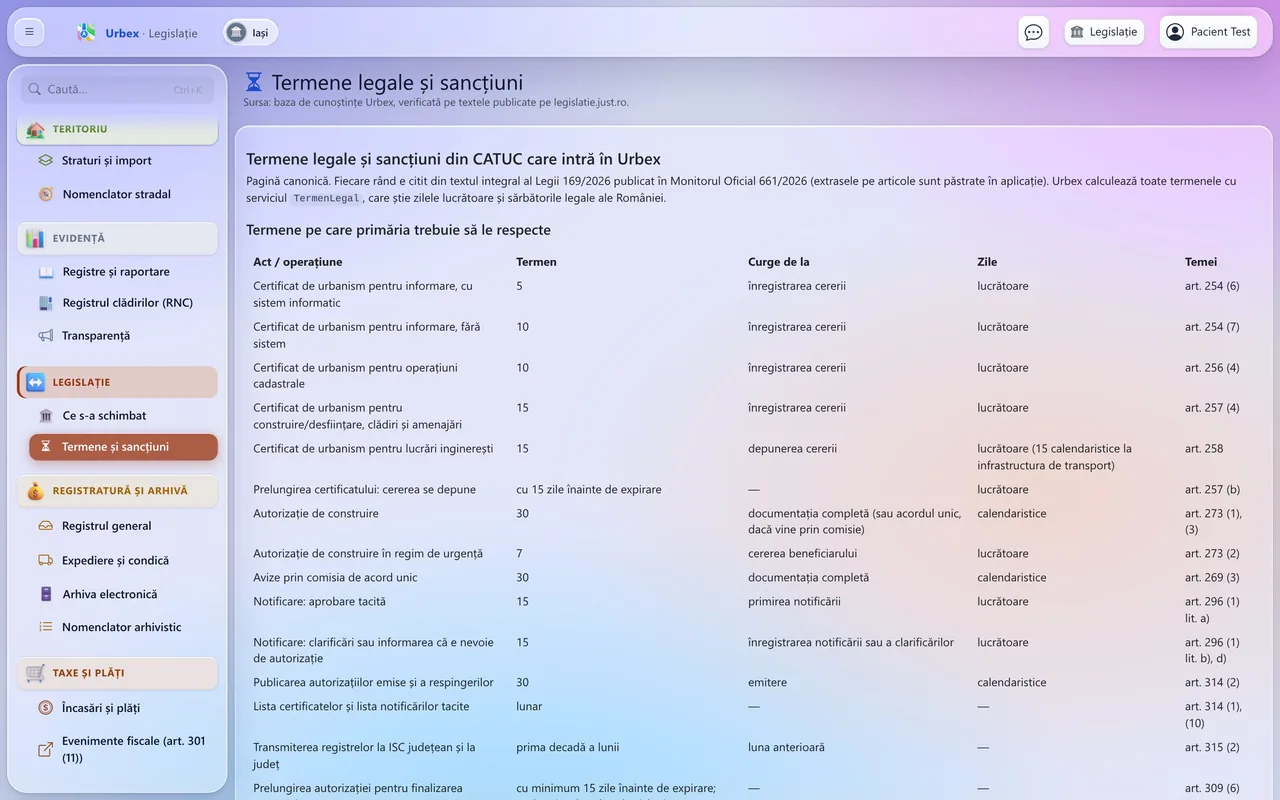
On the file, the legal deadline appears with its legal basis and the type of days, working or calendar. The holiday calendar is pre-filled each year, including Orthodox Easter. The table of deadlines and sanctions from the new Code opens directly in the application.

Urbex: table of legal deadlines from Law 169/2026, each with the article, the date from which it runs and the type of days

Case file

What is missing from the file and who takes the next step

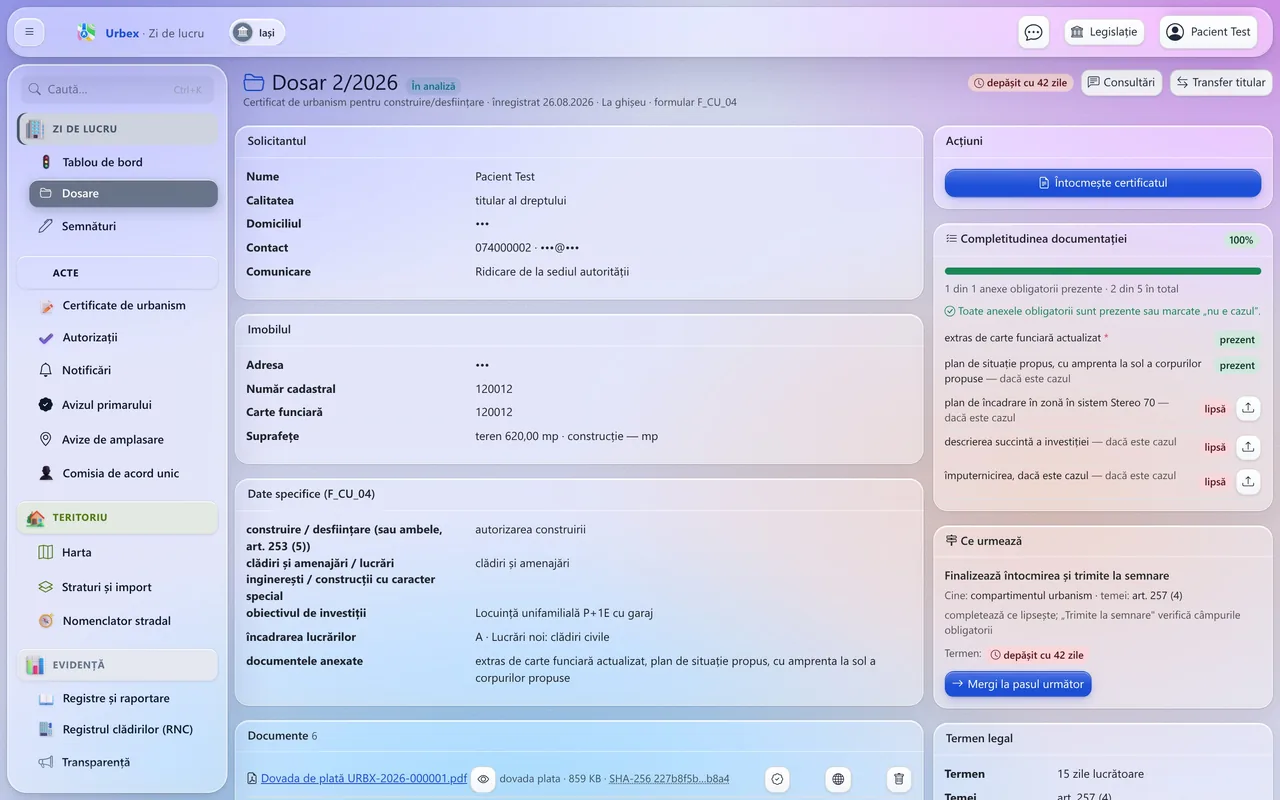
Completeness is checked on the annexes required by the form from Order 975/2026: present, missing or not applicable. The «What follows» panel says who takes the next step, until when and under which article. The town hall can request that signing waits until nothing is missing.

Urbex: file of an urban planning certificate, with the completeness of the documentation, the next step and the legal deadline

Transparency

Monthly lists and authorisations to be made public

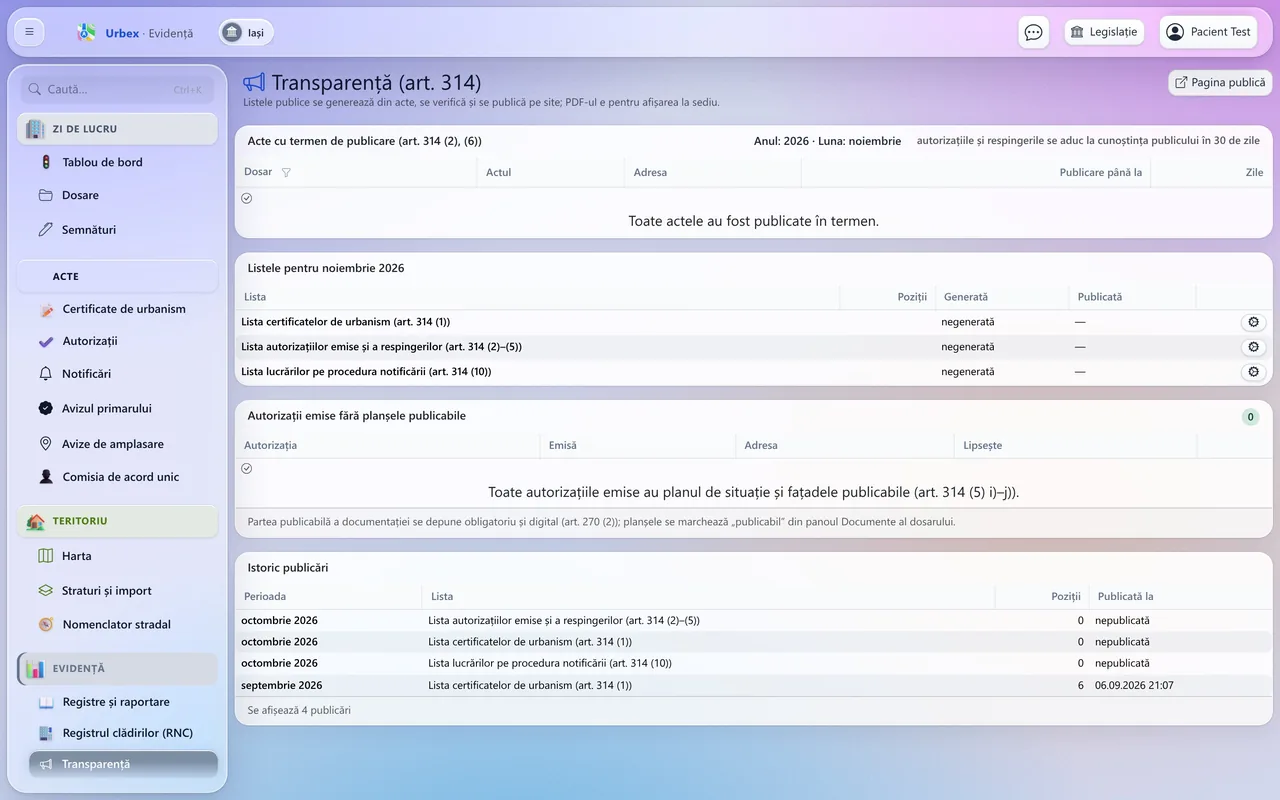
The lists of certificates, of authorisations with rejections and of notifications approved tacitly are generated from the issued documents, without personal data. Each authorisation has next to it the publication deadline of 30 days. The lists also come out in PDF, for the notice board at the headquarters, and the plates marked publishable appear on the public page.

Urbex: transparency, with the documents that have a publication deadline, the monthly lists and the history of publications

Registers

The four registers from art. 315, in digital format

The registers are completed from the issued documents, without personal identification number. On the 1th of the month, the registers of the previous month go by e-mail to the ISC and to the urban planning structure of the county, in CSV and PDF with fingerprint, and the proof of sending remains in the application.

  • Urban planning certificates
  • Single agreements
  • Authorisations
  • Notifications

Documents and signing

Documents signed by roles, with verification code

Each act reaches the “To sign” list of the signatories required by law, in their order. In the application it is signed with the password, with a timestamp. If the town hall has FlexiDocs, the same act is signed PAdES, with the token or with the signing server. The QR code on the act shows anyone whether the document is the one issued.

  • Form from the order
  • Registry number
  • Signatories by roles
  • Verification QR code

Legal obligations

What the law requires and where you do it in Urbex

The town hall’s obligations from the Code on spatial planning, urbanism and construction (Law no. 169/2026) and from Order of the MDLPA no. 975/2026, with the place in Urbex where you fulfil them.

Certificate for information
A town hall that has a functional information system issues the urban planning certificate for information automatically, within at most 5 working days (art. 254 para. 5 and 6). In Urbex the application is submitted online as well, and automatic issuance is started from the map. The information certificate is issued automatically, with the town hall’s electronic seal, in accordance with Law 169/2026 (art. 254 para. 8).
Issuance deadlines
The certificate for cadastral operations is issued within at most 10 working days, the one for construction within at most 15, and the building permit within 30 calendar days from the submission of the complete documentation or within 7 working days, under the urgent regime (art. 256 para. 4, art. 257 para. 4, art. 273 para. 1 and 2). Urbex sets the deadline on each file and counts working days excluding public holidays.
Delay is an offence
Failure to issue or issuing beyond the deadline of the certificate or the permit and exceeding the deadline of the opinions from the single agreement commission are sanctioned with a warning or a fine of 5,000–30,000 lei (art. 357 para. 1 lit. l and n, para. 4 lit. i and para. 8). The compliance report shows, for each document and opinion, whether it was issued on time.
Clarifications to the permit
The town hall notifies the deficiencies of the documentation within at most 10 working days from registration and grants at most 3 months for completion. Consultation at the premises takes place within at most 10 working days, and if the documentation is not completed, the applicant is invited to withdraw it (art. 271 para. 1 and 2, art. 272 para. 3, art. 273 para. 5). In Urbex the dashboard signals the deficiencies not yet notified, consultations have their own register, and the invitation to withdraw is sent from the file.
Single agreement commission
Opinions through the commission are issued within 30 calendar days, incomplete documentation is notified within 5 working days, and an opinion not issued on time is considered granted, on the basis of the beneficiary’s declaration (art. 269 para. 3, 4, 14 and 16). Urbex keeps the clock for each opinion and generates the pre-filled F_A_03 declaration.
Notification
The town hall confirms receipt of the notification, automatically when it arrives in digital format, and a notification without a decision is tacitly approved after 15 working days. Notifications are entered in a register (art. 295 para. 6, art. 296 para. 1 lit. a and para. 2). Urbex issues confirmation F-NOT_02 at registration and tacitly approves notifications that have reached the deadline, every night.
Transparency
The list of certificates and the list of tacitly approved notifications are displayed monthly, and permits and rejections are made public within 30 days from issuance, with the data required by law, including POT, CUT, height regime, site plan and façades (art. 314 para. 1, 2, 5 and 10). Urbex generates the lists from the issued documents, without personal data, and counts the days until the publication deadline.
Registers
The town hall keeps in digital format the registers of certificates, single agreements, permits and notifications and sends them in the first ten days of each month to the county inspectorate for construction and the county urbanism structure (art. 315 para. 1 and 2). In Urbex the registers are completed from documents and are sent by e-mail on the 1 of the month.
Signature on the digital document
The certificate issued in digital format is signed with a qualified or advanced electronic signature (art. 256 alin. 6, art. 257 alin. 7). In Urbex you apply it through FlexiDocs, with the qualified certificate from the token or from the signing server, or with the advanced CertaSign signature. Without FlexiDocs, signing in the application is a simple electronic signature, with a password.
Forms from Order 975/2026
Order of the MDLPA no. 975/2026 (O.J. no. 711 and 711 bis of 26.08.2026) approves the templates of the applications and documents from the urban planning certificate to the notification, plus the related forms. The application screens in Urbex have the fields of its forms, and the certificates, permits, “Seen for no change” stamp and identification panel are generated in PDF on the templates from the annexes.
How to start

First steps until you work in Urbex

  1. Try it

    The “Try it now” button opens an instance with the test data of a town hall, on the role you choose, for example mayor, secretary general or registry office. Access lasts 7 days.

  2. Request a quote

    Town halls buy through SEAP, on the basis of our offer. The offer arrives by e-mail within at most two working days.

  3. We prepare the instance

    We install Urbex on the town hall’s Hypen platform, with the town hall’s data, signatories, holidays and fee grid. Urban plans are loaded on the map from the designers’ files. On the same platform iConta, iHR and FlexiDocs can run, with the same login account.

How to buy

Purchase through SEAP, according to the size of the town hall

Town halls buy Urbex through direct purchase in SEAP. We send you the offer and the annexes, with the price appropriate for your commune, town or municipality.

  1. You request the quote
  2. You receive the quote and the annexes
  3. Direct purchase in SEAP
  4. We install the town hall’s platform

Request a quote for purchasing through SEAP

Within two working days at most, we e-mail you the quote with the catalogue prices and the annexes for the purchase. Until then, you can try the applications on test data.