iQMS, quality and internal control

The procedures, the risks and the 16 SCIM standards

The quality officer sends a procedure for approval and sees who has not responded. The SCIM Commission completes the self-assessment for each standard. The manager sees their evaluation sheet for the indicators in Order 3.626/2022.

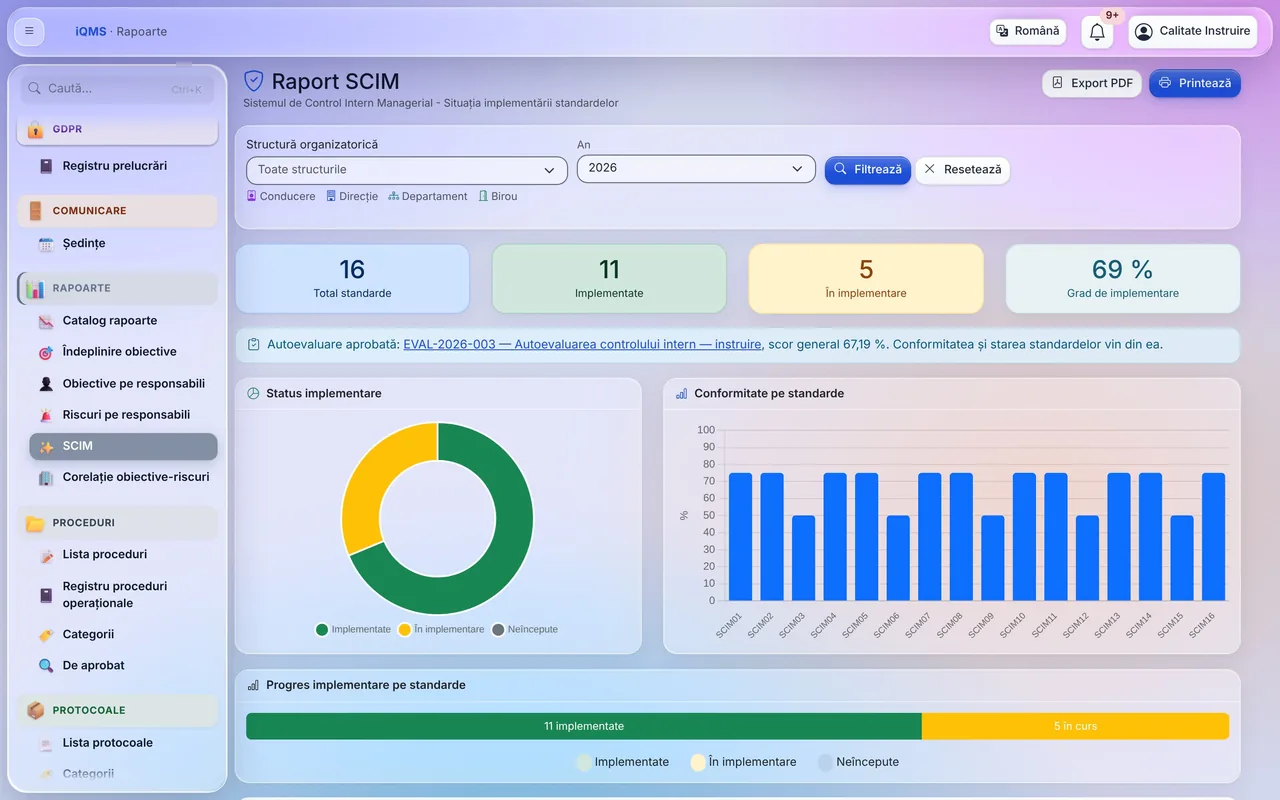
iQMS: the SCIM report, with the 16 standards, how many are implemented and the degree of implementation
Risk registerInherent and residual risk, treatment measures and the register for managerial internal control, in PDF.
Manager's sheetThe 23 indicators from Order 3.626/2022, with the scoring grids, and the evaluation sheet in XLS and PDF.
Values brought from iPortal, iConta and iHRThe indicators calculated in the other applications reach iQMS without you entering them manually.

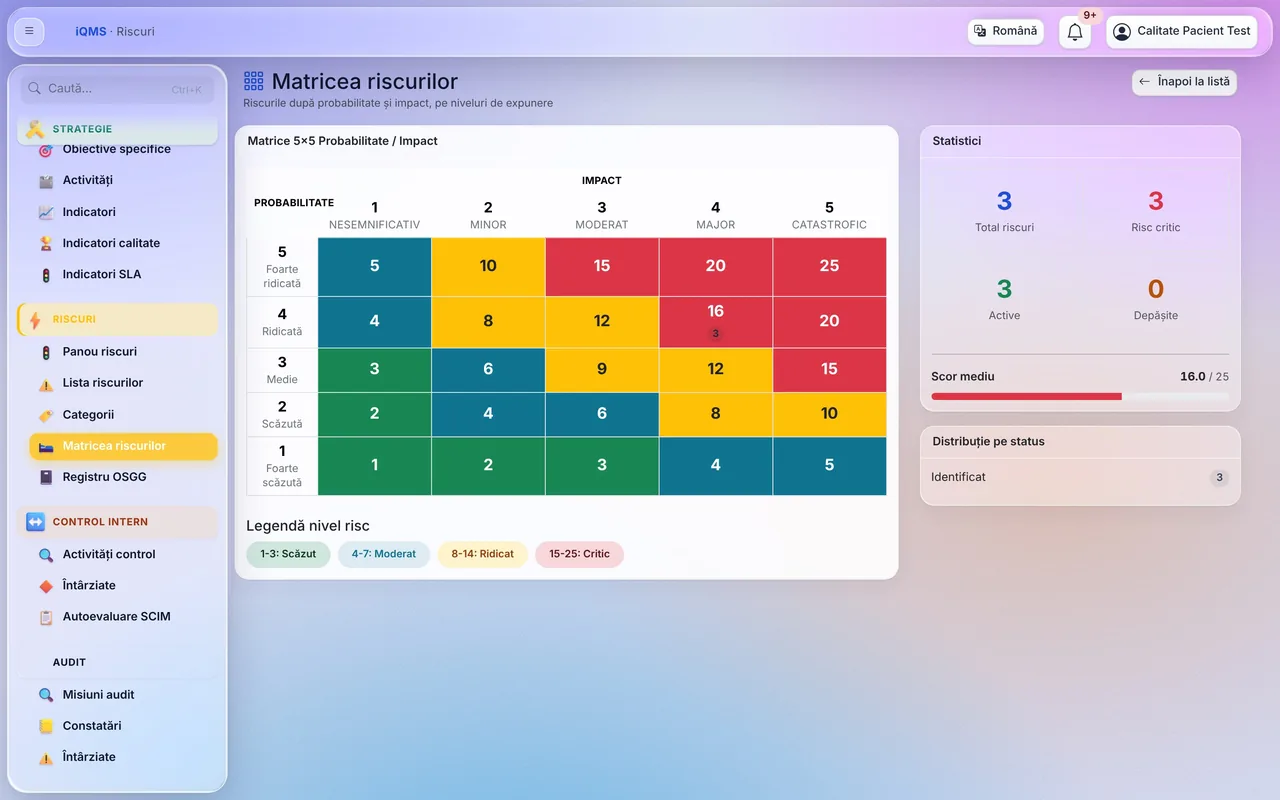
Risk matrix

Each risk, by probability and impact

The risk is placed in the matrix according to probability and impact, on the scale from 1 to 5. After the treatment measures, you see how much it has decreased.

The risk score is the probability multiplied by the impact.

After the treatment measures, the residual risk is calculated.

iQMS: the risk matrix 5 × 5, by exposure levels
The risk matrix, in iQMS.

Who it is for

What iQMS solves for each officer

Each person's question and the place in the application where they find the answer.

Quality officer

Which procedures have overdue review and who has not approved yet?

The review calendar shows, over 12 months, the overdue deadlines and those that expire in 30 days. Each approver has their «To approve» list, and rejection comes with a comment.

The manager

How do I stand on the indicators in the management contract?

The 23 indicators from Order 3.626/2022 have the official scoring grids. The evaluation sheet is generated for the period, with the score by categories and the rating, and the values from iPortal, iConta and iHR come automatically.

SCIM Monitoring Commission

How do we do the annual self-assessment on the 16 standards?

The questionnaire has the official criteria for each standard and is completed per entity or per department. After approval, the SCIM report shows the status of each standard.

Risk officer

What are the critical risks and who treats them?

The dashboard shows the top 10 critical risks, the risks with overdue review and the outstanding actions. Each risk has an owner, treatment measures and the residual risk after them.

Internal auditor

What findings are still open after the last mission?

Each finding has severity, cause and responsible person, and the corrective action is opened directly from it. The list of delayed findings is seen separately.

Data protection officer

Do we keep the register of processing activities up to date?

The register required by art. 30 of GDPR has the purpose, the legal basis, the categories of data and the retention period for each activity. The assessment on 27 requirements gives a score and a list of actions.
Modules

All modules, grouped by the work of the quality office

Each person sees only the modules permitted by their role.

Procedures and protocols

Quality officer, drafters, approvers

  • List of procedures System and operational procedures, with filters by category, department, status and mandatory or optional.
  • Drafting Purpose, scope, responsible person, approvers and review period. The code is generated automatically by department, and the procedure file is mandatory.
  • Approval The procedure reaches all approvers with a notification. Each approves or rejects with a comment, then the procedure comes into force.
  • “To approve” Each approver sees the procedures awaiting their response.
  • Revisions and editions On an in-force procedure, a revision or new edition is opened. The history remains on the procedure sheet.
  • Register of operational procedures With responsible person, version and review deadline, counters for overdue revisions, PDF export and printing.
  • Review calendar Over 12 months: overdue deadlines, those expiring in 30 days and those on time.
  • Medical protocols The same path as procedures, with their indications and contraindications.
  • Quality manual Quality management system manual, with table of contents, opened from the application.

Risks

Risk officer, department heads

  • Risk register Type, causes, consequences, probability and impact on the 1–5 scale, inherent and residual risk, response strategy and estimated financial impact.
  • Reassessments Each risk reassessment remains in the history.
  • Treatment measures Preventive, corrective, detective or directive, each with its status.
  • Matrix 5 × 5 Four levels, from low to critical.
  • Risk dashboard Probability × impact map, the first 10 critical risks and overdue reviews.
  • Register according to OSGG 600/2018 Risk register for managerial internal control, with PDF export and printing.
  • Alerts On a new risk, on status change and when a risk reaches high level.

Incidents and corrective actions

Quality officer, action owners

  • Incident register Clinical, administrative or technical, with priority and responsible person. Waiting time for information is not counted towards the resolution deadline.
  • IAAM cases from iPortal A case declared in iPortal becomes a clinical incident in iQMS on its own, only once per case.
  • Response deadlines Response and resolution times by priority, checked automatically every minute.
  • Single register of actions Actions started from risks, from audit findings and from incidents, with responsible person, deadline, evidence and status. “Delayed” and “Mine” filter the list.
  • Actions from other applications iPortal, iHR and FlexiDocs can open corrective actions in iQMS. The application that sent the action reads its status itself.

Internal audit

Internal auditor, CPIAAM, quality manager

  • Audit missions Internal, external, certification, follow-up and epidemiological control, with purpose, criteria, conclusions and recommendations on the mission sheet.
  • Calendar and statistics The year's missions on the calendar and the status of findings by types.
  • Findings Non-conformity, observation or opportunity, with severity, cause, responsible person and deadline.
  • The journal that cannot be modified Who changed a risk, an action or a finding, when and what the value was before.

Managerial internal control

Management, the SCIM committee, department heads

  • Objectives Directions, general objectives, specific objectives and activities, with codes given automatically, responsible person, current value and target.
  • Progress of activities The responsible person updates their activity. Before the deadline a notification is sent.
  • Control activities Preventive, detective or corrective, with frequency, responsible person and required evidence. At each execution it is noted how effective the control was.
  • SCIM self-assessment On the 16 standards, with official criteria, by entity or by department, with improvement measures, deadline and responsible person.
  • SCIM report The status of each standard from the approved self-assessment, alongside the control activities.
  • Meetings Agenda, participants, attendance, minutes, decisions and actions, with invitations sent automatically.

Data protection

Data protection officer

  • Compliance assessment On 27 GDPR requirements, with the text of the articles, a score and a list of actions.
  • Record of processing activities Record required by art. 30, with PDF export.
  • Reports Analysis, recommendations and actions, in PDF or Excel.

Indicators and reports

Manager, steering committee, quality manager

  • Manager's indicators The 23 indicators from Order 3.626/2022, on categories A–E, with official scoring grids.
  • Evaluation sheet By period, with score by category, total and rating, in XLS and PDF. Where a value is missing, the score remains blank, and some indicators are completed by hand.
  • Values from the other applications The indicators calculated in iPortal, iConta and iHR reach iQMS by themselves, for their period.
  • Own indicators Entered manually, calculated with a formula or aggregated, with history and target.
  • The dashboard and the charts Deadlines in the next 14 days, risks by department, procedures by status and progress of objectives.
  • Standard reports Achievement of objectives, risks by responsible persons, SCIM and the objectives–risks correlation, in PDF.
  • Reports built by you Choose the module, columns and filters, for risks, procedures, indicators, objectives, activities and controls.

Administration

Application administrator

  • Roles Six prepared roles and new roles, with rights on each of the 24 modules.
  • The account and the organisation chart Users and structure come from Hypen One. The organisation chart is exported to PDF, on A4 or A3.
  • Logs The activity log and the export log: who exported what.
  • Role guides “First steps” for the quality manager, auditor, manager and employee, resumed at any time.

A working day

A day of the quality office, with iQMS

The times are indicative. Each step is an action that people perform in the application.

  1. 08:30

    The dashboard

    The quality manager sees the deadlines in the next 14 days and what they have to do.

  2. 09:00

    A new procedure

    The drafter sends it for approval. Each approver receives the notification and finds it in their “To approve” list.

  3. 10:30

    An IAAM case

    The doctor declares the infection in iPortal. A clinical incident appears by itself in iQMS, and the resolution deadline starts running.

  4. 12:00

    Audit

    The auditor notes a non-conformity with its cause and opens the corrective action directly from the finding.

  5. 14:00

    Risks

    The responsible person re-evaluates a risk. When it reaches a high level, its owner receives an alert.

  6. 16:00

    Meeting

    The minutes, decisions and actions are written at the meeting, and the participants had received the invitation from the application.

  7. At the end of the year

    Self-assessment

    The SCIM commission completes the questionnaire on the 16 standards and produces the report. The manager generates their evaluation sheet.

Self-assessment

Self-assessment on 16 standards

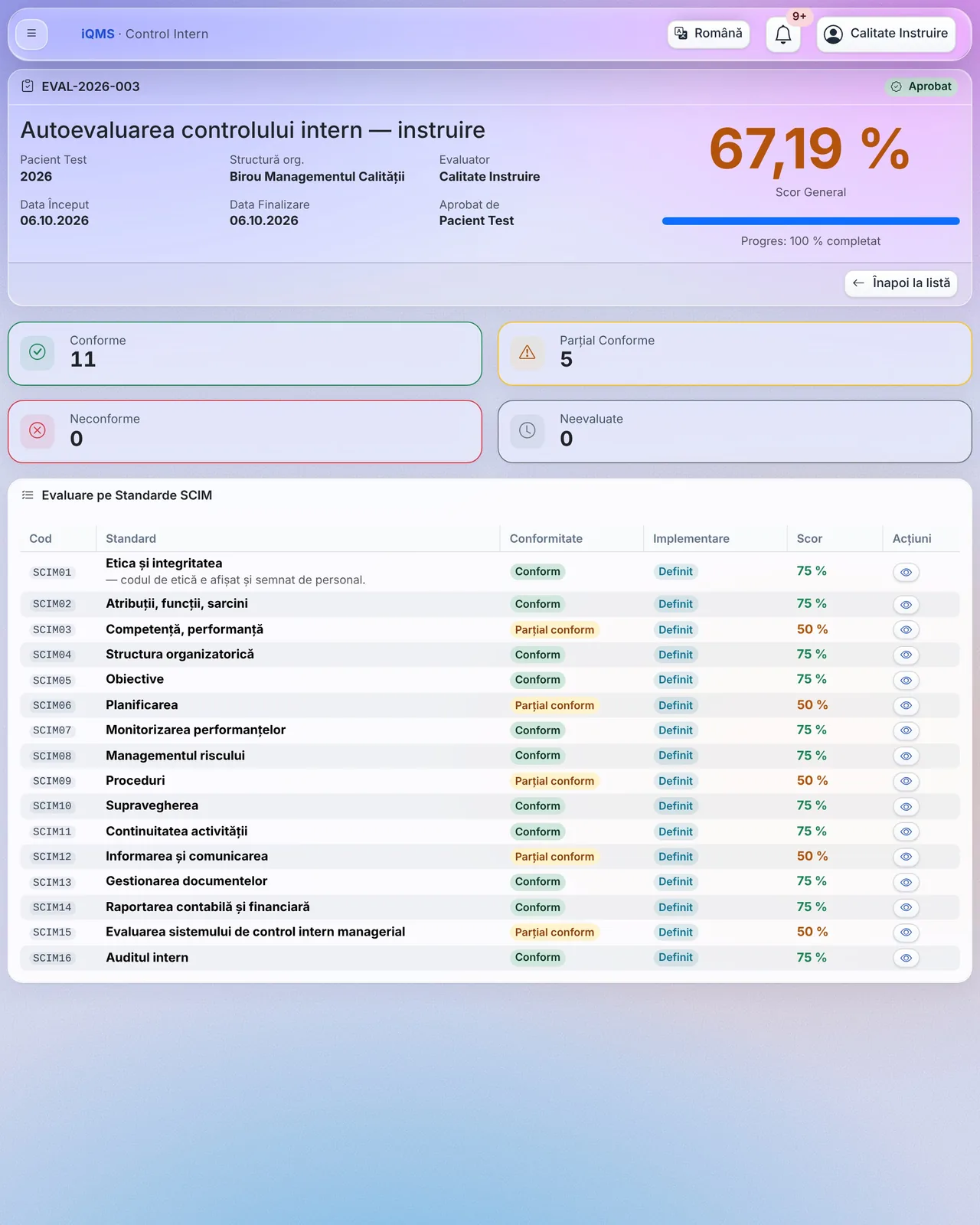
The commission completes the questionnaire on each standard, with the level of compliance, evidence and improvement measures. After approval, the self-assessment enters the SCIM report.

An approved SCIM self-evaluation, with the overall score and compliance for each of the 16 standards

Manager's indicators

Indicators from Order 3,626

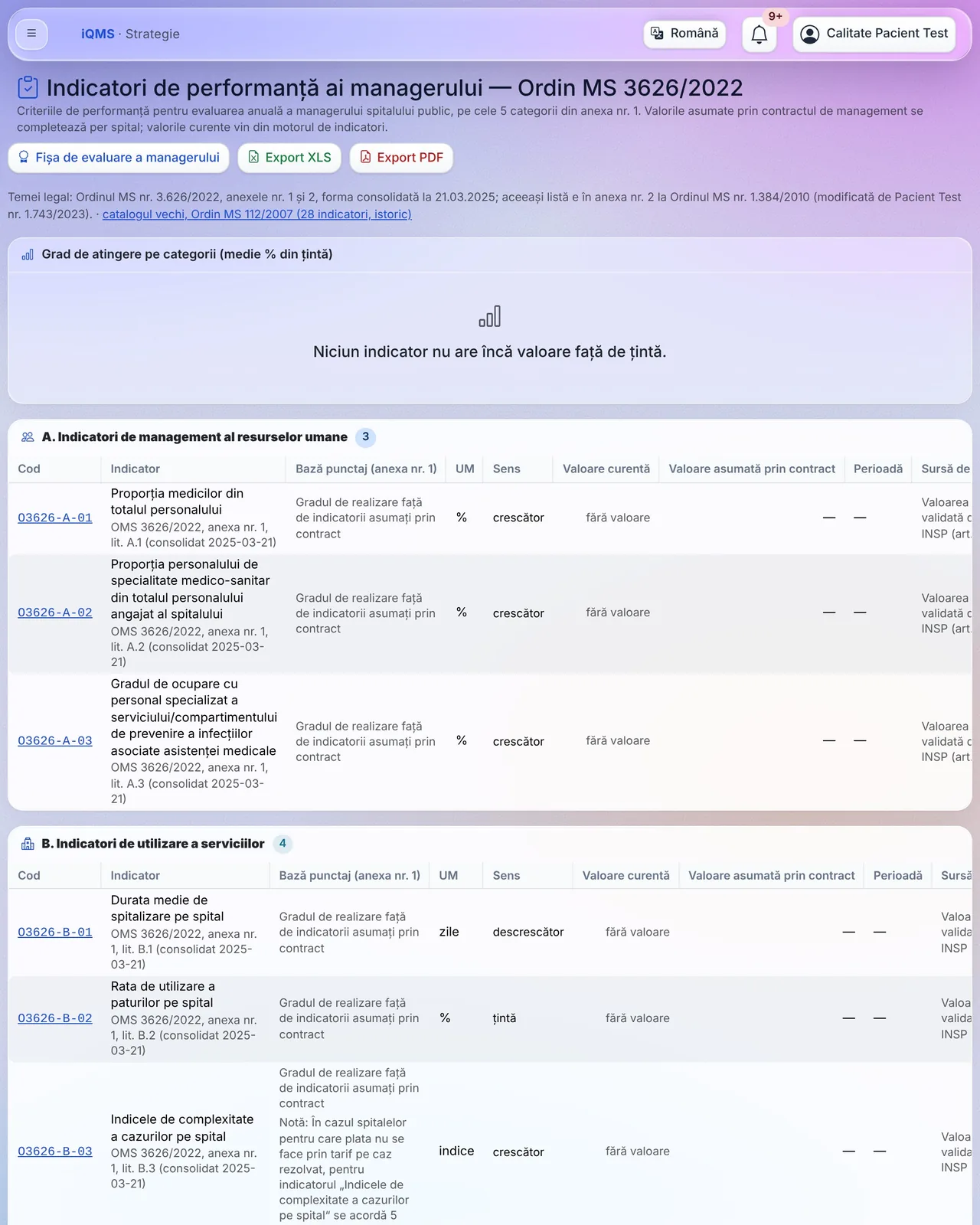
The indicators are grouped into the five categories from annex 1 of the Order of the Minister of Health no. 3.626/2022. The evaluation sheet is exported to XLS and PDF, and for a period still open it is marked “provisional”.

The manager's performance indicators, by categories from Order of the Ministry of Health 3626/2022

GDPR

GDPR compliance, by chapters of the regulation

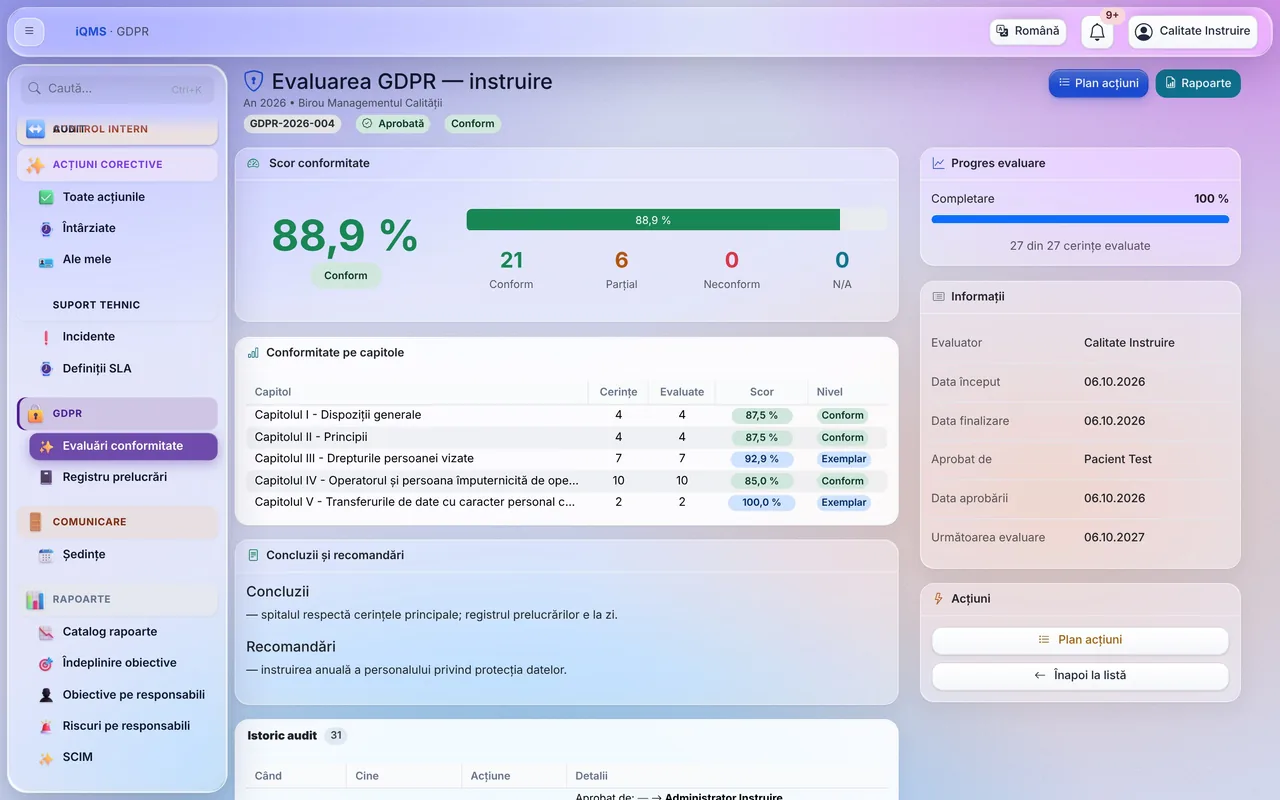
The data protection officer evaluates the 27 requirements and sees the score on each chapter. The register of processing activities and reports with recommendations are produced in PDF or Excel.

An approved GDPR evaluation, with the compliance score and compliance by chapters of the regulation

Procedures

Procedures, with revisions and approval

Each procedure goes through approvers before it comes into force. Revisions and new editions start from the procedure in force, and the history remains on its sheet.

  • Draft
  • Under review
  • Approved
  • Active
  • Replaced
  • Withdrawn

Corrective actions

A single register of corrective actions

Actions started from risks, from audit findings and from incidents go into the same register, with responsible person, deadline and evidence. iPortal, iHR and FlexiDocs can also open actions here.

  • Risks
  • Audit
  • Incidents
  • iPortal
  • iHR
  • FlexiDocs

Legal obligations

What the law requires and where you do it in iQMS

Managerial internal control
Order of the SGG no. 600/2018 requires the risk register (art. 5), documented procedures (art. 6) and the annual evaluation of the state of internal control, in all departments (art. 8), on the 16 standards. In iQMS you keep the risk register, procedures, control activities and self-evaluation on each standard, by entity or by department.
Hospital manager indicators
Order of the Minister of Health no. 3.626/2022 establishes the manager's performance indicators, in five categories. iQMS has them with scoring grids and produces the evaluation sheet.
Record of data processing
Regulation (EU) 2016/679 requires, in art. 30, the record of processing activities. iQMS keeps it for each activity and exports it to PDF.

How to start

First steps until you work in iQMS

  1. Try it

    The “Try it now” button opens an iQMS copy with test data, on the role you choose.

  2. Request a quote

    Public hospitals, town halls and institutions buy through SEAP, based on the quote. Private clinics buy online, by card.

  3. We start with your structure

    Our team imports from Excel files the departments, the categories of procedures and of risks and the users.

Prices

The price, according to the size of the unit

Public hospitals, town halls and institutions buy through SEAP, based on the quote. Private clinics buy online, by card.

Private clinic

390 lei / month

excl. VAT · 471.90 lei incl. 21% VAT

  • Up to 15 users
Buy

Small hospital

On quote

  • Town or private hospital, with beds
  • Through SEAP, by quotation
Request a quote

Municipal hospital

On quote

  • Through SEAP, by quotation
Request a quote

County hospital

On quote

  • County hospital, clinical hospital or institute
  • Through SEAP, by quotation
Request a quote

Monthly prices, excl. VAT. Paid annually, a year costs as much as 10 months.

A 30-minute presentation with the team

We show you the workflows you care about, online or on site, and answer your questions. We write back within one working day to set the time. If you want to see the applications right now, try them on test data, free and without a card.