iPortal, the hospital information system

From scheduling to settlement with CAS

The duty doctor sees on the tablet what treatment the patient received last night. The statistician sends the monthly report from what the doctors have completed in the record. The manager sees, for each inpatient case, how much CAS will reimburse.

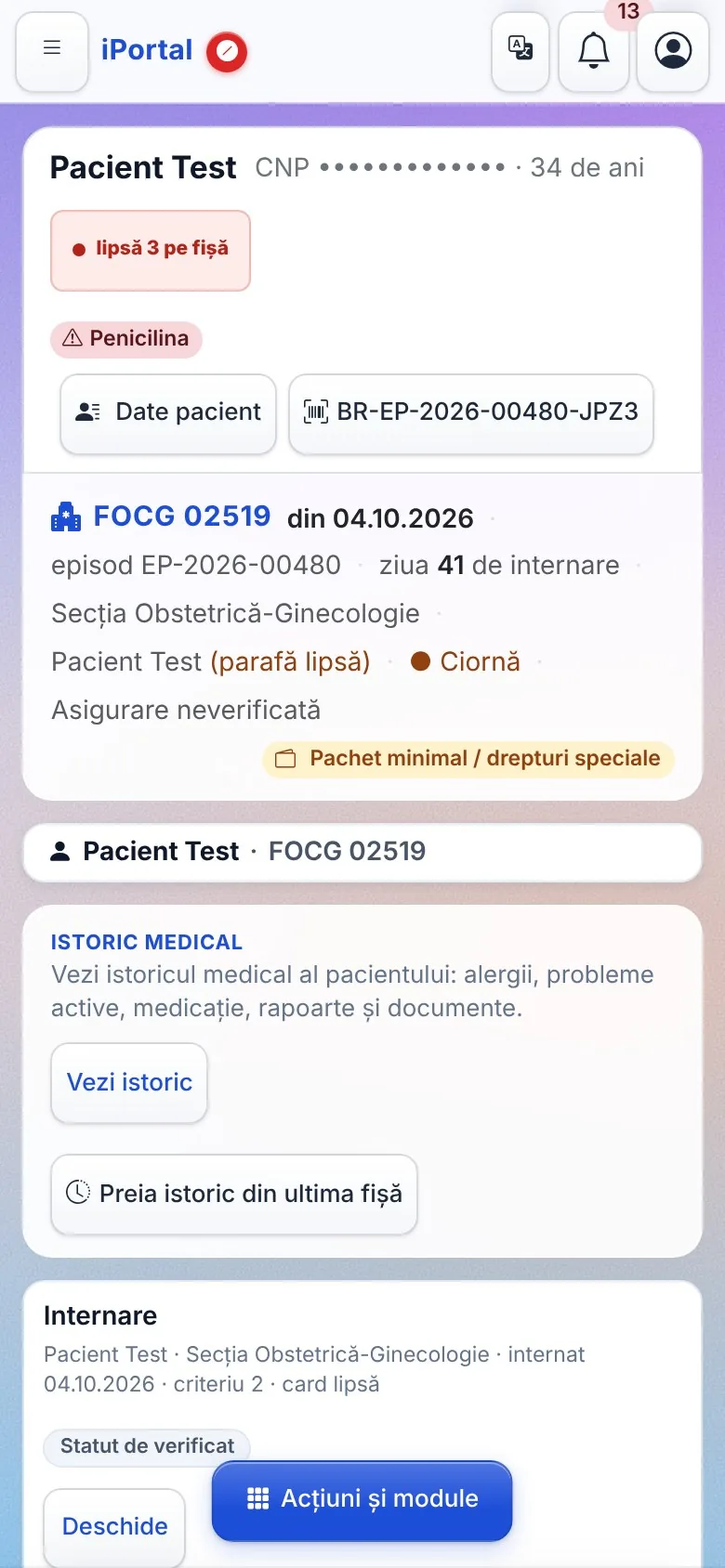
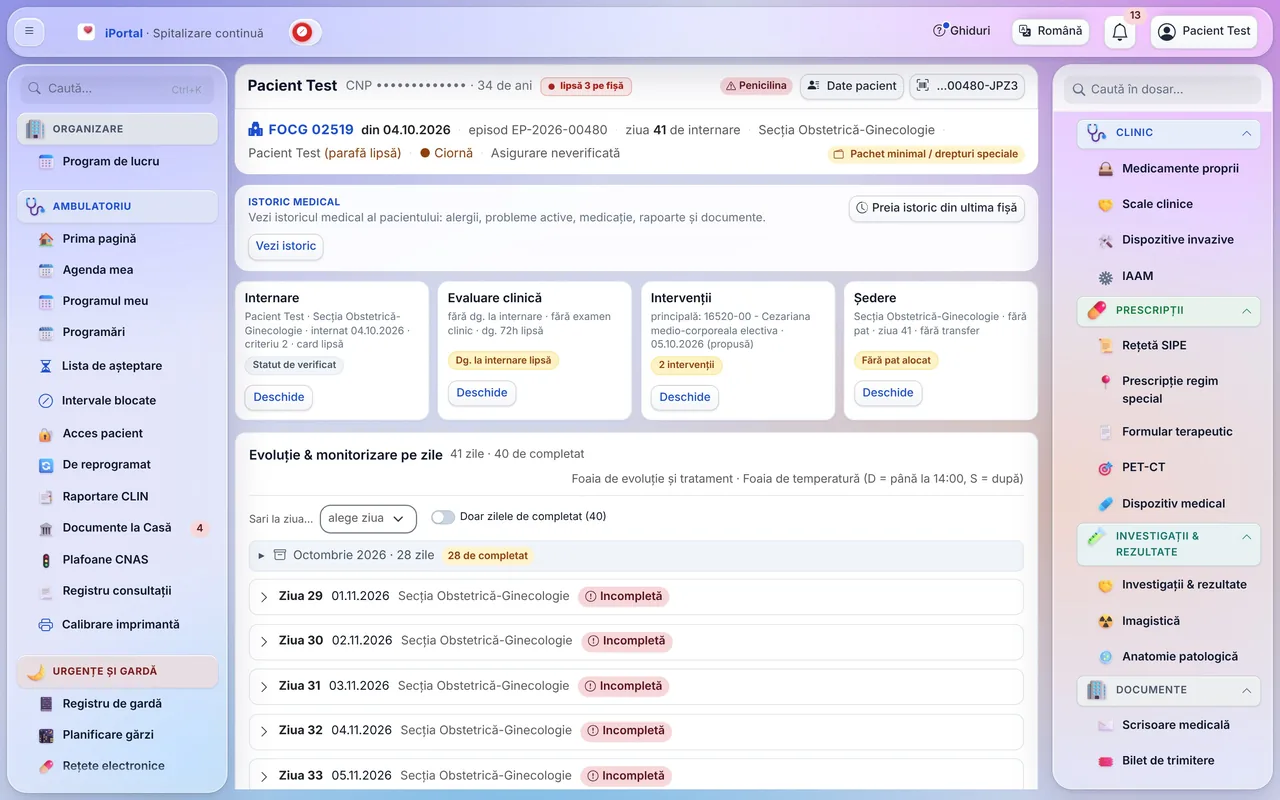
iPortal: the record of an admitted female patient, with the admission, clinical assessment, interventions and day-by-day progress
Pre-validation before sendingThe consultation, therapeutic forms, PET-CT and reports go through CAS pre-validation, while they can still be corrected.
Pathological anatomy and oncologyICD-O-3 and TNM coded bulletin, synoptic reports, day hospital chemotherapy and the National Oncology Programme.
In production at Buftea HospitalBuftea Obstetrics and Gynaecology Hospital works in iPortal, with patient history from 2016 onwards, imported from the previous system.

Patient pathway

The record travels with the patient from UPU to theatre, to ICU and to the ward

Triage in UPU, the operating protocol, the ICU chart completed hour by hour and the progress on the ward are added to the same patient’s record. The doctor who takes over sees everything that was done before.

Each department adds to the record what it has done.

On discharge, the bed is freed on the bed map.

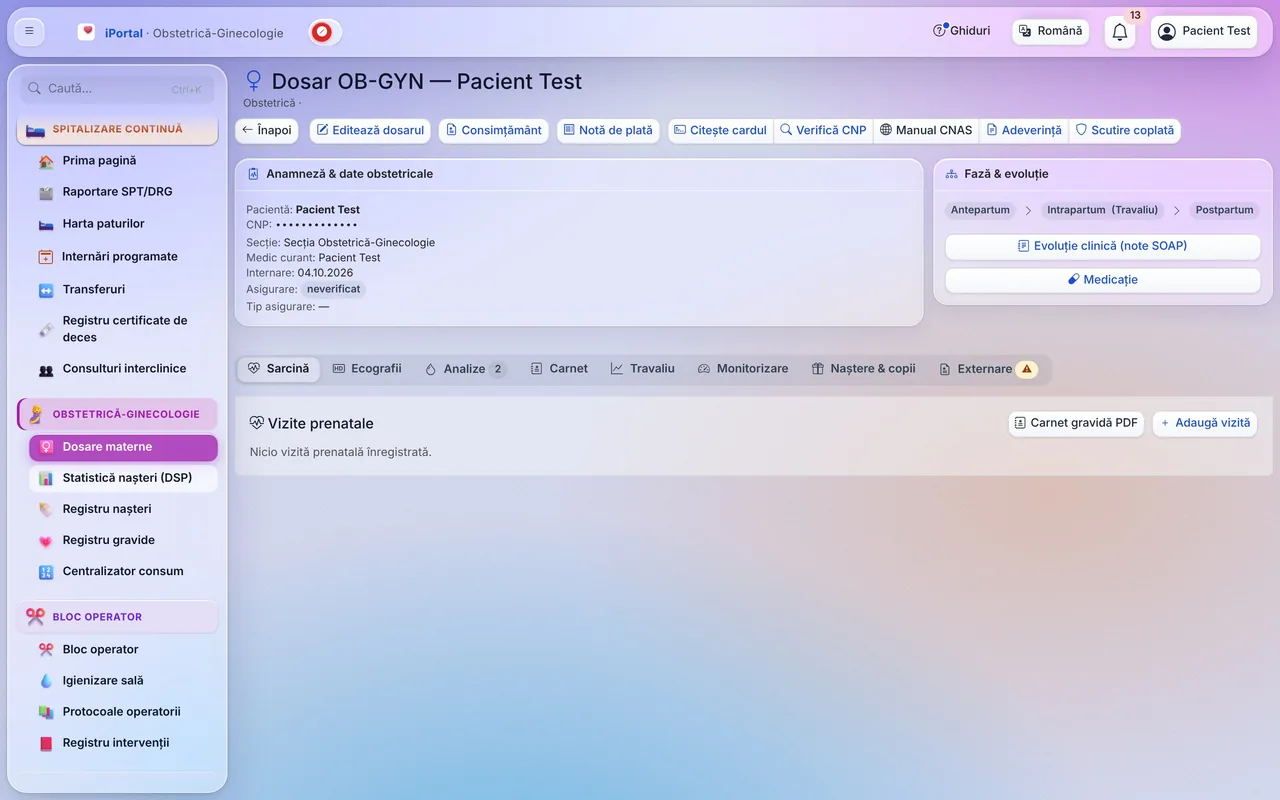
iPortal: the record of a female patient at Obstetrics-Gynaecology, with the phases of pregnancy and the tabs of the record
The record of a patient in Obstetrics and Gynaecology, in iPortal.

Who it is for

What iPortal solves for each department

The question each person in the hospital asks themselves and what they do in iPortal to find the answer.

Hospital manager

How much money do we lose on services that CAS rejects?

Pre-validation shows, before sending, what CAS would reject. Next to the month’s consumption you see the contracted ceiling, and for each inpatient case, how much CAS will reimburse.

Finance and accounting director

Is the invoice to CAS still done by hand, in Excel?

The monthly settlement, the invoice to CAS, pro forma, offsetting note and regularisations are done in iPortal. Pharmacy consumptions are posted in iConta, and the cost per case is seen in the cost reports.

Medical director

What happened on duty last night?

The duty doctor’s report is in the application and you confirm it in the morning. The inpatient medical record goes to the head of ward for approval, and morbidity and doctors’ activity are exported as PDF reports.

Head nurse

How many free beds do we have and what is missing from the emergency kit?

The bed map shows, by room, the beds that are free, occupied or being cleaned. The ward’s emergency kit has a standard list, an inventory and replenishment, and the daily movement sheet and the admissions-discharges register are in the application.

Statistician

Does monthly reporting mean copying the observation sheets again?

CLIN, PARA, DRG, day hospital and RECA reports leave from validation lists, as signed XML. What CAS rejected remains in the validation queue, from where it is corrected and resent.

Chief pharmacist

Which batches expire this month and how do I keep records of narcotics?

Receipt is done on NIR, with invoices also taken from e-Factura. Wards receive first the batch that expires first, with SNVM check. Narcotics have a register, printed log and minutes on destruction.

Modules

All modules, grouped by hospital work

Grouped by who uses them. Each person sees only the modules permitted for their role and ward.

Patient admission

Registry, admissions office, cashier

  • Online booking The patient chooses the service, the doctor and the time, even without an account. They receive a code with which they check or cancel the appointment.
  • Waiting list When a doctor is absent, their appointments are moved in bulk. No-shows are marked.
  • Doctors' schedule Each doctor's schedule, with exceptions, blocks and consultation duration.
  • Insured status It is checked at CAS with the health card, with the CNP or with the certificate, and the status appears on the file.
  • Check-in with the card At the admissions office the health card is read and the insured person is verified.
  • Laboratory and imaging counter The patient who comes with an outside referral receives the contract, the sampling and the labels at the same counter.
  • Cash desk Collections, receipts, cash register and co-payment, with the exemptions provided, including for patients in national programmes.
  • Patient account The patient activates their account with CNP, phone and SMS code. They see their documents, images, reports and receipts.
  • Results with a code Laboratory and pathological anatomy results are downloaded without an account, with the received code.
  • External doctor's access The patient gives an external doctor temporary access to the file. Each access remains in the log.
  • Duplicated files The files that seem to belong to the same person appear on a list. A person unites them, after comparing them.
  • Hospital website The pages about the hospital, services, announcements, public interest information and contact are edited from the application, with versions.

Specialist outpatient clinic

Doctors and nurses from practices

  • The day’s list The day's consultations, by doctor and by status, with the doctor's registry number.
  • Consultation form Anamnesis, examination, coded diagnoses and services reimbursed by CAS. What was written at previous consultations is taken over.
  • Pre-validation and the card The services are pre-validated at CAS, the patient confirms with the health card, and the consultation is closed. Reopening requires a reason.
  • Reimbursed prescription Compensation, sub-list and the programme are calculated for each medicine. The doctor signs with the card or with the stick, and the prescription goes to SIPE.
  • Prescriptions with special regime Narcotics and psychotropics, programme medicines, reserve antibiotics, glasses and medical devices.
  • Referral note Clinical or paraclinical, from the pre-printed booklet, with mentions for the oncological patient.
  • Sick leave certificate The certificate from the booklet, with insurance verification, printed on the matrix printer.
  • Medical letter The letter to the family doctor and the one for related services.
  • Informed consent For each procedure, signed electronically or on paper. The withdrawal and each signature remain in a log that cannot be modified.
  • Investigations The tests, imaging and pathological anatomy are requested from the consultation. The results come back into the file, with the evolution of the tests over time.
  • Test results from another laboratory The patient brings a report from elsewhere. The application extracts the values, and the doctor confirms them.
  • Official forms The standard forms and annexes are filled in within the record and printed just like the official template.
  • Referral for admission From consultation, directly to day hospitalisation or continuous hospitalisation.
  • Teleconsultation and the follow-up plan Video consultation with shared documents and a plan of periodic check-ups, with PDF.

Admission

Continuous and day hospitalisation

  • Admission The attending doctor, the regimen, urgency, scheduled admissions, estimated quote, accommodation and companion.
  • Inpatient medical record Diagnoses, discharge summary, taken history, head of department approval, signature and printing.
  • Bed map Beds by room: free, occupied, being cleaned. Patients without a bed appear separately.
  • The wristband It is issued on admission, with the risk marking, and scanned when administering treatment.
  • Transfers Between departments or to another hospital, with a referral.
  • Day hospitalisation The schedule, the day hospitalisation record, sessions signed by the patient, switching between day and continuous, the reimbursement.
  • Estimated reimbursement How much CAS will reimburse for the open case, already during the hospitalisation.
  • Discharge Discharge verification, DRG coding of diagnoses and procedures, discharge note and letter. The bed is released automatically.
  • Death certificate Completion, signing and the register of certificates.
  • Department registers Daily movement record and registers of admissions-discharges, consents and interventions.
  • Signature on tablet The patient signs the documents on the department's tablet.

On the ward

Doctors, nurses, head nurse

  • Vital signs Temperature chart, NEWS2 score, progress notes, clinical scales, catheters and care.
  • Medication Prescription, approval and administration, with the reason when a dose is not given, and the remainders.
  • Consumed materials They are deducted from stock by batch, for each patient.
  • Medicines brought by the patient They are received, administered without deducting from the hospital's stock and handed over on discharge.
  • Requests to the pharmacy The department's medicine request and the emergency kit, with a standard list, inventory and restocking.
  • Statements of need The department requests purchases from the application.
  • On-call duty The on-call doctor's report and its confirmation. On-call scheduling comes from iHR.
  • Nurse's tablet The Bedside app, for Android: work list, alerts, vital signs, medication with scanning, bedside transfusion, sampling and shift handover.

ICU, operating theatre, sterilisation and blood

Surgeons, anaesthetists, ICU nurses, UTS and sterilisation

  • ATI Hourly chart in the patient record, dynamics, critical stay, consumption and transfusion record.
  • Operating theatre Theatre schedule, booking and approval of procedures, WHO checklist, operative protocol with implants, anaesthetic balance, scanned sterile kit and theatre cleaning.
  • Sterilisation Kits with codes, loads with loading, release and recall, chemical and biological controls, labels.
  • Blood bank Stock by groups, compatibility, serotheque, transfusion orders, bedside verification and haemovigilance.
  • UPU Presentation, triage, clinical examination, procedure pack and decision: home, admission or transfer.

Maternity and newborns

Obstetricians, midwives, neonatologists

  • Pregnancy and childbirth Pregnant woman's record, prenatal visits, ultrasounds, partogram with oxytocin and epidural, delivery, including twins, and birth register.
  • The newborn His record, feeding, weight, neonatal intensive care, screening, vaccines, bracelet and child's health record.
  • Birth certificate It is transmitted from the app, and the child is registered in RENV.

Oncology

It applies automatically when the diagnosis is tumoral or the patient is enrolled in the programme

  • Oncology outpatient clinic Previous oncology consultations are imported, the oncology record is printed, and the referral and letter include oncology notes.
  • Chemotherapy In day hospitalisation, with chemotherapy or monitoring regimen, sessions signed by the patient and maximum frequencies checked.
  • National Oncology Programme Enrolment, therapeutic form for initiation, continuation or interruption, signed quarterly reporting and reconciliation.
  • Oncology prescription C2 compensation is proposed only to the patient with valid enrolment, with the cost-volume ceiling of 30 days.
  • PET-CT The CAS form, signed with the health card and confirmed in PIAS.
  • Cytostatics They are administered only after the pharmacy has dispensed the prepared dose, from a separate programme stock.

Laboratory

Biologists, laboratory doctors, lab technicians

  • Requests and sampling Test packages, Zebra or PDF labels on each tube, sampling in the laboratory or on the ward.
  • Sample reception The sample is accepted or rejected, with a reason.
  • Analysers They receive the work list and send the results via the LIS interface.
  • Validation Technical and medical, with confirmation of critical values, partial and final report.
  • Microbiology Cultures and antibiogram.
  • Reagents Reception, consumption, quarantine, open vials, inventory and stock alerts.
  • Quality in the laboratory Internal and external quality control, measurement uncertainty, calibrations, non-conformities and authorised personnel on each device.
  • Evolution of results The graph of an analysis over time, for each patient.

Imaging

Radiologists and technicians

  • Work list Requests, scheduling and the device. The order arrives in PACS as the device's work list.
  • PACS Search, opening the study and the viewer, with the PACS the hospital has.
  • Examination sheet Exposure, radiation dose and contrast agent.
  • Imaging report Draft, validation, signing with certificate, addendum and templates.
  • Materials and tariffs Stock of materials and contrast per device, the catalogue and tariffs.
  • High-performance investigations Request form Annex 24.

Anatomical pathology

Anatomopathologists, assistants and AP technicians

  • Sample reception Sample code, link to admission and request, compliance and accompanying sheet with barcode. The piece from the operating theatre becomes a sample without being written again.
  • Workstations Reception, macroscopy, processing, microscopy and signing, each with its own list.
  • Macroscopy and blocks Description made by the doctor together with the assistant, cassettes, blocks and slides, with labels.
  • Immunohistochemistry and cytology Antibody panels, cytology with Bethesda report and extemporaneous examination, with concordance to the final diagnosis.
  • Histopathological report ICD-O-3 and TNM coded diagnosis, signed with the doctor's qualified certificate, with addendum when needed. The patient also sees it in their account.
  • Synoptic reports Eight protocols: ovary and fallopian tube, lung tumours, colorectal biopsy and cancer, in situ and invasive breast carcinoma, plus the general cancer protocol.
  • Second opinion External consultation on digital slides, with the patient's consent.
  • Necropsy Necropsy protocol, signed and printed.
  • Archive and biopsy register Blocks and slides by locations, with movements, material releases and shipments, plus the biopsy register.
  • Reporting to CAS The PARA validation list for pathological anatomy, sent to CAS together with the other monthly reports.
  • National Cancer Registry When a malignant report is signed, the case opens automatically, with a deadline of 30 days. The form is then uploaded manually to the INSP application.

Hospital pharmacy

Pharmacists and storekeepers

  • Goods receipt NIR, the invoice register and importing invoices from e-Factura.
  • Issuing to departments The batch that expires first is issued first, with labels and SNVM verification.
  • Registers The department register with the pharmacist's approval and the emergency equipment register.
  • Narcotics The register, the printed log, reversal and destruction with a report.
  • Batches and expiries Batch tracking, expiry alerts, blocking and quarantine.
  • SNVM Verification and decommissioning of serialised medicines, with a scanning application for Android tablet.
  • Magistral preparations, waste, pharmacovigilance The formulas and labels of preparations, the waste report and reporting of adverse reactions.
  • CAS programmes run by the hospital Issuing electronic prescriptions and monthly schedules, available only at hospitals that run these programmes.
  • Pharmacy reports Consumption, antibiotic consumption in DDD, the supporting request and the programme summary for CAS.

Reporting to CAS and statistics

Statisticians, financial director, manager

  • Reporting dashboard Monthly overview, history, sent XML files and the PIAS calendar.
  • CLIN, PARA, day hospitalisation Outpatient, laboratory, imaging and pathological anatomy, each with its own validation list and signed XML.
  • DRG The 45 DRG nomenclatures, coding at discharge, reporting for acute, chronic and palliative, the settlement and revalidations.
  • RECA and the other reports Rehabilitation, home care, medical devices and medical leave.
  • Validation queue What was sent, what CAS rejected and resubmission.
  • Settlement and ceilings The monthly settlement, the invoice to CAS and the contracted ceiling versus monthly consumption.
  • National programmes Enrolment, therapeutic forms, committees and the signed quarterly report.
  • Statistics for DSP Official statistical forms, morbidity and doctors' activity.
  • Cost per case and own reports Cost per case, plus reports built by you, scheduled and shared.

Infections and vaccinations

Epidemiologist, SPIAAM assistant, vaccination office

  • IAAM The register, laboratory notifications, screening, prevalence study, antibiotic consumption, hand hygiene, outbreaks and reports to CNSCBT.
  • Vaccinations Vaccine reception, cold chain, quarantined batches, monthly consumption and adverse reactions reported to DSP.

Recovery, home, kitchen, telemedicine

Recovery wards, the dietitian, the kitchen

  • Recovery Procedures, the recovery cure, procedure timesheets and RECA reporting.
  • Home care Recommendations with verification of the day limit, visits and reporting.
  • The food block Diets, menus, the ward food sheet, kitchen requirements and storeroom. The kitchen has its own app on a tablet, with PIN.
  • Telemedicine Video consultations with consent, encrypted recording, documents and PDF annotation.

Administration

IT, the application administrator, the data protection officer

  • Roles and rights Role-based rights, ward access and individual grants.
  • The stamp and the badge The stamp with image, rank and title, the signature and the badge with barcode.
  • Viewing as another role The administrator sees the application the way a role sees it, without being able to write.
  • CAS data The provider's customisation file, contracts, scoring and nomenclatures, with import and verification.
  • Pre-printed booklets Series of prescriptions, referrals and medical leaves, with losses reported to DSP, plus dot-matrix printing.
  • Beds and accommodation Wards, beds, contracted beds, accommodation classes and co-payment.
  • Integrations PACS, SMS, iConta and the analysers, with a monitor showing what worked and what did not.
  • Audit The general journal with export, the system journal and usage analysis.
  • Beds for dispatch Bed availability, transmitted to dispatch via an API with token.
  • Documents from FlexiDocs The patient document explorer, if the hospital also uses FlexiDocs.

In preparation: the module for the family medicine practice. We will announce it here when it can be used.

A working day

An ordinary day in a hospital that works in iPortal

The times are indicative. Each step below is an action that hospital staff perform in the application.

  1. 07:30

    The on-call report

    The on-call doctor wrote the report during the night. The medical director reads and confirms it from the application.

  2. 08:30

    The visit

    The doctor opens the record on the tablet: vital signs with the NEWS2 score, medication given overnight and results that arrived in the morning. Notes the progress on the spot.

  3. 09:00

    The treatment

    The nurse scans the patient's bracelet and the medication in the Bedside app, then marks the administration. For a dose that is not given, she writes the reason.

  4. 10:00

    Admission

    The registrar admits the patient sent from the outpatient clinic. The bed appears occupied on the map, and the inpatient medical record opens with the attending physician.

  5. 11:00

    Laboratory

    The analyser receives the work list when it reads the barcode on the tube. A critical value arrives as an alert to the doctor, and the report is sent only after validation.

  6. 12:30

    Operating theatre

    The team ticks the WHO checklist and completes the operative protocol. The operative specimen goes to pathology without being written again.

  7. 14:00

    Pharmacy

    The pharmacist dispenses on the ward's register, starting with the batch that expires first, and checks the serialised medicines in SNVM.

  8. 15:00

    Discharge

    The doctor codes the diagnoses and procedures for DRG and issues the medical letter. The bed is released automatically.

  9. At month end

    Reporting

    The statistician sends the month's reports to CAS from the validation lists. The financial director sees the settlement and the ceilings.

At the patient's bedside

The record on phone and tablet

The nurse records the vital signs on the spot, with the NEWS2 and MEOWS scores. Before treatment, she scans the bracelet, so that the medicine reaches the right patient.

iPortal on a phone: the record of an admitted female patient, with the bracelet code

Outpatient care

Prevalidation with CAS

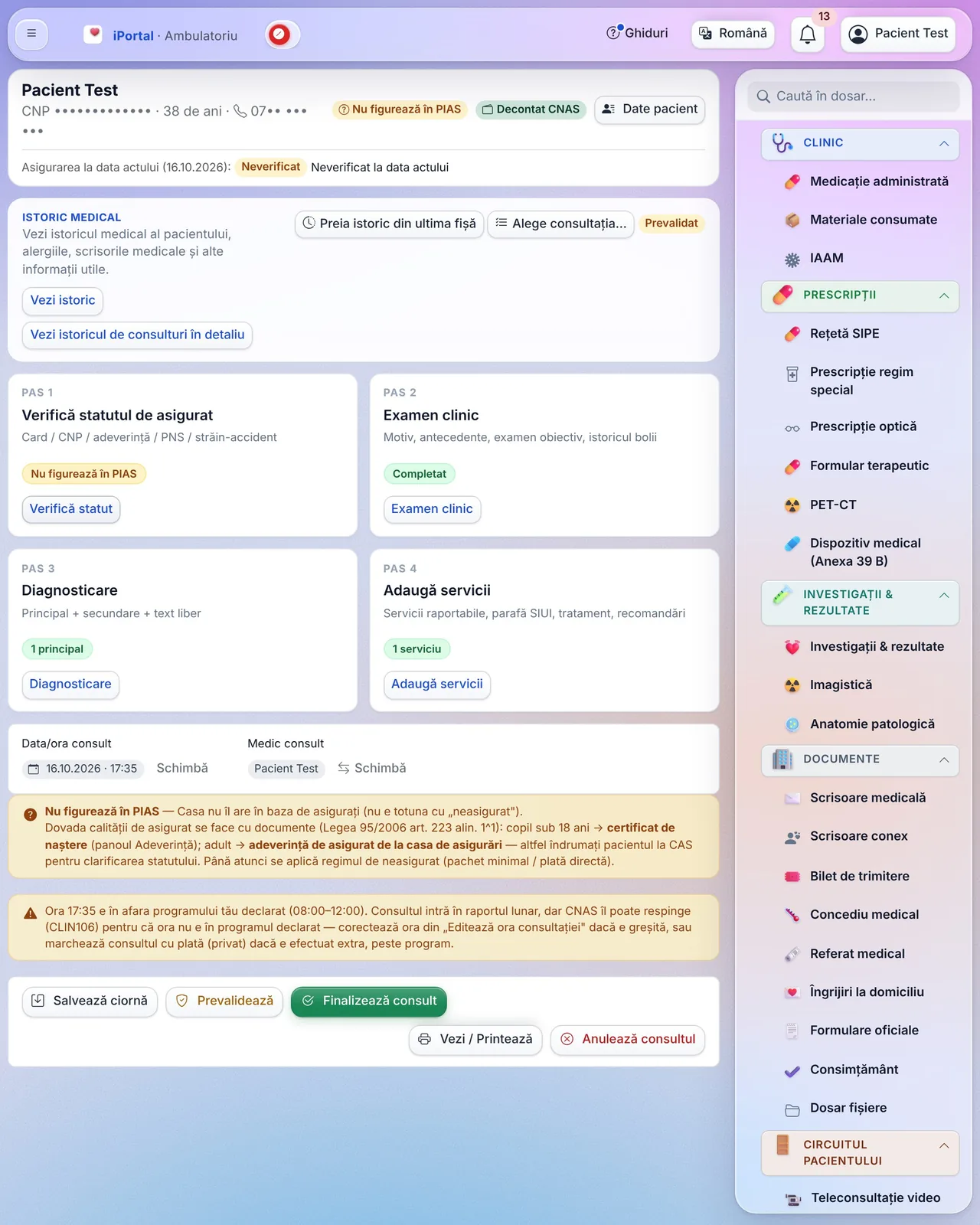
Before reporting, the consultation goes through the hospital's rules and CAS pre-validation. The errors that would block the settlement and the warnings appear on the spot, each with its reason, while the patient is still in the consulting room.

The outpatient consultation in four steps, pre-validated, with CAS warnings

SIPE prescriptions

Reimbursed prescription in SIPE

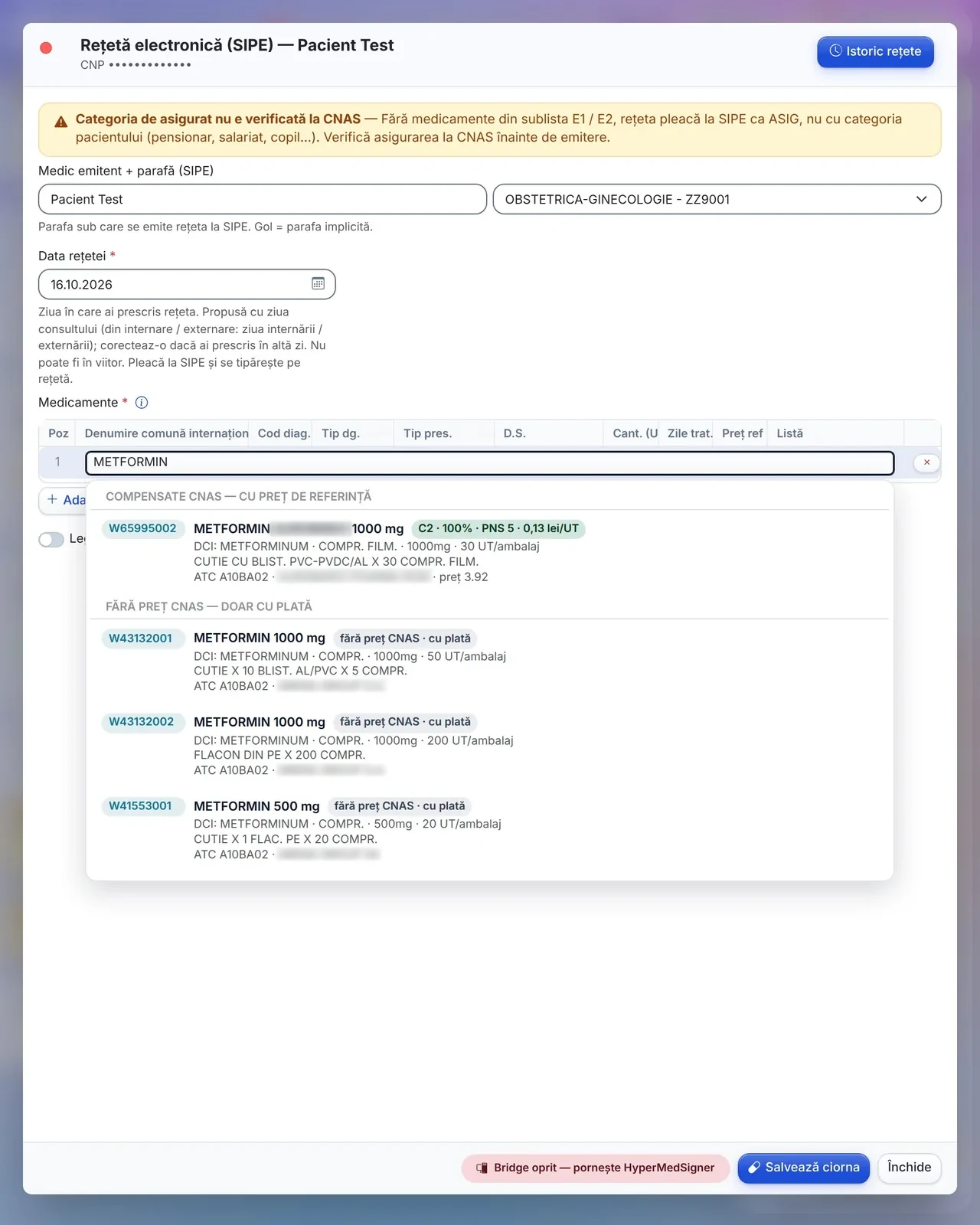
The doctor chooses the medicine from the CAS nomenclature, and the compensation is calculated on the diagnosis of each item. He signs with the card or the stick. If SIPE does not respond, the prescription waits in the queue and is resent automatically.

SIPE electronic prescription: searching for a reimbursed medicine in the CAS nomenclature

Insured status

Online and offline verification

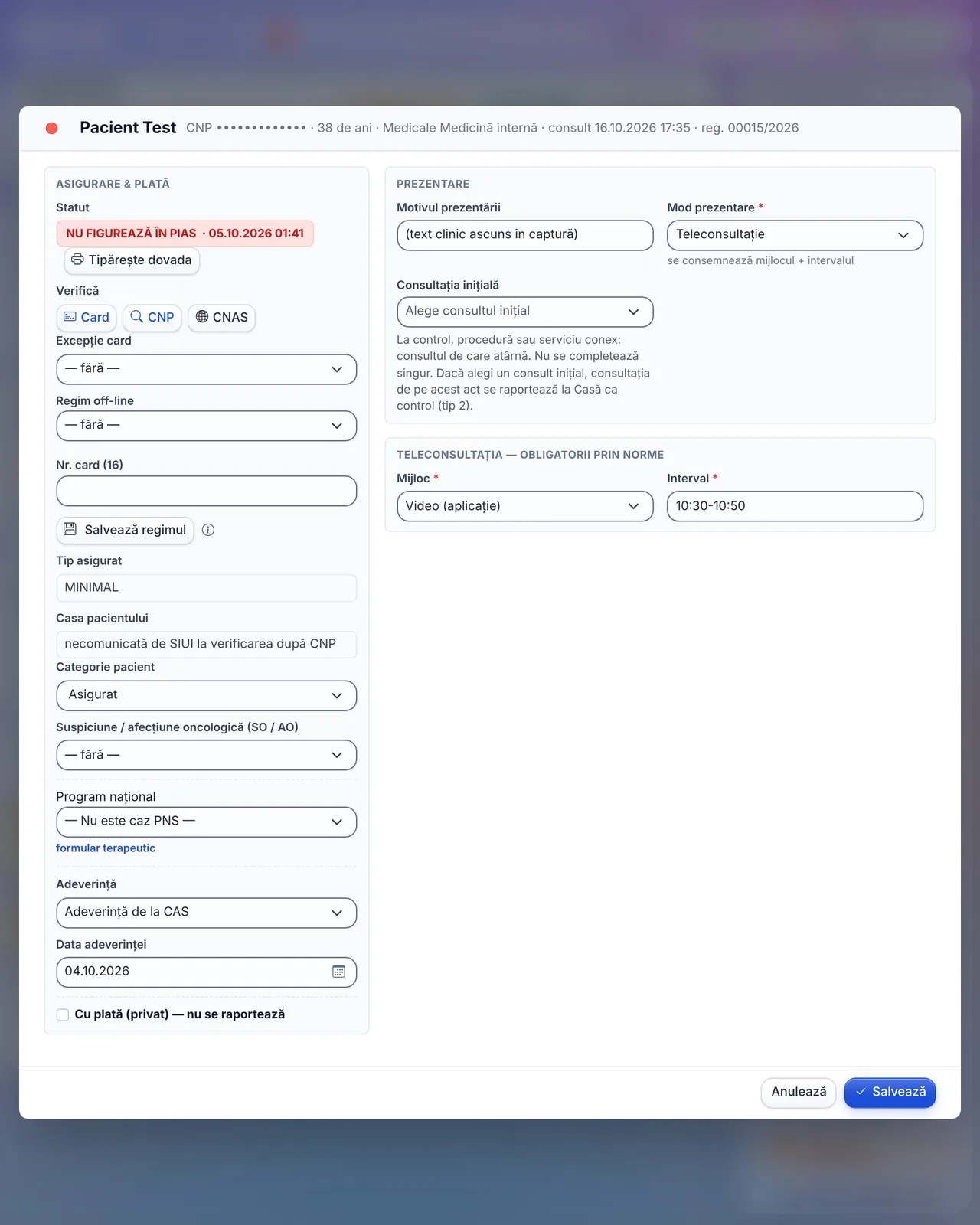
When the CAS system does not respond, you record the document brought by the patient and continue the consultation. iPortal automatically re-verifies the insured status after the system returns.

Verification of insured status: the status, verification with the card, CNP or at CAS, online and offline

Legal obligations

What the law requires and where you do it in iPortal

The obligations that a hospital has towards CAS, the patient and the health authorities, and the place in the application where they are fulfilled.

Insured status
It is verified with the health card, with the CNP or with the certificate. When the CAS computer system does not respond, the rules approved by Order of CNAS no. 1.549/2018 (art. 10) allow the provision of services on the basis of documents. iPortal records them and automatically re-verifies after the system returns.
Patient consent
Law on patient rights no. 46/2003 requires the patient's consent for the medical intervention, and a refusal is made in writing (art. 13). In iPortal the consent is given for each procedure, signed electronically or on paper, and remains in a journal that cannot be modified.
Monthly reporting to CAS
CLIN, PARA, day hospitalisation, DRG, RECA and medical leaves leave from validation lists, as signed XML files.
Electronic prescription
The compensated prescription is signed electronically and transmitted to SIPE. Prescriptions with narcotics have their own register.
Infections associated with medical care
Order of the Minister of Health no. 1.101/2016 approves the rules for surveillance, prevention and limitation of infections associated with medical care, including their reporting. In iPortal you keep the IAAM register, the prevalence study, antibiotic consumption and reports to CNSCBT.
Serialised medicines
At dispensing, the boxes are checked and removed from use in SNVM.
Births
The birth certificate is transmitted from the application, and the child is registered in RENV.
National Cancer Registry
The case is opened upon signing a malignant bulletin, with a term of 30 days. The form is then uploaded to the INSP application.
How to start

First steps until you work in iPortal

  1. Try it

    The «Try it now» button opens an iPortal copy with test patients, on the role you choose: doctor, nurse, registrar, medical director, manager or accountant.

  2. Request a quote

    Public hospitals buy through SEAP, based on our offer. Private clinics buy online, with the card.

  3. Bring in the data

    DataForge copies the data from the old system into a separate database and compares them table by table. You move to iPortal after the list of differences is empty.

How we implement

What the subscription terms say and how the Buftea hospital project went

The terms below are the ones published for subscriptions bought on hypen.ro. A public hospital buys through SEAP, on the basis of our quotation, in the procurement procedure that applies to it.

Installation and what the subscription includes
We install the platform at the address in the order once the first payment is confirmed and e-mail the administrator’s access details. Hosting, maintenance, updates, backups and support are included in the subscription. Support answers by e-mail and phone on working days.
What is contracted separately
Training at the hospital’s premises, migration of data from other systems, custom development and integrations with other providers’ systems are not included in the subscription unless the order says so.
Accounts and Hypen staff access
The hospital creates the users’ accounts and sets their roles and rights. Hypen staff access the platform only for support, maintenance or security, or at the hospital’s request, and each support access is recorded in the audit log.
Exporting the data
The hospital can export all its data, including the change history and audit logs, in a structured format, with documents in their original format. Hypen charges nothing for exporting the data or for switching to another provider.
At Buftea: the data from the old system
The data from the hospital’s previous system was brought in with DataForge. The record holds 10 years of history: 989,672 episodes from 2016–2025.
At Buftea: the applications installed
iPortal, iQMS, iHR, iConta and FlexiDocs were installed in June 2026, with a single account for all of them, in Hypen One. Self-Service for employees followed in September 2026. On 14.11.2026, all seven applications were running in production, on the latest version.

Prices

The price, according to the size of the hospital

Public hospitals buy through SEAP, based on the offer. Private clinics buy online, by card.

Private clinic

1,490 lei / month

excl. VAT · 1,802.90 lei incl. 21% VAT

  • Up to 15 users
Buy

Small hospital

On quote

  • Town or private hospital, with beds
  • Through SEAP, by quotation
Request a quote

Municipal hospital

On quote

  • Through SEAP, by quotation
Request a quote

County hospital

On quote

  • County hospital, clinical hospital or institute
  • Through SEAP, by quotation
Request a quote

Monthly prices, excl. VAT. Paid annually, a year costs as much as 10 months.

A 30-minute presentation with the team

We show you the workflows you care about, online or on site, and answer your questions. We write back within one working day to set the time. If you want to see the applications right now, try them on test data, free and without a card.