iHR, personnel and payroll

From hiring to the payslip

The department head validates the monthly attendance register, and the economist calculates the salaries from it, without entering the hours a second time. The HR inspector sees which mandatory documents are missing from the files. The employee sees their payslip in the Self-Service application.

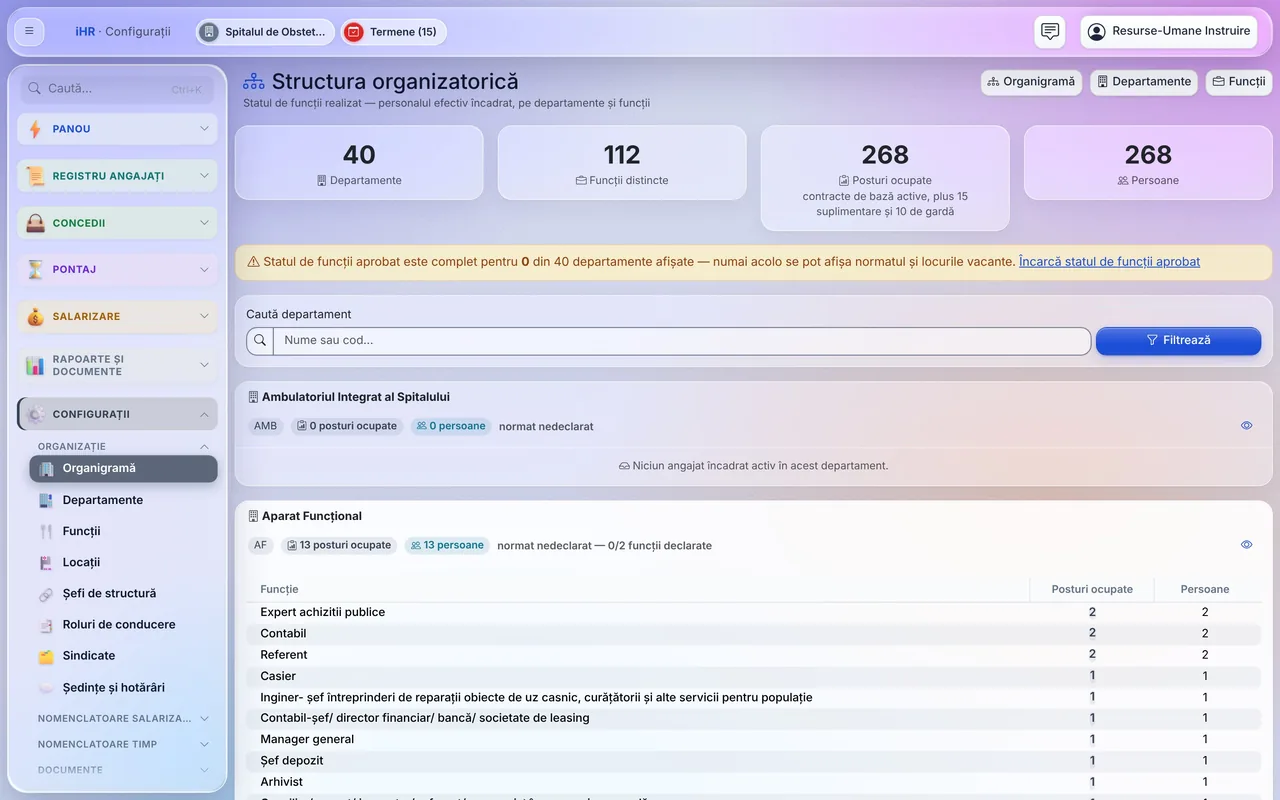
Organisational structure in iHR: departments, functions and posts
Salaries, from the signed attendance registerEach structure enters the calculation after signing its attendance register. The month is compared with the previous one before validation.
D112 passed through the ANAF validatorThe declaration is generated from the liquidation month. One with errors cannot be marked as submitted.
In production at Buftea and at SmeeniiHR runs at Buftea Obstetrics and Gynaecology Hospital since June 2026 and at Smeeni Chronic Diseases Hospital.

A new employee

What starts from the contract of a new employee

The HR office completes the contract on the official template. From it, the declaration for REGES is prepared, and the person appears on a new row in the department's attendance register. From the signed attendance register, the payroll is calculated, and from the liquidation month, D112 is generated.

The declaration for REGES is prepared from the contract, without being written again.

D112 passes through the ANAF validator before submission.

Report catalogue in iHR
The report catalogue in iHR: 148 reports in eight categories.

Who it is for

What iHR solves for personnel, payroll and management

The question everyone asks themselves and what they do in iHR to find the answer.

The head of the RUNOS service

Which documents are missing from the files and which deadlines come this month?

Each employee's file contains the contracts, addenda, job description, professional authorisations and training. The document register shows the mandatory documents that are missing. The HR calendar collects the deadlines from the files: suspensions, retirements, documents that expire.

Payroll economist

Do I have to enter the hours from the attendance register again in the payroll programme?

Salaries are calculated from the signed attendance register, by structure, as each one signs its attendance register. Before validating the month, you compare it with the previous one. From the liquidation month you generate D112 and pass it through the ANAF validator.

Finance and accounting director

Who calculated the salaries and who verified them?

The person who calculates the month cannot sign it. The month passes through CFP approval, your signature, payment confirmation and reconciliation with accounting. The variation of the salary fund shows what has changed compared to last month.

The manager of the institution

How many people am I missing compared to the staffing standard?

The personnel staffing standard, applied to the actual structure, shows the requirement by category. The staffing table is generated from the approved posts and their occupancy. The decisions you sign have previously passed through the approvals established by you.

The department head

Who works in which shift next month and who does the on-call duties?

The monthly schedule is generated from the standard programme, passes through review and approval and is copied into the attendance register. The on-call duties performed are entered in the on-call register, on the approved lines, next to the number of on-call duties owed by each doctor. Your people's leave requests reach you for approval.

Employee

Where do I see my payslip and how many days of leave do I still have?

In Self-Service Angajat, the application for employees that reads data from iHR. There you see the payslip and the monthly timesheet, the leave balance and submit the leave request. The certificate received has a QR code that leads to a verification page.

Modules

All modules, grouped by personnel and payroll work

Grouped by who uses them. Each person sees only what their role allows, and the department head sees only the people in their structure. On the public authority profile, on-call duties, staffing standards and health reporting do not appear.

The competition and hiring

HR office, competition committees

  • Personnel request The head of structure requests new personnel from the application. The request reaches the HR office.
  • Competition for the position The announcement with legal deadlines, candidates with unique identification code, file selection, committees, tests with scores, appeals and results, according to Government Decision no. 1.336/2022. The winner goes directly from the competition to employment.
  • The new person and the employment file The person is entered with the verified CNP. The application requests the employment documents, and the contract comes into force only when the file has all the documents.
  • Employment contract It is completed directly on the printed template, with preview and PDF, and is signed on paper or via FlexiDocs. In addition to the individual employment contract there are on-call contracts, management contracts, mandate contracts, collaboration contracts and internship contracts. A person can have multiple norms, with only one as the basic function.
  • Probation period and the mentor Confirmation of the probation period and the manager's decision by which the new employee receives a mentor.
  • Seniority The seniority of multiple employees is completed from a single page, and the salary grading results from it.

The employee's file and the contract over time

Personnel office

  • Personnel register Employees, collaborators, residents, volunteers and members of the board of directors, with filters and export. The «Without employee file» tab shows the persons for whom the contract has not yet been made.
  • Electronic file Personal data, family and dependants, IBAN accounts, contracts, job description, sanctions, leaves, timesheets and on-call duties, payroll, documents, approvals, trainings, equipment, residency and change history. The head of department sees a restricted version.
  • Addendum It is completed on the document template, with the preview calculated by the application. It goes through approval by a second person, then through signing and communication to the employee. Promotion and transfer are also done through an addendum.
  • Request for contract modification The employee or their manager requests the modification, and the request enters the HR office queue.
  • Suspensions and secondments The days, resumption and suspension decision. Secondment, with the unit to which the person goes.
  • Contract termination The dismissal decision or termination document first goes through approval. Then follows the clearance form, the handover report of assets, archiving the file and, if applicable, re-employment.
  • Collective dismissals Selection of contracts, consultation with the trade union, notifications to ITM and AJOFM with their deadlines, decisions printed in batch and the re-employment offer.
  • Disciplinary sanctions The decision, communication, appeal and revocation.
  • Collaborators For service provision contracts with companies, PFA or medical practices: the monthly estimate, confirmed, sent and rectified. If the hospital also has iPortal, the activity on the stamp comes from there.
  • Retirement The list of mandatory documents, submission of the file to the pension house, its requests for completion, with the deadline of 30 days, and the response received.
  • Residents The placements of resident doctors in departments and at host units, with interruptions in training.
  • Other records from the file The degree of disability or invalidity, kept separate as sensitive data. Trade union membership, access authorisations and equipment sizes.

The structure, posts and staffing table

The HR office, the manager

  • Organisation chart The structure tree, with export to Excel and PDF. The structures come from Hypen One, so they are the same in all applications.
  • Reorganisation The proposal to change the organisational chart is written and printed as PDF.
  • The structures and their heads The record of each structure, with its people, the designated head and who signs for it.
  • The positions and the job description The nomenclature of positions, with comparable versions, the COR code, professional grades and required competencies. The job description is printed as PDF and signed on paper or digitally.
  • The staffing table It is generated from the approved positions and their actual occupancy, including the on-call roster and summaries. The approved table can also be imported.
  • The personnel standard Applied to the actual structure, it calculates the personnel requirement by categories.
  • Job evaluation The criteria, the evaluation of each position and the hierarchy of positions.
  • Sensitive positions The annual inventory approved by the manager, with the occupants and the rotation plan.
  • Meetings, ethics and delegations The meetings of committees and councils, with participants and decisions. The ethics council, with cases, opinions and the report. Representation delegations.

The schedule, attendance register and on-call duties

Department heads, coordinating assistants, the HR office

  • The monthly schedule Who works on which day and in which shift. It is generated from the standard programme, then goes through handover, validation, approval and sign-off. It is signed on paper or via FlexiDocs and copied into the attendance register.
  • The attendance register The monthly grid by structure, with entry and exit time for each day worked. It is completed from the schedule, with the standard programme or from Excel. Overtime requires written instruction.
  • Approval of the register Handover, head validation, payroll verification and signing, electronically or on paper. Each step is done by a different person, and reopening the month is done with reason.
  • The on-call register The on-call duties performed, in four regimes: working day, rest or holiday, from home and call-out. It has calendar, approval and separate signing.
  • The on-call lines and standards The approved on-call lines by specialty and the number of on-calls due monthly from each doctor.
  • The on-call plan from iPortal If the hospital also uses iPortal, the on-call plan made there is validated, recorded and paid in iHR.
  • Shift swap The employee requests the swap from Self-Service, the colleague confirms, both sign, and the head applies it in iHR.
  • Business trips The travel register, with the travel order printed.
  • The working time reports The time sheets by structures, planned versus performed, compliance with rest and coverage of on-call lines.
  • Types of hours and public holidays Types of hours and statutory public holidays, with synchronisation.

Leave and medical certificates

The personnel office, payroll, section heads

  • The leave register Annual leave, unpaid leave, leave for events or studies, with calendar by structure, day estimation, standard form and the signed scanned request.
  • Leave approval The request is approved or rejected, with the substitute's consent recorded. Approved days are written automatically in the attendance register and deducted from the balance. Recall from leave has its own step.
  • Annual scheduling Section heads propose annual leave periods, and the personnel office approves the annual schedule.
  • Leave advance The leave allowance is calculated and paid before departure, then settled on the monthly payroll.
  • Sick leave certificate The certificate is transcribed from the form, with the diagnostic code selected from the list. The application estimates the allowance on the spot, with the insurance period, the part paid by the employer and the part from FNUASS. Chains of certificates and work accidents have their own rules.
  • Certificates coming from iPortal Certificates issued in iPortal arrive automatically in the register, without duplicates. Those issued outside the hospital are entered manually, because iHR does not receive them electronically from CNAS.
  • Recovery from FNUASS The monthly recovery file: documents generated and approved, submission to CAS, CAS decision, collection and closure. If you use iConta, the collection comes from there.
  • Calculation base Income from previous months from which the allowance is calculated, including that from other employers.
  • Leave reports Balances, summaries of annual and medical leave, medical leave sheets and the advance payroll.

Payroll calculation

Payroll economist

  • Payroll month The month opens, passes the pre-calculation checks and is calculated by structures, as each person signs the attendance register. Then it is compared with the previous month, validated and locked.
  • Framework Law grid 153/2017 The grid is kept by versions, with the entry into force date and the legal basis written at each change. The base salary results from the grid.
  • Allowances Each bonus has its decision, individual or collective, and the hours worked in special conditions. The rules are set by staff categories.
  • On-call duties for payment The hourly rate with the bonus according to the type of day, on-call from home and the monthly on-call allowance.
  • Parameters Contribution and tax rates, personal deductions, minimum wage and ceilings, kept by month.
  • Deductions and attachments Attachments on enforceable title have correspondence with the bailiff, including when there are several at once. Amounts paid incorrectly are turned into deductions.
  • Retroactive differences Differences from a normative act with retroactive effect are entered on the due month, with contributions recalculated.
  • Increases for multiple people They are loaded from a template and produce an addendum for each person, with approval, printing and handover list.
  • Simulations Trial calculations and the net-gross calculator, which do not affect the real month.
  • Food, holiday, incentives The food allowance, holiday vouchers and financial incentives, plus the declarations on own responsibility on which the payment of certain rights depends.
  • The bonus cap Each month, how much of the legal bonus cap has been used and each employee's share, plus the comparison with the bonuses from December 2025.
  • Funded projects The budget of each project, the percentages declared per person, the eligibility of expenses, the reimbursement requests and the payrolls by funding source.
  • The settings log Every change to a payroll parameter remains in the log, with export.

Month signing and payment

Payroll, the financial-accounting director

  • Who signs the month Whoever calculates cannot sign. The month goes through CFP approval, the signature of the financial-accounting director, archiving, payment confirmation and reconciliation with accounting.
  • Payroll You choose the columns, and the registration number is given at issue. Next to it are the liquidation statement, the summary and the variation of the salary fund compared to the previous month.
  • The payslips The template is configured. After signing the month, the payslips are printed and sent by email to everyone, and the code on the payslip is verified on a public page.
  • The bank list The transfer file for BCR, BRD, Treasury or on a generic template, numbered at issue. People without IBAN are marked.
  • Journal entry The accounting note, also by projects, with the budgetary articles. With iConta, the month is accounted for and reconciled there. Without iConta, the month is closed with the recording of the payment and the D112.

Declarations and reporting to the state

Payroll, the personnel office

  • D112 The ANAF file and the PDF are generated from the liquidation month and go through the ANAF validator. A declaration with errors cannot be marked as submitted. Submission is done from outside the application or from iConta, and the date from the receipt is recorded in iHR.
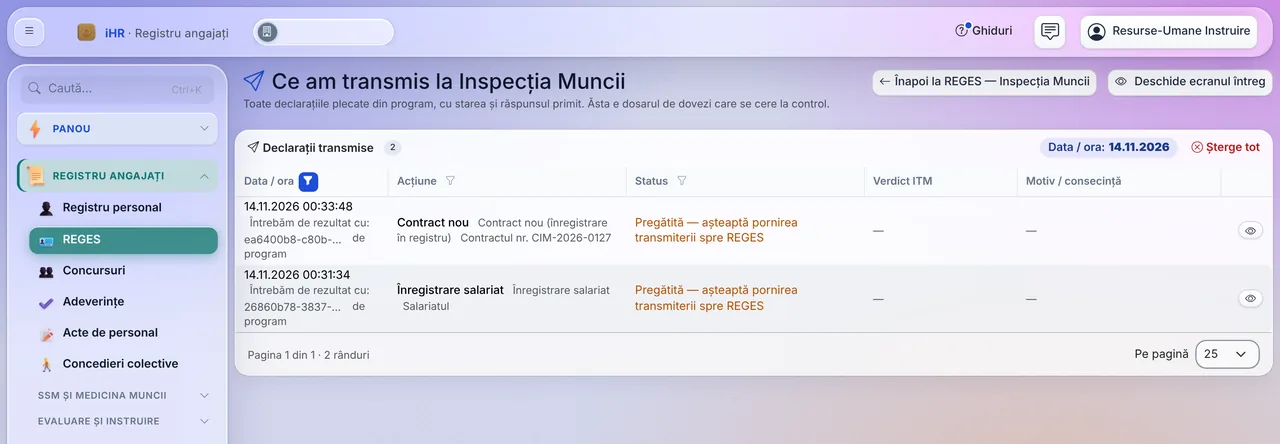
  • REGES-ONLINE The declarations for contract, addendum, suspension, secondment and termination are prepared automatically from the file and tracked on tabs: to do, to submit, sent, corrections, received. The direct link with REGES-ONLINE has so far only sent to the test register. The records are also exported in REVISAL format, marked unofficial, for the archive.
  • The INS statistics Monthly S1, S2, annual S3, quarterly LV and annual SAN for medical-sanitary staff, each issued with a registration number.
  • The sanitary reports The annual report to the DSP, the monthly reporting to the Ministry of Health and the quarterly annex with positions and expenses by sources.
  • Income transparency The list of incomes by positions, in PDF and in the FSSR file. If the hospital also has iPortal, the list is published on the site.
  • The annual income certificate The year's income for each employee.
  • The submissions register Which report was submitted, when, on which channel and with which number.

Certificates, documents and registry office

Personnel office

  • The certificates Number from the register, reprint under the same number, revocation and digital signature. The QR code leads to a public verification page. Templates for seniority, competition, professional grade, pension and medical leave.
  • Personnel documents Decisions, minutes, notices, training sheets and records sheets. Each printed document enters the archive.
  • The documents from the files The uploaded documents, with versions, approval, signing and expiry alert. The list also shows the mandatory documents that are missing.
  • Registry office The register of incoming and outgoing documents, with the drafted addresses, the dispatch and the handover list.
  • The unit's regulations The internal regulation, the ROF and the procedures are drafted and presented for signing. Employees confirm that they have read them, also from Self-Service.
  • The unit's archive The archival nomenclature and the archival units by years.
  • Approvals For each type of document you set who approves it and in what order. An unapproved document is not issued.
  • Templates and numbers Document templates with versions and validity periods, plus series and number registers.
  • Documents to sign Each signatory has their list of documents. Signing is done in FlexiDocs.
  • Third-party access to data Requests for access to an employee's data, coming from third parties or relatives, decided by the manager and released by the personnel office.

Evaluation, training and career

Personnel office, section heads

  • Annual evaluation Objectives at the beginning of the year, evaluation, countersignature, acknowledgement, appeal and the PDF form. The employee does their self-evaluation from Self-Service.
  • Promotion exam The statement and the exam for promotion in grade or step.
  • Competences The catalogue of competences, their validation and renewal, the matrix by structures and the analysis of gaps.
  • Succession Talent pool, the 9-box matrix, successors for key positions and the risk of departure.
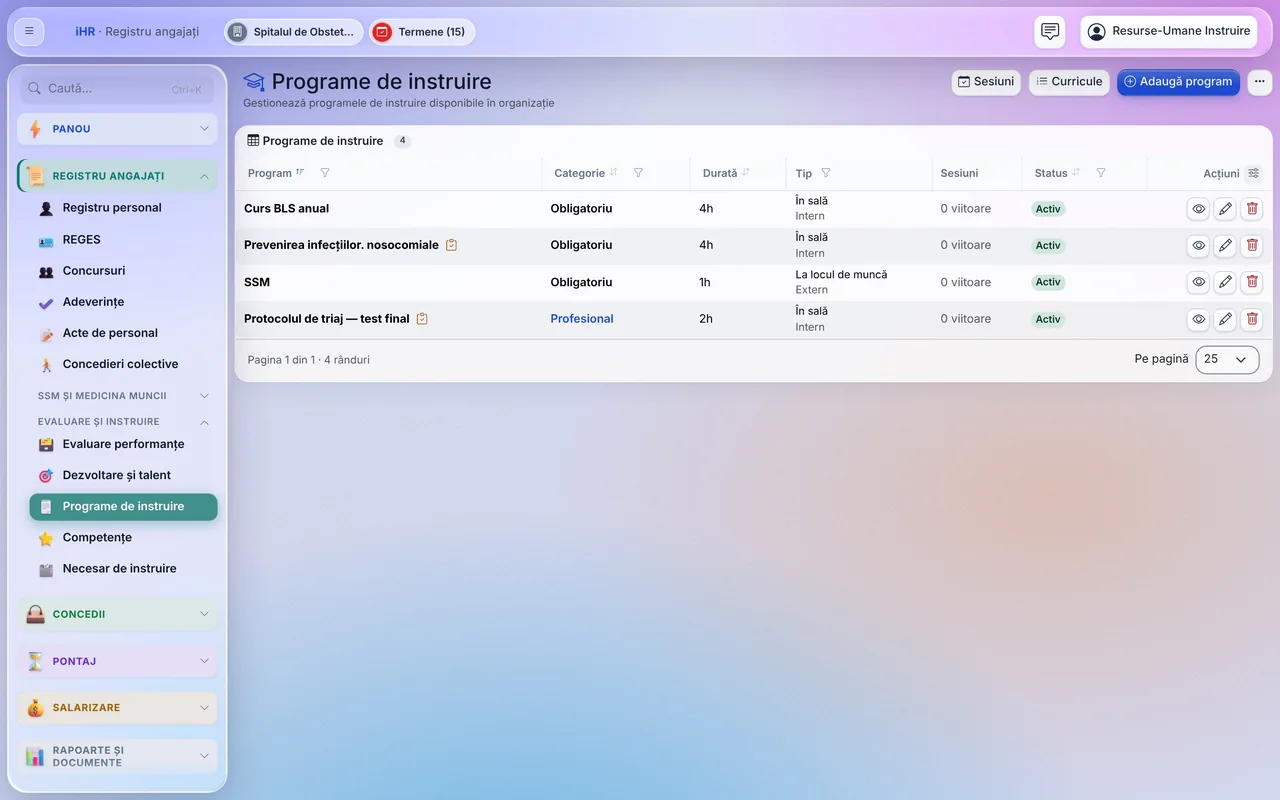
  • Training Programmes, sessions with registrations, attendance taken also from the phone, tests and certificates with QR code. The panel shows compliance and is exported for DSP.
  • CME credits and authorisations The continuing medical education credits of each doctor, with the supporting document. The authorisations and professional licences, with the visa and expiry alert.
  • Training plan The requirements collected from structures and the annual training plan.
  • Satisfaction survey Employees respond anonymously from Self-Service. The office sees only aggregated figures and the annual report.

Occupational safety and health

The OSH officer, the personnel office

  • Occupational medicine Providers, job-specific risk factors, examinations, the risk exposure sheet, the fitness sheet and referrals for examination for several people at once.
  • Work accidents Event registers, the investigation report, the FIAM sheet and the event file.
  • OSH records The annual programme, inspections with their measures, briefings, hot work permits and positions with psychological approval.
  • Protective equipment The equipment due for each position and the handovers, with minutes.
  • Emergency situations Exercises, evacuation plans, civil protection and intervention teams.
  • Environment Environmental authorisations and waste handovers.

Employee requests

Employees, through Employee Self-Service, and those who respond to them

  • Self-Service Employee The separate application in which the employee sees their data, contracts, payslips in PDF, leave balance and monthly timesheet, which they confirm or request corrections for. There they also make requests, change shifts, do their self-evaluation and respond to surveys. Data comes from iHR.
  • Requests to process The personnel office queue: approval, rejection, request for information, processing the resignation and the downloadable response.
  • The manager's approvals The manager sees his people's requests and approves them from the same list.

Dashboards, reports and data quality

The manager, the personnel office, payroll

  • The start panel The personnel office and the department head have different pages, with what awaits resolution, deadlines and alerts.
  • Management indicators Personnel indicators for the manager.
  • The reports catalogue 148 reports in eight categories, with filters and export to Excel, PDF or Word.
  • Your reports The office builds a new report without a programmer. Sensitive data require a separate right.
  • The deadlines calendar Deadlines collected from files: suspensions, retirements, documents that expire.
  • Data quality Checks that find the gaps: contracts without funding source, people without bank account, undeclared terminations, bonuses without document. Part of them are fixed directly from the list.

Administration

The application administrator, the data protection officer

  • The institution profile Hospital or public authority. From the profile the on-call duties, norms, health reports and healthcare bonuses are started or stopped.
  • Settings and approval levels Active modules, signatures on reports and approval levels.
  • Roles and rights The menu shows each person only what they can open. The administrator sees the application as a role sees it, to check the rights.
  • Data protection Deletion requests, with the retention report, and the log of report downloads.
  • Links to other applications Hypen One for the single account and structures, iPortal for on-call duties and medical certificates, iConta for salary accounting, FlexiDocs for signing. A panel shows the status of each link.
  • API REST API with token, for persons, timekeeping and salary months, documented in the application.
  • Guides and language Step-by-step guides on screens, according to each person's role. The interface is in Romanian and in English.

A working day

An ordinary day in a hospital that works in iHR

The times are indicative. Each step below is an action that people take in the application.

  1. 08:00

    The start panel

    The personnel inspector opens the start panel and sees what awaits resolution: employee requests, upcoming deadlines and alerts.

  2. 08:30

    Leave

    The department head approves the leave requests of his people, with the substitute agreement recorded. The approved days appear by themselves in the attendance register.

  3. 09:30

    A medical certificate

    The inspector transcribes a medical leave certificate brought by an employee. The application shows on the spot the estimated allowance, with the part paid by the hospital and the part from FNUASS.

  4. 10:30

    The competition

    The office enters the written test scores on the candidates' codes. The winner passes from the competition directly to employment.

  5. 11:30

    Hiring

    The inspector completes the contract of a new employee on the official template. The contract comes into force only when the employment file has all the documents.

  6. 13:00

    Next month's schedule

    The coordinating assistant generates the department's schedule from the standard programme and submits it for endorsement and approval.

  7. 14:30

    A certificate

    The office issues a length of service certificate with registry number and QR code, digitally signed.

  8. 15:30

    Data quality

    The economist opens the data quality checks and sees the people without a bank account and the bonuses without a document, before the month's calculation.

  9. At the end of the month

    Payroll

    The sections sign the register. The economist calculates the salaries of the signed structures, compares the month with the previous one and sends it for CFP approval. The financial-accounting director signs, and the payslips go out by email.

  10. On pay day

    Payment and D112

    The economist issues the payroll list for the bank or Treasury, generates D112 and runs it through the ANAF validator.

Salaries

Each employee's payslip

The base salary results from the framework grid of Law no. 153/2017, kept on versions with the entry-into-force date. Each bonus has its own decision, and attachments correspond to the bailiff. The code printed on the payslip is verified on a public page, and the employee sees their payslip in Self-Service.

Payslip of a test employee in iHR (names masked)

The attendance register

The signed register goes straight into payroll

The head of section completes the register with the entry and exit time, from the schedule, from the standard programme or from Excel. The month passes through their validation, through the payroll check and through signing, each step performed by a different person. Salaries are calculated only on a signed register.

Collective timesheet of a test department in iHR, signed and imported into payroll

Training

Training sessions, with attendance taken from the phone

You organise programmes and sessions with registrations. Participants confirm attendance from the phone, with signature and location, and the certificates have a verifiable QR code. The EMC credits of the doctors sit next to the supporting document, and the professional authorisations have an expiry alert.

Training programmes in iHR

REGES-ONLINE

REGES declarations are prepared from the file

The contract, the addendum, the suspension, the secondment and the termination automatically produce the declaration for the employees' register. The screen keeps them on tabs: to do, to submit, sent, corrections and received, with refusals and resubmissions. The direct link with REGES-ONLINE has so far sent only to the test register. For the live register, the institution's key is first tested with sending disabled.

REGES declarations of a test employment in iHR, prepared for submission

Employment contracts

The contract, completed on the official template

The contract is written directly on the printed template, with preview and PDF, and is signed on paper or via FlexiDocs. A doctor may have, in addition to the base post, an on-call contract. Only one of the posts is marked as the base function. The addendum passes through approval by a second person before signing.

Employment contract of a test employee in iHR (names masked)

Legal obligations

What the law requires and where you do it in iHR

The obligations of a public employer towards employees and towards the state, with the place in the application where you fulfil them.

Record of hours worked
The Labour Code (art. 119) requires a daily record of hours worked by each employee, with the start and end time of the shift. In the iHR register, each day worked is recorded with the entry time and the exit time, and the register is signed each month.
Holiday planning
The Labour Code (art. 148) requires holiday planning by the end of the year, for the following year. In iHR, heads of section propose the periods, and the HR office approves the annual plan.
The bonus cap
Framework Law no. 153/2017 (art. 25 para. 2) limits, in healthcare units, the total of bonuses, premiums and allowances to 30% of the total base salaries, for each main credit authoriser. iHR shows each month how much of the cap has been used and each employee's share. The report is informative and does not change salaries.
Bonuses in 2026
Law no. 141/2025 (art. XVII) maintains in 2026 the bonuses, allowances and premiums at most at the December 2025 level, for the same post and the same conditions. iHR compares each bonus of each employee with the December 2025 amount and exports the list to Excel or PDF.
Income transparency
Framework Law no. 153/2017 (art. 33) requires public institutions to publish, on 31 March and on 30 September, the list of functions with base salary, bonuses and other entitlements. iHR exports the list to PDF and to the FSSR file. If the hospital also has iPortal, it publishes it on the hospital website.
Competition and evaluation
The framework regulation approved by Government Decision no. 1.336/2022 establishes the competition for contractual posts in the public sector, promotion and annual evaluation. In iHR, the competition has the notice, the candidates with unique identification code, the panels, the tests with scores and the appeals. Promotion and evaluation have their own workflows.
How to start

First steps to working in iHR

  1. Try it

    The «Try it now» button opens an instance with test data, on the role you choose, for example human resources, accountant or manager. Access lasts 7 days.

  2. Request a quote

    Hospitals and public institutions buy through SEAP, based on our quote. The quote arrives by email within two working days at most.

  3. Bring in the data

    DataForge copies the data from the old programme into a separate database and compares them table by table. The approved staffing structure can be imported, and the register can also be loaded from Excel.

How to buy

Purchasing through SEAP, by size of institution

Hospitals and public institutions buy iHR through SEAP. We send you the quote and annexes, with the price appropriate to the size of your institution.

  1. You request a quote
  2. You receive the quote and the annexes
  3. The institution buys through SEAP
  4. We start the installation

A 30-minute presentation with the team

We show you the workflows you care about, online or on site, and answer your questions. We write back within one working day to set the time. If you want to see the applications right now, try them on test data, free and without a card.