OmniGest ERP, invoicing and accounting for companies

From invoice to VAT return

The operator issues the invoice, and OmniGest sends it to e-Factura and tracks its status with ANAF. The accountant finds the suppliers' invoices downloaded from SPV, with a suggested account on each line. The owner sees what is to be collected, by the age of the receivables.

From 149 lei per month, excl. VAT.

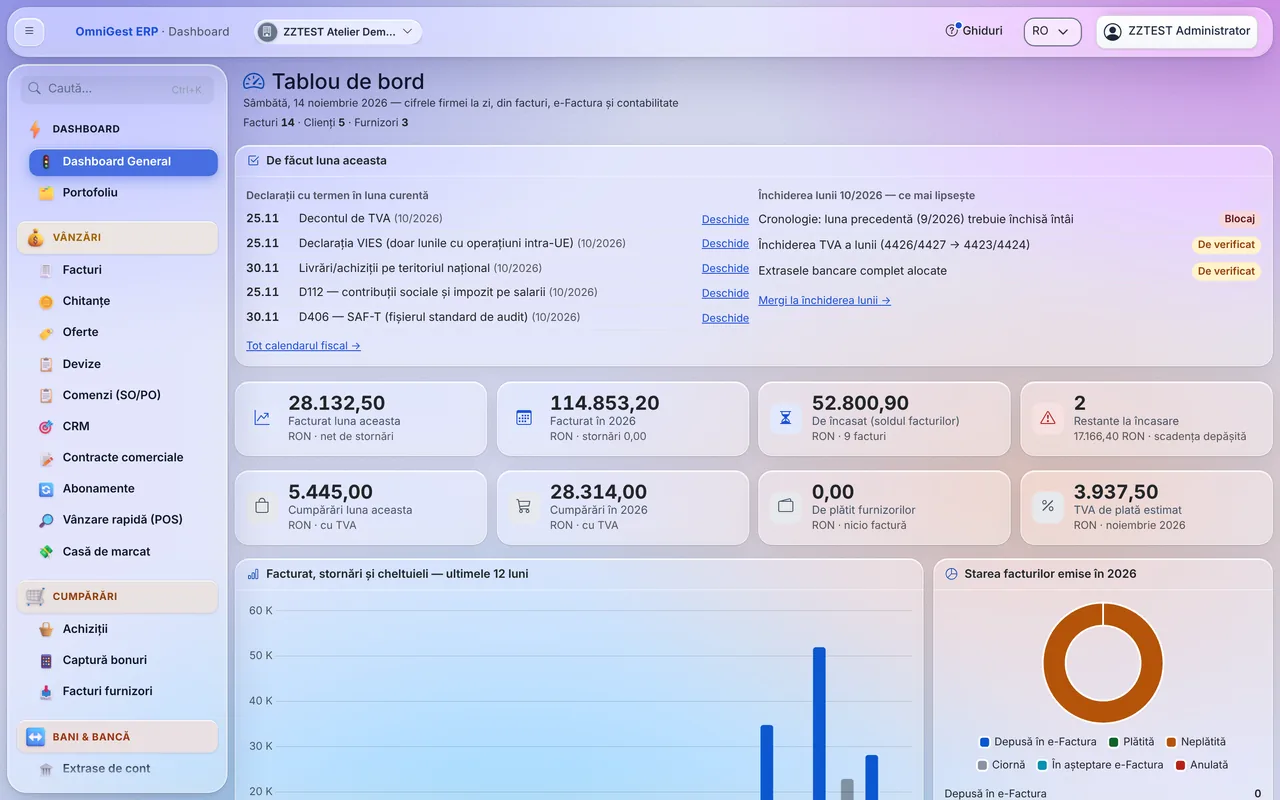
OmniGest ERP: the dashboard of a test company
e-Factura sent and receivedThe issued invoices go to ANAF once, and the received ones download themselves from SPV, with the PDF provided by ANAF.
Multiple companies in the same accountThe accounting firm sees all companies, with the month's deadlines, and enters each with one click.
Declarations verified with the ANAF validatorD300, D390, D394 and D406 go through the official schema and the ANAF validator, run on the server, before you submit them.

From invoice to declaration

Where an invoice goes after you issue it

You issue the invoice once. OmniGest sends it to ANAF and, if the company has started automatic accounting, it makes the accounting entry. From the entries, the VAT journal and the D300 return are made.

The invoice goes to ANAF immediately or in the day's queue, at the time chosen by the company.

The D300 return is generated from the VAT journals, which come from the accounting entries.

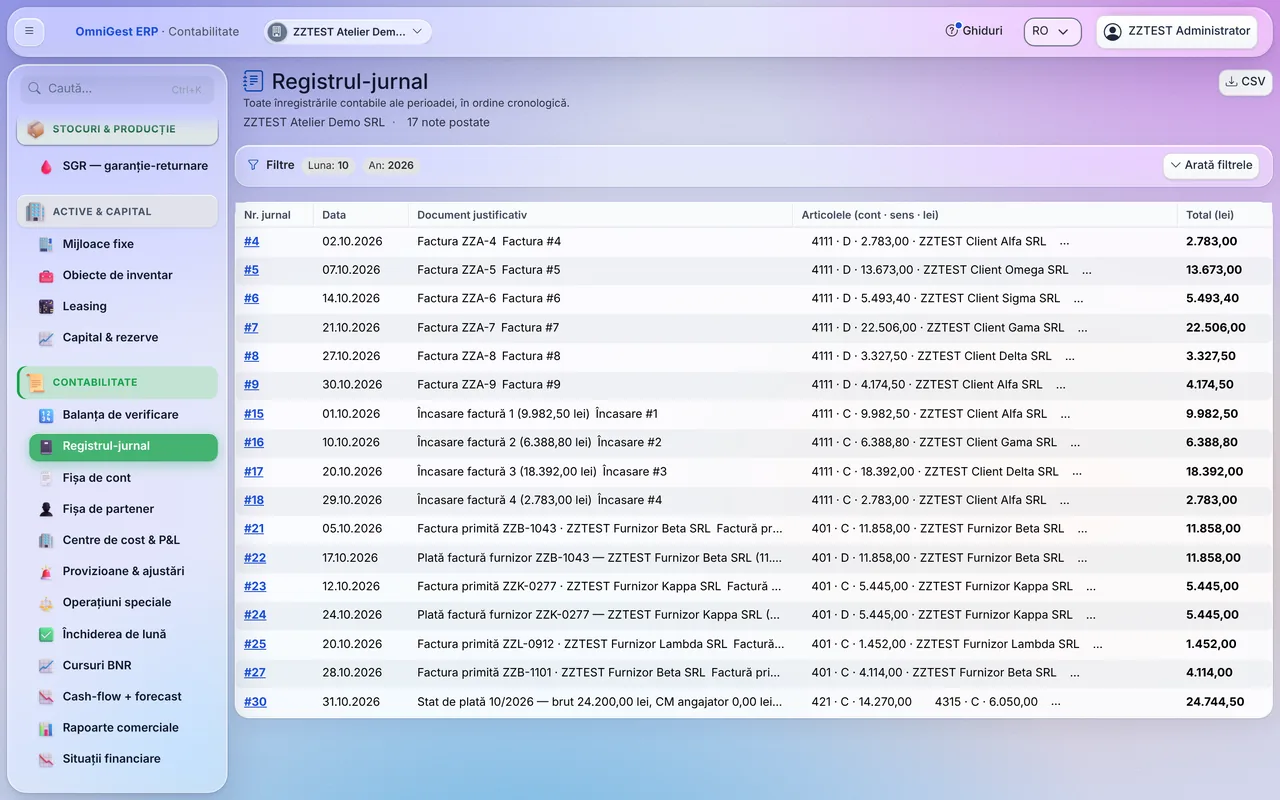
The journal register in OmniGest ERP, with the accounting entries of the issued invoices
Journal register, with the accounting entries of the issued invoices, on test data.

Who it is for

What OmniGest solves for each person in the company

The question each person asks and what they do in OmniGest to find the answer.

Business owner

How much do I have to collect and what taxes are due this month?

The dashboard shows the year's revenues, outstanding receivables by age and debts to suppliers. Up-to-date tax obligations estimate how much you have to pay if you close the month today, and the cash flow makes a forecast for 90 days.

Invoicing operator

Which invoices has ANAF rejected and why?

Each invoice shows its status in e-Factura, with the messages received from ANAF. The status checks itself, and on up to 100 ticked invoices you issue, send or reverse at once and see the result for each.

Accountant

Which supplier invoices have I not accounted for yet?

The received invoices download themselves from SPV every two hours. The “unposted only” list shows the remaining ones, with the lines read from the XML and a suggested account on each line, which you confirm or change.

Accounting firm

What deadlines do I have this month, for each company?

The portfolio shows all companies, each with the month's deadlines and its alerts, and you enter each with one click. Each company has its fiscal profile, and old periods are calculated on the regime of that time.

Payroll office

Have the approved leaves entered the timesheet?

Leave requests sent by employees from Self-Service arrive in OmniGest, and the approved days enter the timesheet themselves. The payroll leaves from the validated timesheet, and the medical leave allowance is calculated on save.

Storekeeper

What do I have in stock in each warehouse and what comes out first?

Stock is seen by warehouse and by item, with batches and expiry dates. Each warehouse has its method: average cost, FIFO, FEFO or LIFO. The NIR, consumption note, transfer and inventory make their own accounting entry.

Modules

All modules, grouped by the company's work

Grouped by who uses them. Each person sees only the screens and actions allowed by their role.

Invoicing

The billing operator and sales

  • List of invoices On each invoice: the document status, the status in e-Factura, the payment status and the balance. You filter by any column, with combined conditions, and send someone else the link with the filter.
  • Draft and issuance The invoice stays as draft until you check it. On issuance it receives the next number in the series, without gaps, and if the company has chosen, the accounting entry is made at the same time.
  • Advance and delivery note The advance invoice is reversed on the final invoice, with reference to it, and the VAT of the advance is closed only once. The delivery note does not enter e-Factura and is then invoiced with one click.
  • Reversal In full or in part, for example the part refunded from a subscription. The reversal starts as a draft, on the same series and with the same VAT regime.
  • Invoices in foreign currency The invoice takes the BNR rate from its date and shows the VAT in lei. The rates are taken automatically from BNR every day. Without a rate, issuance stops with an explanation.
  • Periodic invoices Subscriptions issue their invoices themselves in the morning, without duplicates, recover skipped months and index the price once a year. In “confirmation” mode they wait for your approval.
  • On multiple invoices at once You tick up to 100 invoices and issue them, send them to e-Factura, mark them as paid or reverse them. See the result for each.
  • The PDF and the email The invoice goes by email with CC, reply address, message and attachments. An old invoice is duplicated, so you do not write the lines again.
  • Quotes, proformas, orders, contracts Quotes and proformas are downloaded in PDF. Sales and purchase orders have approval, partial delivery with remainder to deliver and invoicing from the order. Commercial contracts keep their linked documents.
  • Series, VAT rates, receipts Series of invoices and receipts, each with the currency and the next number, for each company. Receipts are issued on their series.
  • Late payment penalties They are calculated on overdue invoices and invoiced.
  • Invoices from Excel and from the online shop Invoices from an Excel file are checked before they enter. New orders from WooCommerce become invoices once an hour, without duplicates.

e-Factura and SPV

The billing operator and the accountant

  • Connection to ANAF The company is authorised only once, and the authorisation renews itself at night, before it expires. The administrator chooses the test environment or the real one.
  • Verification before sending The invoice goes through the e-Factura rules and the ANAF validation service, without being sent.
  • Sending Immediately or in the day's queue, which leaves at the time chosen by the company. The same invoice does not leave twice, and clients outside Romania do not enter e-Factura.
  • Status at ANAF In processing, accepted, rejected or with error, with message history. The status checks itself every 5 minutes in the first hours, then less often, or on demand. The ANAF response is downloaded.
  • Received invoices They download themselves every two hours, with the PDF provided by ANAF. You see them for the last 7, 30 or 60 days, you move them to purchases with one click and mark them paid.
  • e-Factura register All company messages, sent and received, with amounts and names, filterable and exportable.
  • Messages and documents from SPV This part requires a SignDesk station that keeps the company's qualified certificate on token. With it, OmniGest brings the messages from SPV and treasury statements. Through it, it also requests from ANAF the role sheet, fiscal vector, status of obligations and copies of submitted declarations.
  • Daily alerts Every morning, the company's tax deadlines and issues found by checks, by email and in the browser.

Supplier invoices

Accountant

  • Invoices to post Invoices received via e-Factura, with the “unposted only” filter and a suggested account for each.
  • Lines read from XML The supplier links itself, and each line receives a suggested account, which you confirm or change.
  • Accounting One invoice, a re-accounting after correction or all at once, on one account and one deduction percentage.
  • Invoices without e-Factura Suppliers that do not send via e-Factura and expenses paid cash or with an employee's card are entered manually.
  • Payment to supplier Payment of the received invoice, in full or in part.
  • Protocol over the limit The protocol limit overruns from the month are added up, and VAT is collected via self-invoice, on the last working day.
  • Purchases register The company's purchases, with their status and Excel export.

Partners and sales

Sales, the owner, the accountant

  • A single partners register Clients and suppliers stay in the same register, and a deactivated partner keeps its history. The address is completed with suggestions from the maps service.
  • Data from ANAF by CUI You write the CUI and receive the name, address, number from the Trade Register and VAT status. The data completes only the empty fields.
  • VIES verification A partner's VAT code from the EU is verified in VIES, and the consultation number remains on the partner.
  • Renamed company It becomes a new partner with the same CUI, and old invoices remain under the old name.
  • Offers by stages Draft, sent, negotiation, won or lost with reason. The won offer becomes a sales order, with its lines.
  • Activities and the partner's card Calls, emails and meetings, with the list “what I have today”. The partner's card gathers its balances, due dates, invoices, offers and orders.
  • Balance confirmation Turnover and balance with a partner, with export and the balance confirmation letter in PDF.
  • Client in insolvency The receivable moves to 4118, VAT is adjusted or reversed, and in case of bankruptcy the client is removed from the records. Assignment of the receivable can also be done.

Bank, cash and payments

The accountant and the cashier

  • Bank statements They are loaded in MT940 or CSV format, from BT, BCR, ING or BRD. The same file does not enter twice, and the balances must close.
  • Lines classified by rules The rules place the lines on accounts by themselves, and above a sum threshold they only propose them. A line classified by hand becomes a template for the following lines.
  • Receipts Partial, on multiple invoices of the client, first on the oldest ones, or moved to another invoice. The payment status of the invoices is reconciled daily with the actual balance.
  • Due-date schedule Unpaid invoices by delay intervals, with link to the document.
  • Cash book On each cash desk, with collection and payment orders. Above the legal cash ceiling, the order is not saved until you confirm it. Treasury advances have their own settlement.
  • Business trips The per diem is calculated with the non-taxable ceiling, the advance is linked to the cash, and the settlement on multiple lines creates its own note.
  • Compensations The application finds partners with balances in both directions and creates the minutes. Above the legal threshold it asks for the compensation order number.
  • Cheques, promissory notes, guarantees Maturity schedule of commercial effects, with alerts before maturity, and performance guarantees, with their deadlines.
  • Online payments Collections via Netopia, Stripe, PayU and euplatesc: gross, commission and net, allocated to the client's invoices.
  • Payment order to the Treasury A single order with multiple payments, in standardised PDF and as OPME ready to be submitted in SPV. Signing it requires the SignDesk station with the certificate on token.
  • Payment file The net salaries of the month or payments to the selected suppliers, in a CSV file for internet banking, with IBAN, name, CIF or CNP and amount.
  • Z reports of cash registers They are imported from the cash register's XML file or entered by hand. Each Z report creates the day's note, with cash, card and VAT.

Accounting

Accountant

  • Chart of accounts It starts with one click from the general plan. You add analytical accounts and deactivate the accounts you do not use.
  • Journal entries The issued invoice creates its own note, if the company has chosen so. The manual note passes only balanced and only in an open month. An incorrect note is reversed.
  • Trial balance, journal register, general ledger On any period, with export. From the trial balance you reach the note and the document it comes from.
  • VAT on collection VAT becomes due proportionally with each collection, and on purchases, on payment.
  • Currency at the end of the month Receivables and payables in foreign currency are revalued at the BNR rate, and the note reverses itself the following month.
  • Advances, provisions, special operations Amounts paid or collected in advance are allocated over months. For receivables older than 270 days the application proposes adjustments. Subsidies, invoices not received and goods in custody have their own flow.
  • Capital and partners Payment, increase and reduction of capital, proposed legal reserve, dividends with withheld tax, loans from partners and the record of each partner.
  • Leasing Financial or operational, with the maturity schedule of instalments and the note of each instalment.
  • Cost centres Income and expenses for each cost centre or subunit.
  • Sole traders and NGOs For sole traders, the cash receipts and payments register is generated automatically from the cash and bank. An NGO receives the NGO chart of accounts and the annual reporting, with the result by activities.
  • Fiscal profile, with history VAT payer or not, micro or profit, monthly or quarterly. The regime changes from a date, and the old months are calculated on the regime at the time.
  • Statutory parameters Rates and thresholds have their normative act and period. A new value opens a new period and leaves the past untouched.

Month-end closing, reports and control

Chief accountant, owner, auditor

  • Month-end closing First the checklist, with blocking items separated from warnings. After closing, nothing else enters the respective month. Reopening requires special rights and a written reason, which remains in the history.
  • VAT and year-end closings VAT regularisation, closing of revenue and expense accounts and closing of the financial year. Errors from previous years are corrected through a guided flow, with mandatory explanation.
  • Integrity checks Each problem found comes with its proof and the link “Fix here”.
  • Archive and control file Archive by company and year, with declarations in XML, the signed PDF and the receipt, plus contracts, personnel files and statements. A month’s file is downloaded with one click.
  • Dashboard Year’s revenues, receivables to collect and overdue ones, payables to suppliers, from the same figures as the ageing report.
  • Current obligations and cash flow How much the company would have to pay if it closed the month today and a forecast of receipts and payments for 90 days. Both are marked as estimates.
  • Reports Sales and purchases by partner, month, series and item, profitability with cost from stock, top customers and suppliers. VAT, profit and tax reports, by quarter. From each figure you reach the documents.
  • Search by amount You find a transaction by the exact amount or by text, in all the company’s documents.

Declarations and taxes

Accountant

  • D300, D390, D394 They are generated from the VAT journals, on the period model, monthly or quarterly. Each goes through the official schema and the ANAF validator (DUKIntegrator), run on the server, and has the official PDF. You submit it yourself, in SPV.
  • Rectifications D390 and D394 regenerated for a submitted period become rectifications, and the original remains. For D300, the correction enters the current return. The screen shows the documents that affect periods already declared.
  • Comparison with the pre-filled return You upload the pre-filled return downloaded from SPV, and the application shows the differences from your return, on each line.
  • Submission and receipt The valid declaration is marked as submitted, and the receipt is linked to it. You enter the receipt manually or, with the SignDesk station, it is searched automatically in SPV.
  • Profit tax and micro-enterprise income tax Quarterly calculation, fiscal records register and carried-forward losses. For micro, the application warns you as the company approaches the threshold. D100 comes out as validated XML, with the official PDF, and for dividend tax.
  • SAF-T (D406) Monthly D406, from accounting, partners, items, invoices and payments, with checks beforehand and with the official validator. Annual D406 for assets and D406 on request for stocks are not generated.
  • Annual financial statements Abbreviated balance sheet and profit and loss account for small entities (form S1003), from the trial balance, checked with the official validator. The form for micro-entities (S1005) is not in the application.
  • Data for other declarations For D205, D107 and Intrastat the application prepares CSV files, and for Intrastat it also tracks the INS thresholds. For D101 and D212 it calculates the figures to enter in the form.
  • VAT with pro-rata Setting and regularising the pro-rata, adjustment for capital goods, change of VAT regime and the sponsorships register.
  • Fiscal calendar Deadlines of the declarations, according to the company’s regime.
  • PDF signing The official PDF of any declaration is signed electronically via the SignDesk station, with the qualified certificate on the token.

Salaries and personnel

Personnel and payroll office

  • Personnel file Contracts, addenda with salary or standard from a date, dependants and garnishments. Data that violates the Labour Code is not saved.
  • Employee documents The contract, addendum, employee certificate, termination decision and liquidation note, in PDF.
  • Monthly timesheet The grid of days, with the time interval and night hours. The validated timesheet can only be changed by reopening.
  • Leave Sick leave allowance is calculated on save: base over 6 months, percentage by code, employer’s share and FNUASS share. Annual leave is visible on each contract.
  • Payroll Monthly payroll per employee, accounting note for salaries in one click, payslips in PDF and the request to recover medical leaves from FNUASS. Meal vouchers and benefits are included in the calculation.
  • Gross-net calculator You simulate a salary on the period’s rates, with the basis for each.
  • D112 For income from January to June 2026: D112 from validated timesheets, verified with the official validator, with the official PDF and corrections. For months from July 2026, the new form is in preparation.
  • Employee requests With Employee Self-Service, leave requests, timesheet corrections and employee certificate requests arrive here. Approved leave days enter the timesheet automatically.

Stocks and production

The storekeeper and the accountant

  • Warehouses Each warehouse has its own valuation method: average cost, FIFO, FEFO or LIFO.
  • Stocks Balances by warehouse and item, recent movements, batches and expiry dates.
  • Stock documents Goods receipt note, consumption note, transfer between warehouses and inventory. Each is applied together with its accounting note.
  • Retail goods receipt note Receipt in the shop at selling price, with the markup and non-due VAT calculated.
  • Stocktaking Sessions by warehouse, with book and physical lists. On completion, differences are accounted for and appear in the minutes.
  • Production Product recipes and production orders: components are consumed, and the finished product enters stock at cost.
  • SGR packaging Register of packaging in the deposit-return system and balances to be refunded or recovered, with their note.
  • Items Item and service catalogue, with unit of measure and suggested accounts.
  • Warehouse report Daily warehouse report.
  • Quick sale The cashier selects items, and the receipt depletes stock and creates the collection note. The receipt is internal, for printing.

Fixed assets and inventory items

The accountant and the storekeeper

  • Fixed assets register The useful life is verified against the official catalogue, and the card of each fixed asset retains its history.
  • Monthly depreciation Straight-line, reducing balance or accelerated, with the methods permitted for each group, for all fixed assets at once.
  • Revaluation and modernisation Changing the duration, revaluation and modernisation recalculate the depreciation from now on. Past months remain as they were.
  • Disposals Scrapping and sale, with their notes.
  • Work in progress Work in progress and its commissioning as fixed assets.
  • Low-value inventory items Acquisition, commissioning, off-balance sheet recording and derecognition, with printable inventory labels.

Imports, exports and API

The accountant, the administrator, the company's programmer

  • Import from SAGA You upload the company's archive from SAGA C and see what has been recognised. You choose what to bring in: analytical accounts, partners, items, opening balances. An unbalanced trial balance stops the import.
  • Import from CSV or Excel The same data, from files on downloadable templates, with headers in Romanian.
  • Exports Invoices, receipts, partners, purchases and e-Factura messages in Excel. Invoices and customers also in SAGA format.
  • All company data An archive with all the company's data or with the invoices from an interval, prepared in the background and downloaded when ready.
  • The company's API Partners, invoices with their PDF, issuance and reversal, plus the payment schedule, via a documented OpenAPI REST API. A repeated request with the same reference does not create a new invoice. Each key sees only its company and has its rights.

Companies, users and rights

The administrator and the accounting firm

  • Multiple companies The client's companies stay in the same installation. You switch from one to another from the sidebar and see only the companies you have access to.
  • The firm's portfolio All companies, each with its monthly deadlines and alerts. You enter a company with one click.
  • Starting a new company The «Start the company» guide has six steps, each with its real status and the link to its screen.
  • Menu by company type You hide the groups that do not concern you, for example stocks at a service company.
  • Roles Rights on each screen and action, with ready-made profiles: administrator, chief accountant, accountant, economist, cashier, storekeeper, procurement officer, internal auditor with read-only rights.
  • History of changes Who changed what and when, with search and filters by date, plus the application's technical log, for the administrator.
  • Logging into the application Attempt limit, forgotten password and login from the Hypen portal without another password.
  • Language and guides The interface in Romanian or in English. The interactive guides show step by step where to click, without saving anything.
  • Official nomenclatures CPV, the combined nomenclature, SAF-T units of measure, counties and currencies are searched from any field.

In preparation: D112 on the model of the form valid from July 2026, transmission to REGES-ONLINE in the live environment and the link of quick sales with the fiscal cash register. We announce them here when they can be used.

A working day

An ordinary day in a company that works in OmniGest

The times are indicative. Each step below is an action that the company’s people take in the application or that the application takes on its own.

  1. 06:30

    Periodic invoices

    Subscriptions issue their own monthly invoices. Those set to «confirmation» await the operator's approval.

  2. 07:30

    Day's alerts

    The accountant and the owner receive by email and in the browser the upcoming tax deadlines and the issues found by checks.

  3. 08:00

    e-Factura

    Invoices queued yesterday are sent to ANAF at the time chosen by the company. The status of each is checked automatically in the following minutes.

  4. 09:30

    Supplier invoices

    The accountant opens the “only unposted” list. Received invoices are already downloaded from SPV, with lines read and an account suggested for each.

  5. 11:00

    Bank statement

    The accountant uploads the statement. The rules assign the lines to accounts, and receipts are linked to customer invoices.

  6. 14:00

    Goods receipt

    The storekeeper creates the NIR for the arrived goods. Stock increases per batch, and the accounting entry is made together with the document.

  7. 16:00

    Daily invoicing

    The operator issues the invoices, checks them against the e-Factura rules and sends them immediately or leaves them in tomorrow’s queue.

  8. 17:00

    Business owner

    Open the dashboard: year-to-date revenue, overdue receivables by age and payables to suppliers.

  9. At month end

    Closing

    The accountant goes through the checklist and closes the month. Generates D300 and D406, checks them with the ANAF validator and submits them in SPV, and the receipt remains linked to the declaration.

e-Factura

Invoice, tracked at ANAF

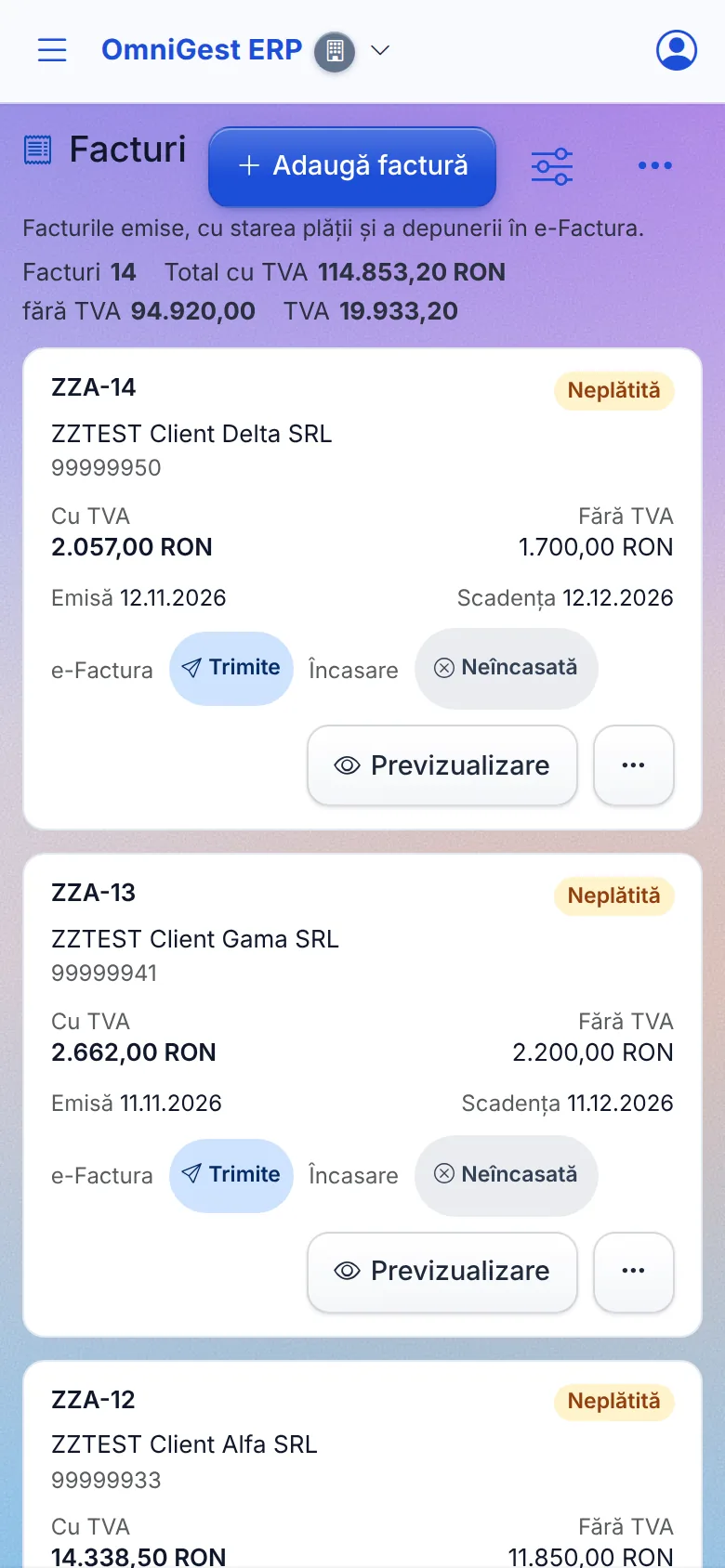
Invoices in the queue are sent to ANAF once a day, at the time chosen by the company, or immediately, on request. The same invoice is not sent twice. The status is checked automatically, and a rejected invoice keeps the messages received from ANAF.

The invoices issued in OmniGest ERP, on the phone, with the status of each in e-Factura

Accounting

Accounting entry from the invoice

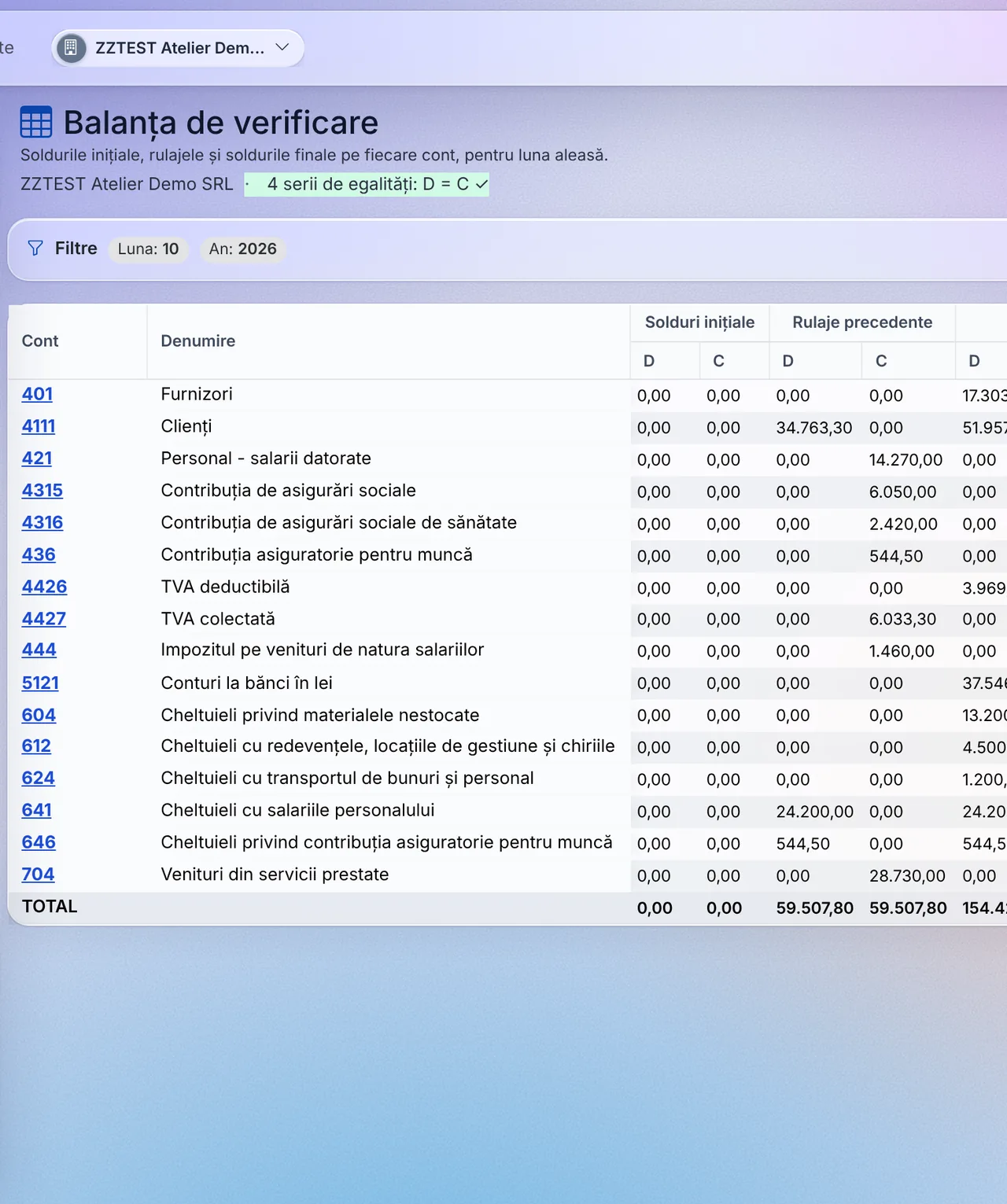
If you enable automatic posting, the issued invoice creates its accounting entry at the same moment. The trial balance, journal register and account ledger are read from the same entries, and from the trial balance you reach the entry and the document from which each amount originates.

The trial balance in OmniGest ERP, on a test company

Declarations

Declarations, checked before submission

D300, D390 and D394 are generated from the VAT journals and pass through the official schema and the ANAF validator run on the server. You also receive the official PDF. You submit them in SPV, and the receipt remains linked to the declaration.

The declarations screen in OmniGest ERP, with the D300 return of a validated test company

Multiple companies

All the companies in the firm’s portfolio, with their deadlines

The portfolio shows each company with its monthly deadlines and alerts, and you enter each with one click. Each company has its fiscal profile, with history: if it moves from micro-enterprise to profit tax, previous months are calculated under the regime in force at the time.

  • Company portfolio
  • Fiscal profile with history
  • Rights on the role
  • Auditor with read rights

Salaries

Payroll from validated timesheets

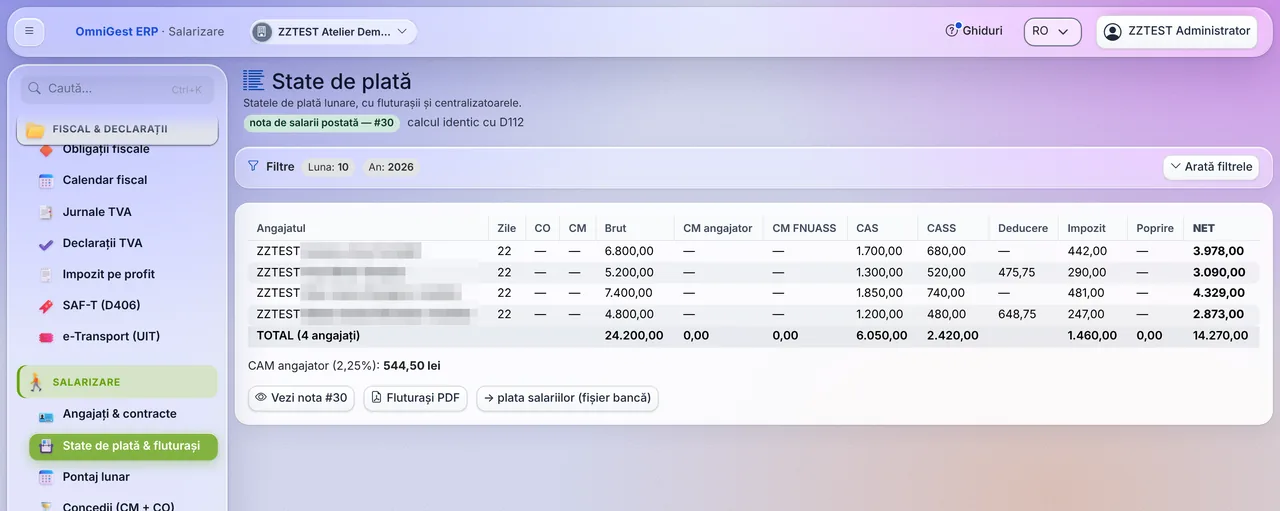
Validated timesheets feed into payroll, and the salary entry is created with one click. Sick leave allowance is calculated on save, with the employer’s and FNUASS portions. With Self-Service Angajat, employees view their payslip and request leave from their phone.

The payroll in OmniGest ERP, with test employees (names masked)

Legal obligations

What the law requires and where you do it in OmniGest

The obligations a company has towards ANAF, employees and its own accounting, and the place in the application where you fulfil them.

Invoice via RO e-Factura
Between companies established in Romania, the issued invoice is transmitted through the RO e-Factura system (OUG nr. 120/2021, art. 10 alin. (1)). OmniGest generates the invoice file, checks it, sends it to ANAF and tracks its status. Received invoices are downloaded automatically.
VAT return
The Fiscal Code requires the VAT return for each fiscal period, by the 25th of the following month (art. 323 alin. (1)), and the recapitulative declaration for intra-Community transactions (art. 325 alin. (1)). OmniGest generates D300 and D390 from the VAT journals and checks them with the ANAF validator. You submit them in SPV.
Cash ceilings
Law no. 70/2015 allows cash receipts of at most 5,000 lei per day from one person and payments of at most 5,000 lei per day to one person, but not more than 10,000 lei per day in total (art. 3 alin. (1)). In the cash book, a voucher exceeding the ceiling is not saved until you confirm it.
Minimum wage
The national minimum gross basic salary guaranteed in payment is set by government decision (Labour Code, art. 164 alin. (1)). OmniGest does not save a contract with basic salary below the minimum, relative to the norm. Each minimum value has in the application the date from which it applies.
Annual inventory
The Accounting Law requires a general inventory of assets, liabilities and equity at least once during the financial year (Law no. 82/1991, art. 7 alin. (1)). In OmniGest, stocks are inventoried by warehouse, with book and physical lists and the minutes. Balances with partners are confirmed by the balance confirmation letter.
Annual financial statements
Companies submit annual financial statements to ANAF by 31 May of the following year (Law no. 82/1991, art. 36 alin. (1) lit. a)). OmniGest prepares form S1003 for small entities from the trial balance and checks it with the official validator. Form S1005 for micro-entities is not in the application.
How to start

First steps until you work in OmniGest

  1. Choose the size

    The small company and the medium company buy online, by card. For a large company we prepare a quote. If you want to see the application first, request a presentation.

  2. Start your company

    The «Start your company» guide has six steps, each with its real status: the company's data taken from ANAF after the tax ID, the fiscal profile, the chart of accounts, the invoicing series, the bank account and the declarant. Then you authorise the company in e-Factura.

  3. Bring in the data

    From SAGA you load the company's archive and choose what you bring: the analytical accounts, the partners, the items and the opening balances. From other programmes you import CSV or Excel files. We import the old accounting history ourselves, at go-live.

The “Company” package

Accounting, the company's documents and the employees' portal

Besides OmniGest, the package brings FlexiDocs, the company's document archive. There you send the documents for approval and for signing and you edit Word and Excel files in the browser. Self-Service Angajat shows employees the payslip, the leave balance and the timesheet, and their leave requests and certificate requests reach OmniGest. Hypen One is included: the account with which each person enters all the applications.

  • FlexiDocs
  • Self-Service Employee
  • OmniGest ERP
  • Small company299 lei / monthinstead of 347 lei, bought separately
  • Medium company699 lei / monthinstead of 847 lei, bought separately

Monthly prices, excl. VAT.

Subscription

The price, by company size

The application is hosted by us, with e-Factura included. The small company and the medium company pay monthly or annually, by card. For the large company we make an offer.

Small company

149 lei / month

excl. VAT · 180.29 lei incl. 21% VAT

  • Up to 5 users
  • Up to 25 employees
  • One company
Buy

Medium company

349 lei / month

excl. VAT · 422.29 lei incl. 21% VAT

  • Up to 20 users
  • Up to 100 employees
  • Up to 5 companies
Buy

Large company

On quote

  • We set the size together
Request a quote

Monthly prices, excl. VAT. Paid annually, a year costs as much as 10 months.

Buy the subscription online

You see the final price and pay by card. The platform is installed after payment. If you have questions, talk to the team first.