iPortal for the specialist medical practice

From booking to CLIN reporting

The patient books in the evening, on the website, and receives a confirmation code. During the consultation, the doctor sees what CAS would reject and issues the reimbursed prescription from the same form. At the end of the month, the list of consultations shows what goes into the report and what still needs correcting.

From 199 lei per month, excl. VAT.

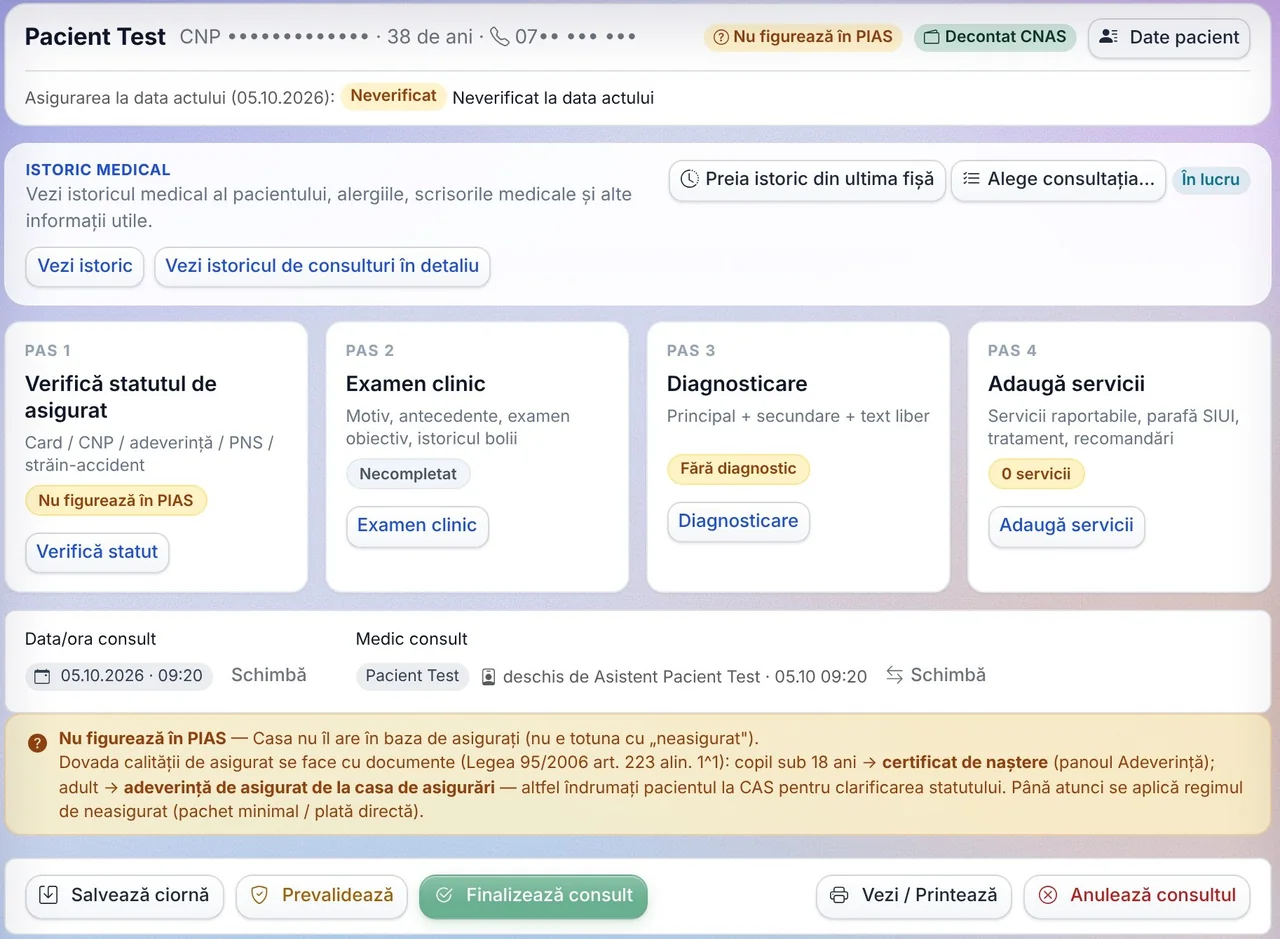
iPortal, outpatient care: a patient’s consultation in four steps, from insured status to services, with CAS prevalidation
Booking without an accountThe patient chooses the doctor and the time. With the code received, they check or cancel their appointment.
Prevalidation before reportingThe consultation’s services are checked with CAS while the patient is still in the practice.
Hypen One includedThe doctor and the reception desk have messages, calls, calendar and e-mail in the same subscription.

The practice’s day

From the consultation, the prescription goes to SIPE and the reporting to CAS

The patient confirms the services with their health card. The doctor signs the prescription with the USB token and sends it to SIPE, and the closed consultation goes into the month’s report.

On arrival the insured status is checked, and at the end the consultation is prevalidated.

The prescription goes to SIPE, and the consultation goes into the month’s CLIN report.

Who it is for

What iPortal solves for each person in the practice

Four questions from the practice and the place in the application where you find the answer.

The doctor, during the consultation

Do I have to open another program for the prescription and the referral?

The reimbursed prescription, the referral note, the medical letter and the sick leave certificate are issued from the consultation form, on the official templates. The medical history is taken over from the previous consultation, and the prescription goes to SIPE after the doctor signs it with the USB token.

The doctor who runs the practice

How many of this month’s consultations will CAS reject?

Every consultation goes through CAS prevalidation before it is closed. At the end of the month, the list of consultations shows what stays out of the CLIN report and why, while it can still be corrected. What CAS rejected appears in the validation queue, from where it is resubmitted.

The nurse and the reception desk

Who is coming today and whom do I need to move to another day?

Appointments from the website and those made by phone are in the same calendar. When the doctor changes their schedule, you see before saving the appointments that would fall outside it. On arrival you mark attendance and check the insured status with the card, the CNP or the certificate.

The practice’s accountant

How much did CAS settle and how much was collected at the desk?

The month’s settlement is retrieved from CAS in the application, as a PDF with the accepted amount. Payments from patients have a receipt, the cash register is exported, and outstanding balances have a statement of account per patient.

Modules

All the modules of the practice subscription

Grouped by the work in the practice. Each person sees only what their role allows.

Appointments and reception

The nurse and the reception desk

  • Online booking The patient chooses the service, the doctor and the time, with or without an account. They receive a code and a confirmation PDF, with which they check or cancel their appointment.
  • Booking at reception An appointment made by phone or at the desk goes into the same calendar as those from the website. From the list of upcoming appointments you move an appointment to another day.
  • Waiting list Patients who found the day full on the website go on the list. Reception books them from the list or closes the request, with a reason.
  • Appointment reminder The patient receives a reminder before the appointment, by e-mail, and by SMS when the practice has the SMS integration switched on.
  • Attendance On arrival you mark the patient present or absent. No-shows are also marked automatically, and a wrong mark can be corrected.
  • The doctor’s schedule The days, the hours and the length of a consultation, for each doctor. Before you save a change, you see the appointments that would fall outside the schedule. The days when the practice is closed are entered in the same screen.
  • Insured status Checked with CAS using the health card, the CNP or the certificate. When SIUI does not respond, you record the document brought by the patient, and the check is repeated automatically once SIUI is back.
  • Cash desk The payment note from the consultation, the receipt, a free-form payment for a service on request, the cash register with export, and the patients’ outstanding balances, with a statement of account.
  • Services sheet On request, the patient receives the services sheet and the statement of costs for the consultation.

Consultation

The doctor

  • The day’s list Consultations, filtered by day, doctor and status. The day’s log is exported to Excel or PDF.
  • Consultation form Reason for the visit, medical history, examination, coded diagnoses and CLIN services. The medical history and past history are taken over from the previous consultation you choose.
  • Signature with the card The patient confirms the services with their health card, at the reader in the practice, at the end of the consultation.
  • Prevalidation The services are checked with CAS before the consultation is closed. Errors that would block the settlement and warnings each appear with their reason.
  • Offline mode When the reader or SIUI is not working, you enter the card number manually, and the doctor takes responsibility for the services with the signature on the USB token.
  • Reopening and cancellation A consultation that is closed but not yet sent to CAS is reopened and corrected. A consultation that has been sent is cancelled and leaves the report.
  • Consultation register The practice’s register, printed from the consultations entered.
  • Teleconsultation The doctor invites the patient to a video consultation. The patient accepts the consent for telemedicine the first time they join the call, and documents sent in the chat go into the record after the doctor accepts them.
  • Follow-up plan The patient’s periodic check-ups, in a plan printed as a PDF.

Documents issued from the consultation

The doctor

  • SIPE reimbursed prescription The reimbursement is calculated for each medicine. The patient confirms with the card, the doctor signs with the USB token, and the prescription goes to SIPE. When SIPE does not respond, the prescription is issued in offline mode.
  • The prescription after issue From the form you find out whether the prescription has been dispensed. A transmitted prescription can be cancelled with CAS as long as it has not been dispensed, and “Correct the prescription” opens a new one, pre-filled. Before issuing, you see the patient’s active prescriptions.
  • Special-regime prescription For narcotics and psychotropics, on the printed form, separately from SIPE.
  • Referral note Clinical or for investigations, with the series and number from the practice’s book, printed on the standard form. The draft remains editable until you press “Issue”, and an issued referral is cancelled with a reason.
  • Sick leave certificate The certificate from the practice’s book, with an insurance check. An issued certificate is cancelled with a reason.
  • Medical letter The letter to the family doctor, printed on the template of Annex 43, and the letter for related psychologist or speech therapist services.
  • Optical prescription and medical report Issued from the consultation, with printing and history.
  • Official forms The standard forms and annexes are filled in within the record and printed just like the official template.
  • Informed consent For each procedure: the printed form, a signature on the tablet or a link sent by SMS or e-mail. Every signature and withdrawal stays in a log that cannot be modified.

Reporting to CAS

The doctor and the practice administrator

  • List of the month’s consultations Shows what goes into the CLIN report and what is left out, with the reason and what needs to be corrected, before generation.
  • CLIN reporting Generated as an XML file, signed on the practice’s computer and sent to CAS.
  • Report status Each report sent, with its history and the XML file, to open or download.
  • Validation queue What was sent to CAS, what is pending and what was rejected, with the reason. A rejected validation is resubmitted from the list.
  • Documents sent to CAS Prescriptions, referrals and sick leave certificates sent to PIAS, by patient, with resending of the failed ones.
  • CAS settlement The month’s settlement is retrieved from CAS as a PDF, with the accepted amount. The day the invoice is submitted is entered in the application.
  • PIAS calendar Each month’s reporting windows, taken from the CAS calendar and confirmed by a person.

The patient, from home

The practice’s patients

  • Patient account Activated with the CNP, the phone number and the code received by SMS. The patient sees their documents, signed SIPE prescriptions and receipts, and downloads their record as a PDF.
  • Results with a code Without an account, the patient downloads the results that have been sent to them, with the access code received.
  • Access for another doctor The patient gives an outside doctor access to the record through a link sent by e-mail and can revoke it at any time. Every access stays in the log.
  • The practice’s website The pages about the practice, services, announcements and contact are edited from the application, with versions.

Administration

The practice holder or the administrator

  • Users and rights Rights by role and grants per person.
  • Stamp and signature The stamp with image, rank and title, and the drawn signature, saved by each person for themselves.
  • Viewing as another role The administrator sees the application the way a role sees it, without being able to write.
  • CAS data The personalisation file is uploaded with a preview: you see the contracted doctors and specialities before importing.
  • Document series The active series and the starting number for prescriptions, referral notes and sick leave certificates, plus the books for special-regime prescriptions.
  • Audit The log of actions in the application, with export.

Hypen One, included in the subscription

The whole practice team

  • Messages and calls One-to-one and group conversations, with files and voice messages. From a conversation you start an audio or video call.
  • Calendar Calendars from Google, Microsoft 365 or a CalDAV server, next to the practice’s calendar.
  • E-mail You connect the mailbox you already have: Microsoft 365, Google, Exchange or any IMAP.
  • Documents, with FlexiDocs Office documents are edited in the browser and signed only if you add FlexiDocs to the subscription. Hypen One does not include them.

The practice subscription covers only outpatient care. Admissions, the laboratory, imaging, the pharmacy and the other hospital modules are in iPortal for hospitals.

In preparation: the module for the family medicine practice. We will announce it here when it can be used.

A working day

An ordinary day in a practice that works in iPortal

The times are indicative. Each step is an action that the doctor or reception takes in the application.

  1. 08:00

    The day’s schedule

    The nurse opens the day’s list. Appointments made on the website overnight are already in it, and a patient from the waiting list gets a free slot.

  2. 08:30

    The first patient

    Reception marks them present and checks their insured status with CAS, using the health card.

  3. 08:40

    Consultation

    The doctor takes the medical history from the previous consultation, fills in the examination and the diagnosis, then prevalidates the services with CAS.

  4. 09:00

    The prescription and the referral

    The patient confirms the services with the card. The doctor issues the reimbursed prescription, signs it with the USB token and sends it to SIPE, then issues the referral note.

  5. 11:00

    The consent

    For a procedure, the patient signs the consent on the tablet on the desk, after the short code displayed by the doctor.

  6. 13:00

    SIUI is not responding

    Reception records the certificate brought by the patient and the consultation continues. The insured status is rechecked automatically once SIUI is back.

  7. 15:00

    Teleconsultation

    The doctor invites a patient to a video consultation. The patient sends a lab test report in the chat, and the doctor accepts it into the record.

  8. 17:00

    Cash desk

    For a paid service, reception collects the payment note from the consultation and prints the receipt. At closing, the cash register is exported.

  9. At the end of the month

    Reporting

    The month’s list shows the consultations left out of the report, each with its reason. After correction, the CLIN report is generated, signed and sent to CAS.

Consultation

Prevalidation with CAS

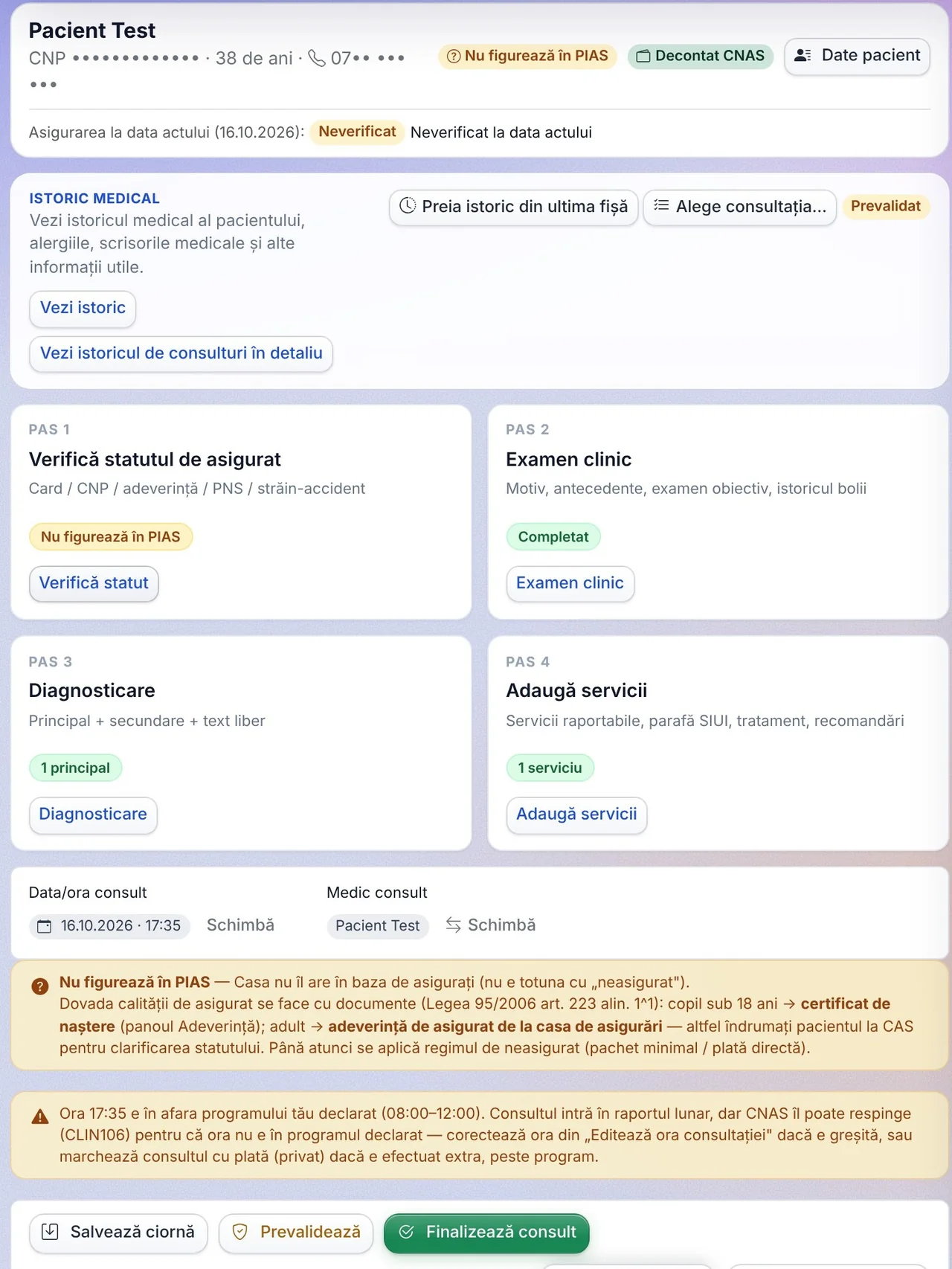
Before you close the consultation, iPortal checks the local rules, then sends the services for CAS prevalidation. Errors that would block the settlement and warnings each appear with their reason, while the patient is still in the practice. When SIUI does not respond, the local checks remain and the consultation goes ahead.

The outpatient consultation in four steps, prevalidated, with the CAS warning about the time outside the schedule

SIPE prescriptions

Reimbursed prescription in SIPE

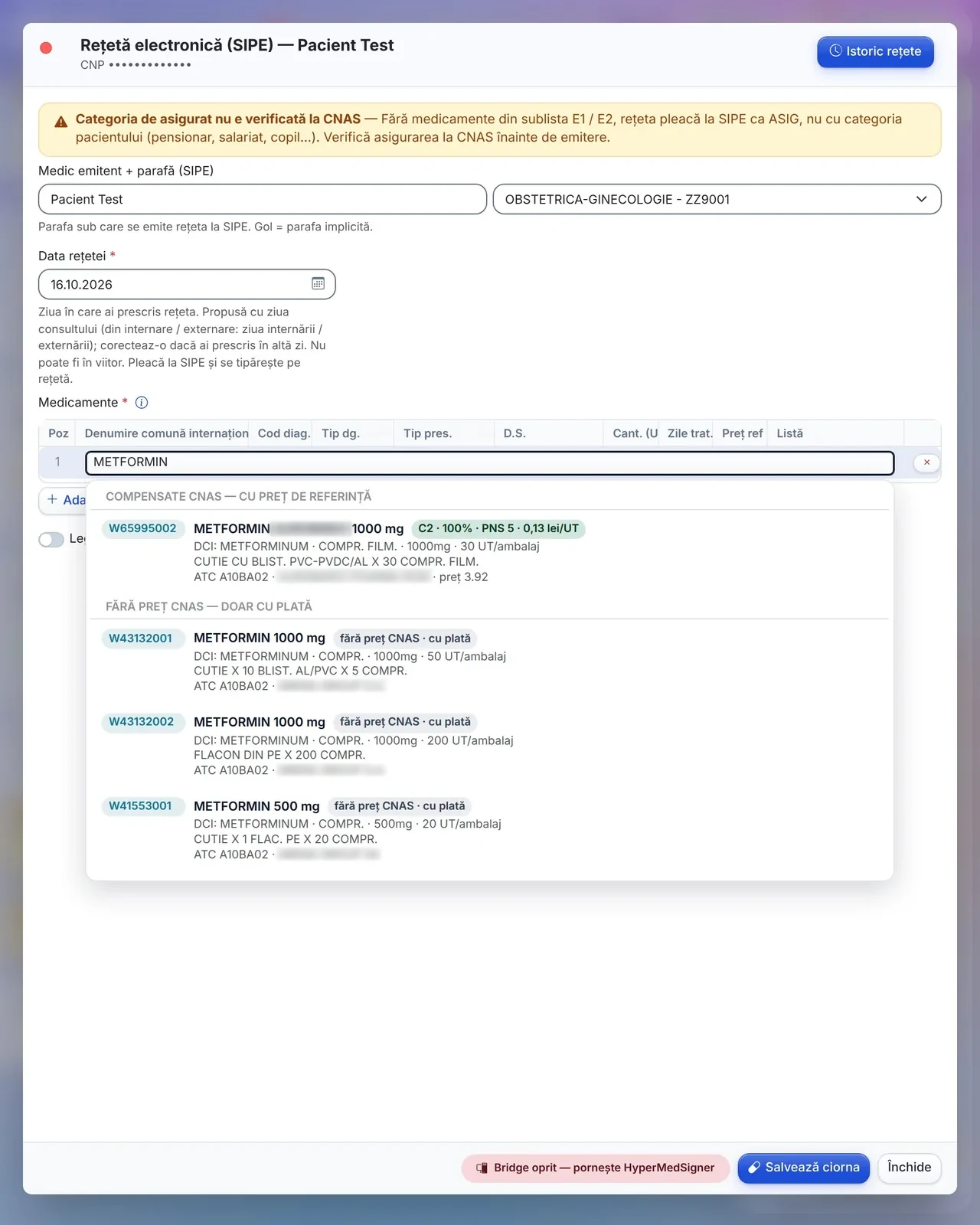
The doctor chooses the medicine from the CAS nomenclature, and the reimbursement is calculated for each item. The patient confirms with the health card, the doctor signs with the USB token, and the prescription goes to SIPE. If the connection drops, the prescription stays in the queue and is resent automatically.

SIPE electronic prescription: searching for a reimbursed medicine in the CAS nomenclature

Electronic signature

Consent, signed electronically or on paper

The patient signs on the tablet in the practice, after a short code displayed by the doctor, or on their own phone, with the link received by SMS or e-mail. The link goes only to the contact details in the record. Those who prefer paper sign the form printed from the record. The electronic signature is a simple one and sits alongside the paper form.

  • On the tablet
  • Through a link, by SMS or e-mail
  • On paper

On your phone

The record on the phone

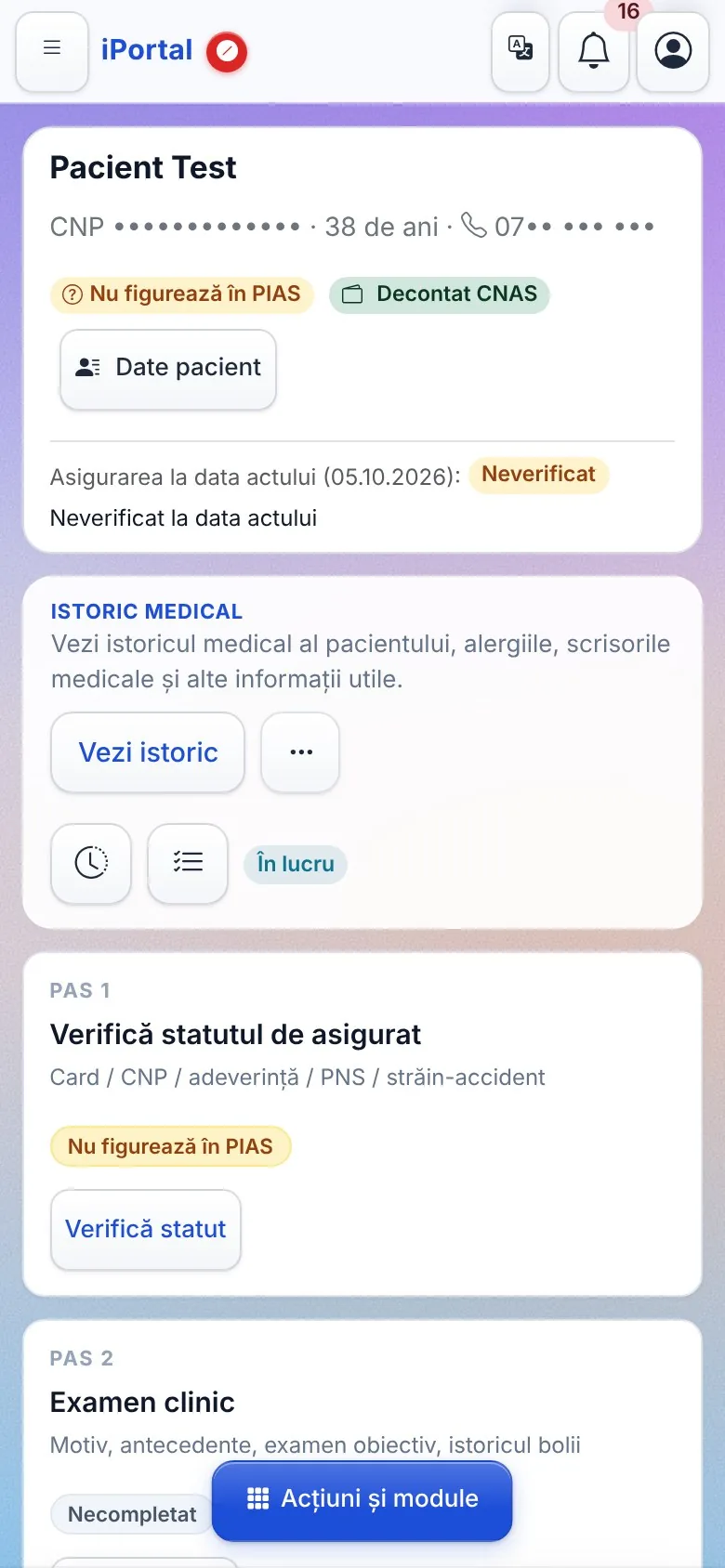
The doctor opens the same consultation on the phone: the insured status, the consultation steps and the documents. The patient activates their account with the CNP, the phone number and the code received by SMS, then sees their signed prescriptions and downloads their record as a PDF.

iPortal on the phone: the outpatient consultation, with the insured status and the consultation steps

Legal obligations

What the law requires and where you do it in iPortal

The practice’s obligations towards the patient and towards CAS, with the place in the application where you fulfil them.

The next appointment
Since March 2026, the Patients’ Rights Law no. 46/2003 (Art. 4 para. 2) gives patients the right to be referred and booked for the next consultation or investigation by the facility where they were seen. In iPortal, reception makes the new appointment in the same calendar as the website appointments.
Consent and refusal
Law no. 46/2003 gives patients the right to be informed about the proposed interventions, their risks and their alternatives (Art. 6). Refusing or stopping an intervention is acknowledged in writing (Art. 13). In iPortal, consent is given for each procedure, on paper or signed electronically, and stays in the record.
Insured status
When communication with the CAS information system is not possible, the rules approved by CNAS Order no. 1.549/2018 (Art. 10) allow services to be provided on the basis of the documents brought by the patient. iPortal records the document and rechecks automatically once the system is back.
Monthly reporting
Consultations under the contract with CAS are reported monthly, in the CLIN report. In iPortal, the month’s list shows in advance what would not pass, and the file is sent electronically signed.
Reimbursed prescription
The reimbursed prescription is issued electronically, signed with the doctor’s certificate and transmitted to SIPE. Narcotics prescriptions are made on their own printed form.
How to start

From demo to the first consultation

  1. Try it

    The “Try it now” button opens a test practice, with test patients, in the “Practice doctor” role.

  2. Buy

    You choose the practice subscription, fill in the company details and pay by card. The company details are filled in from the CUI, from ANAF.

  3. Upload the CAS data

    The administrator uploads the personalisation file received from CAS and sees the contracted doctors and specialities before importing. Then they enter the series for prescriptions, referrals and sick leave certificates.

  4. Connect the reader

    The signature with the health card and the one with the doctor’s USB token go through the signing application installed on the practice’s computer. The reader and the certificate belong to the practice, and iPortal connects to them.

Price

The subscription price for one doctor

The subscription is paid monthly, online, by card. It includes Hypen One for the doctor and reception.

Individual medical practice

199 lei / month

excl. VAT · 240.79 lei incl. 21% VAT

  • Up to 2 users

Hypen One included.

Buy

Monthly prices, excl. VAT. Paid annually, a year costs as much as 10 months.

Buy the subscription online

You see the final price and pay by card. The platform is installed after payment. If you wish, try the applications first, free of charge, on test data.