iAcademie, the learning management system (LMS)

The company’s courses, with tests, assignments and each learner’s progress

You put the course into iAcademie as modules and lessons. Your colleagues read it or listen to it, check their understanding with multiple-choice tests and hand in assignments. For assignments, the AI grader proposes a score on each criterion of the marking scheme, and the instructor validates it. Every learner sees how far they have got, and the study plan tells them what to do today.

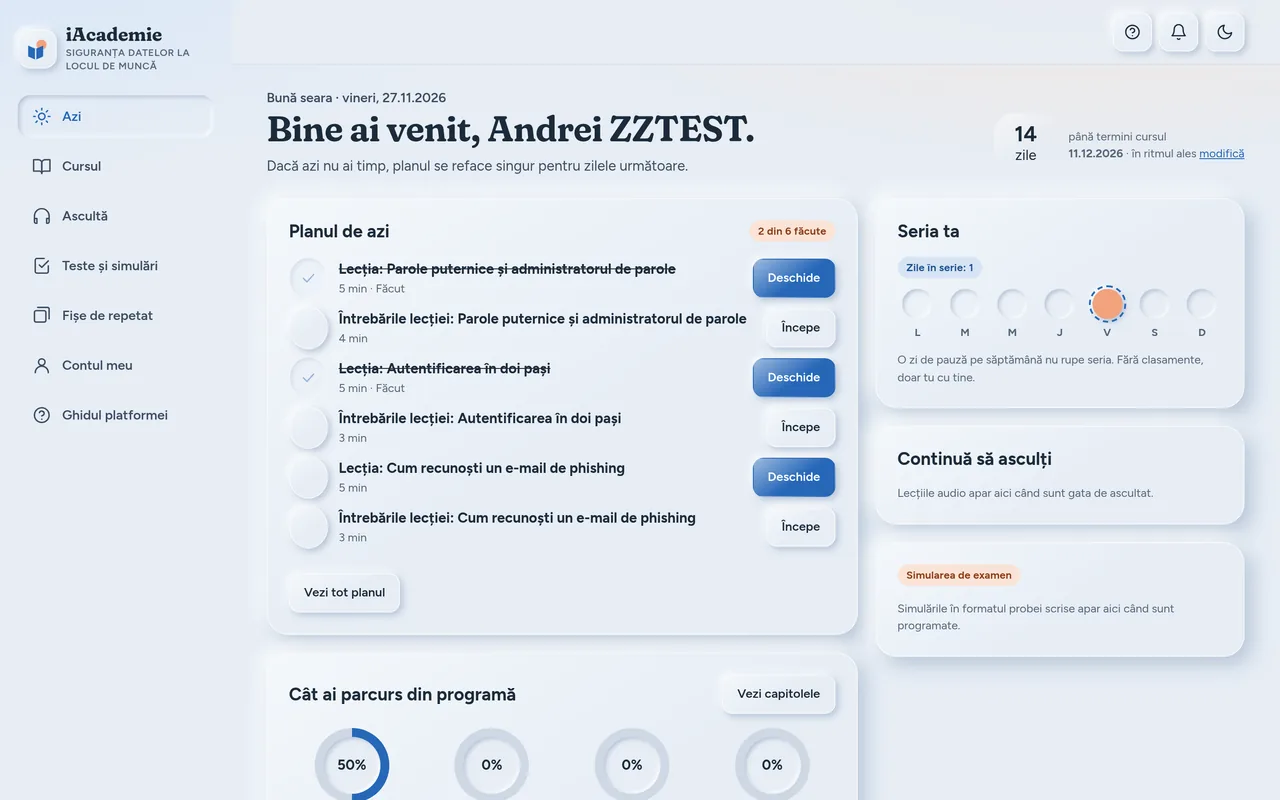
iAcademie: a learner’s “Today” screen, with the day’s plan from the demo course “Data security at work”, the study streak and the number of days to the end
Tests are marked on the spotMultiple choice, true or false and short answers get their score immediately, with the explanation and the lesson to reread.
Assignments are marked against a marking schemeThe instructor sees the score proposed by the AI on each criterion and validates it or changes it, with the reason written down.
Colleagues sign in from the company portalIn internal mode, the learner account is created on the first sign-in, with the work account.

Who it is for

For companies and institutions that train their people

A company’s internal academy, staff training in an institution, induction courses for new colleagues. The question each role asks and what it does in iAcademie to get the answer.

The learner

What do I have to learn today?

The “Today” screen shows the lessons and questions of the day, following the plan the learner chose: how many hours a week, on which days and which module to start with. If a day is missed, the plan rearranges itself.

The instructor

Which work do I have to mark?

The marking queue holds the learners’ assignments and open answers, in order of arrival, with the score proposed by the AI on each criterion of the marking scheme. The instructor validates the proposal or changes a point and writes the reason.

The content author

How does a new lesson reach the learners?

The author writes the lesson draft, with citations from the course sources, and sends it for review. The instructor approves and publishes it, or rejects it with the reason. For a new version, the instructor sees the differences from the published one.

Administrator

How many colleagues have started the course?

The dashboard shows them the enrolled learners, the new ones from the last 30 days and the enrolments per week. The administrator also issues the API tokens and manages the academy settings.

How learning works

A day of learning, from lesson to grade

A learner’s steps in iAcademie, in the order they take them.

  1. The course

    Opens the day’s plan

    On the “Today” screen the learner finds the lessons and questions of the day. Under “Course” they see the modules, each with the percentage completed.

  2. The lesson

    Reads or listens

    The reader shows how much you have read and picks the lesson up where you left off. A published lesson also has an audio version, with markers for each subsection.

  3. The test

    Answers the questions

    Multiple choice, true or false and short answers are marked on the spot, against the answer key, with the explanation and the source in the lesson. An open answer goes to marking.

  4. The assignment

    Hands in the assignment

    Uploads a PDF, a Word document or photos. The instructor grades it from 1 to 10 against the marking scheme, and the learner sees the grade and the comment.

  5. Recurrence

    Reviews the flashcards

    After the lesson, flashcards to review appear. Each one comes back after an interval that grows with every correct answer, following the SM-2 algorithm.

  6. Progress

    Sees how far they have got

    A lesson is done when it has been read or listened to and its test has been passed. The streak counts the study days, and the first missed day of a week does not break it.

AI-assisted marking

The proposed score on each criterion, validated by the instructor

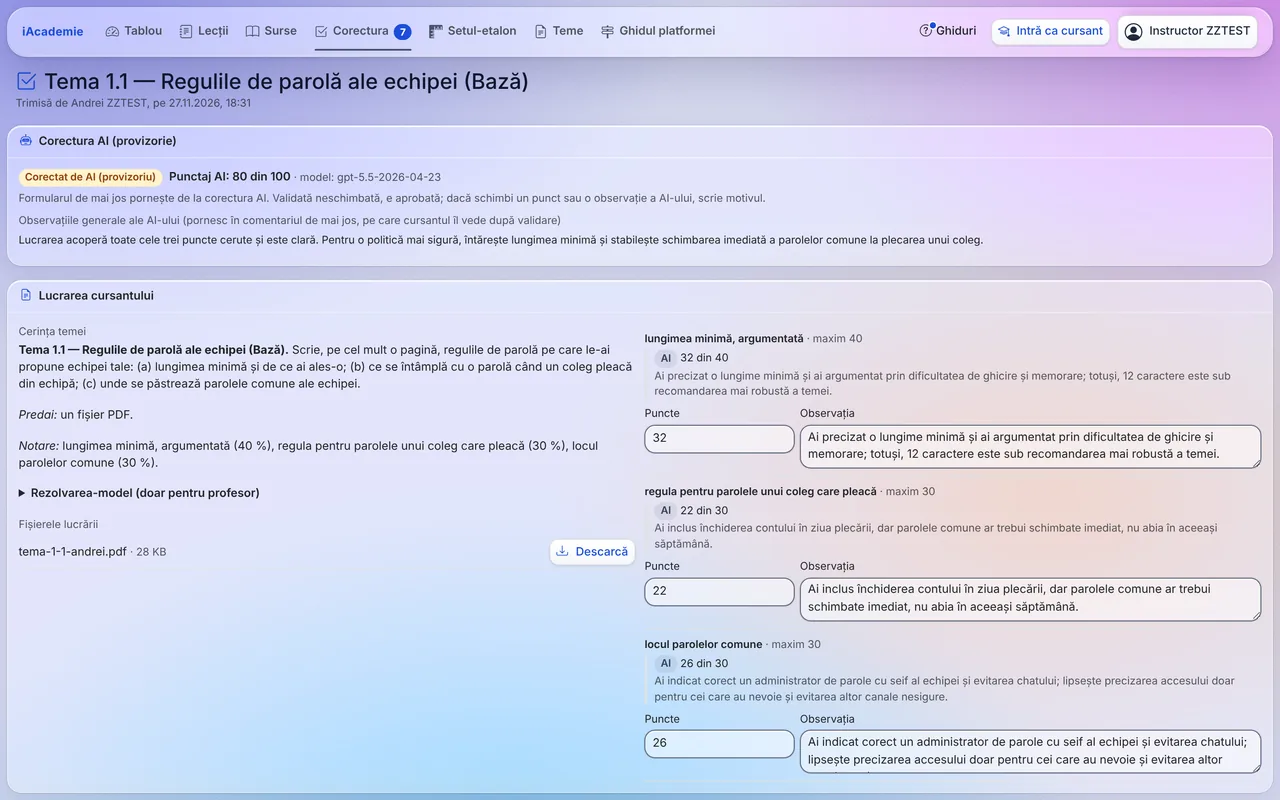
For an assignment with a marking scheme, the AI grader receives the task, the criteria, the model solution and the files handed in, without the learner’s name. It proposes points and a remark on each criterion. The instructor starts from the proposal: validates it as it is, or changes a point and writes the reason.

iAcademie: the marking of an assignment, with the score proposed by the AI on three criteria, the remark on each and the proposed grade, ready to be validated by the instructor

Tests

The correct answer and the explanation, right after answering

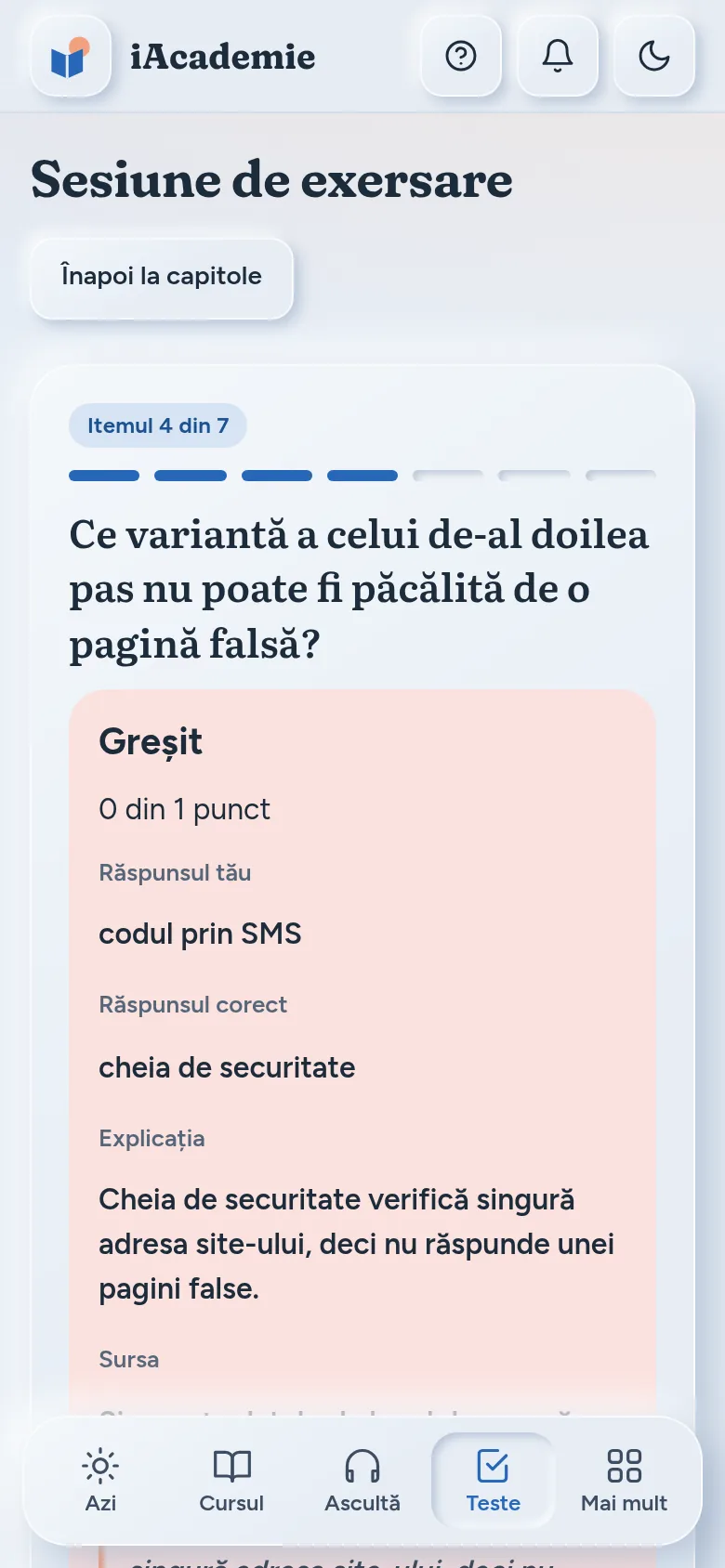
A session has at most 10 questions, picked at random from a lesson or a module. After each answer, the learner sees whether it was correct, the right answer, the explanation and the source in the lesson, with a link to the lesson to reread.

iAcademie on a phone: a multiple-choice question the learner got wrong, with the correct answer, the explanation and the source in the lesson

Lessons

Every lesson goes through review before it reaches the learners

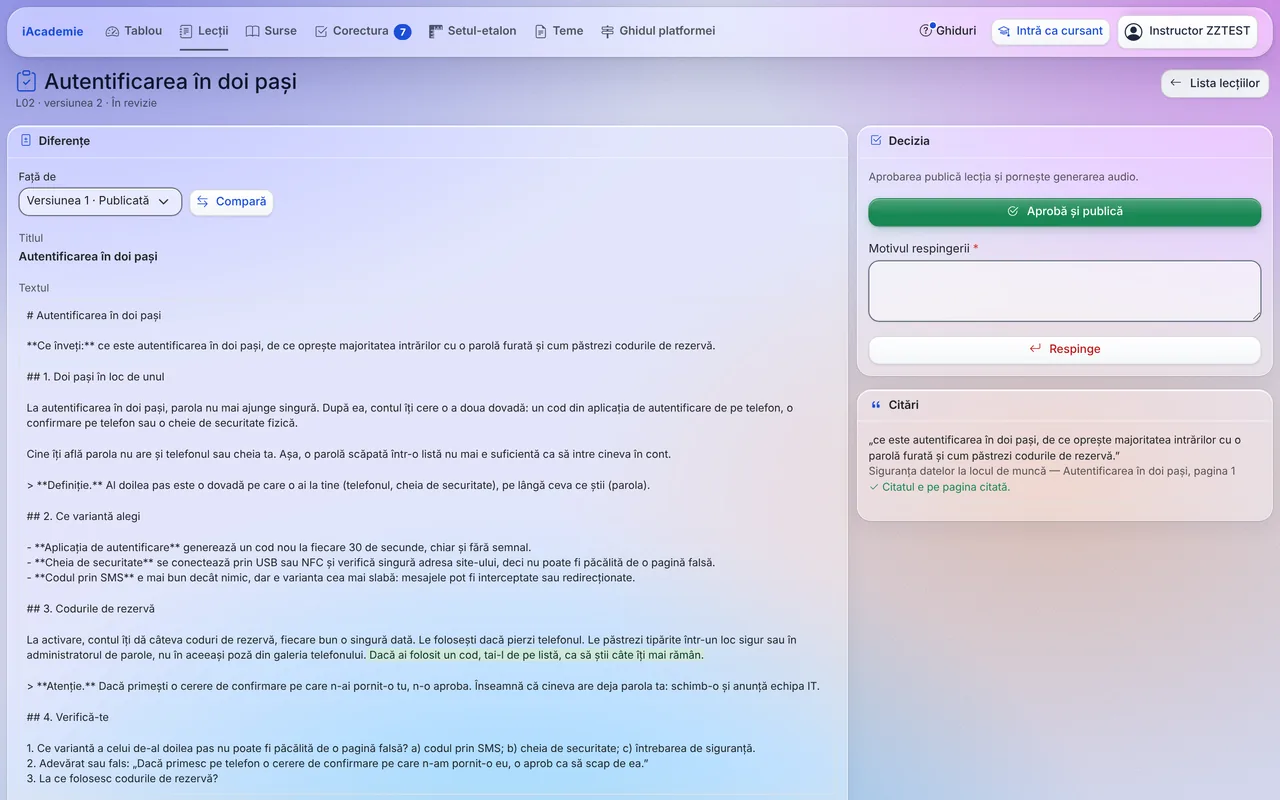
The author writes the draft, with citations from the course sources, and sends it for review. The instructor sees the differences from the published version, then approves and publishes in a single step, or rejects with the reason. A lesson whose citation cannot be found in the source cannot be approved.

iAcademie: the review of the second version of a lesson, with the new sentence highlighted against the published version, the “Approve and publish” decision and the verified citation

Assignments

The assignment comes back with the grade and the comment

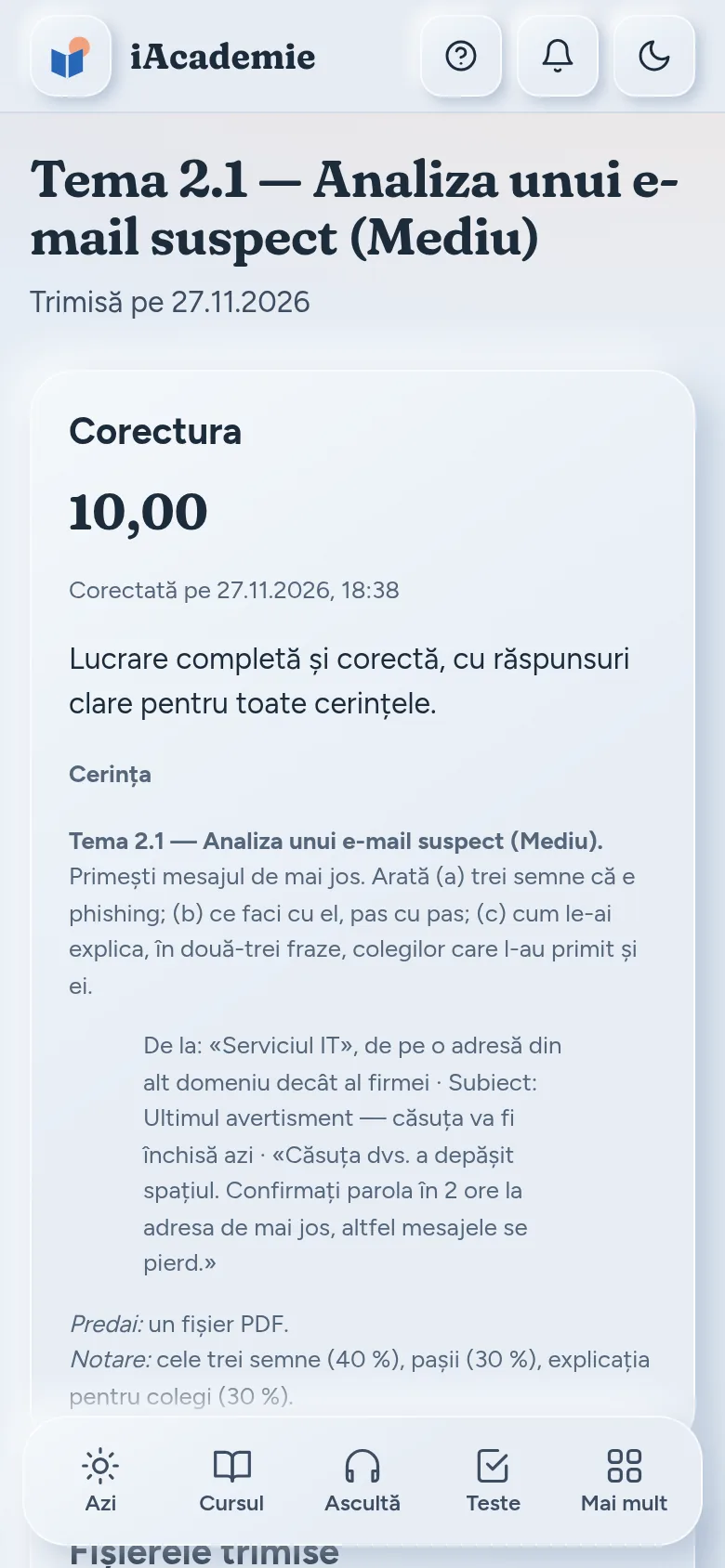
The instructor publishes the assignment with the task, the marking scheme by criteria and, if they wish, a deadline. The learner hands it in from a phone or a computer and gets the grade and the comment after marking. Files are stored encrypted, and photos lose their metadata, including the place where they were taken.

iAcademie on a phone: a marked assignment, with the grade, the marking date, the instructor’s comment and the task

The reader

Lessons can be read on any screen and resumed where you left off

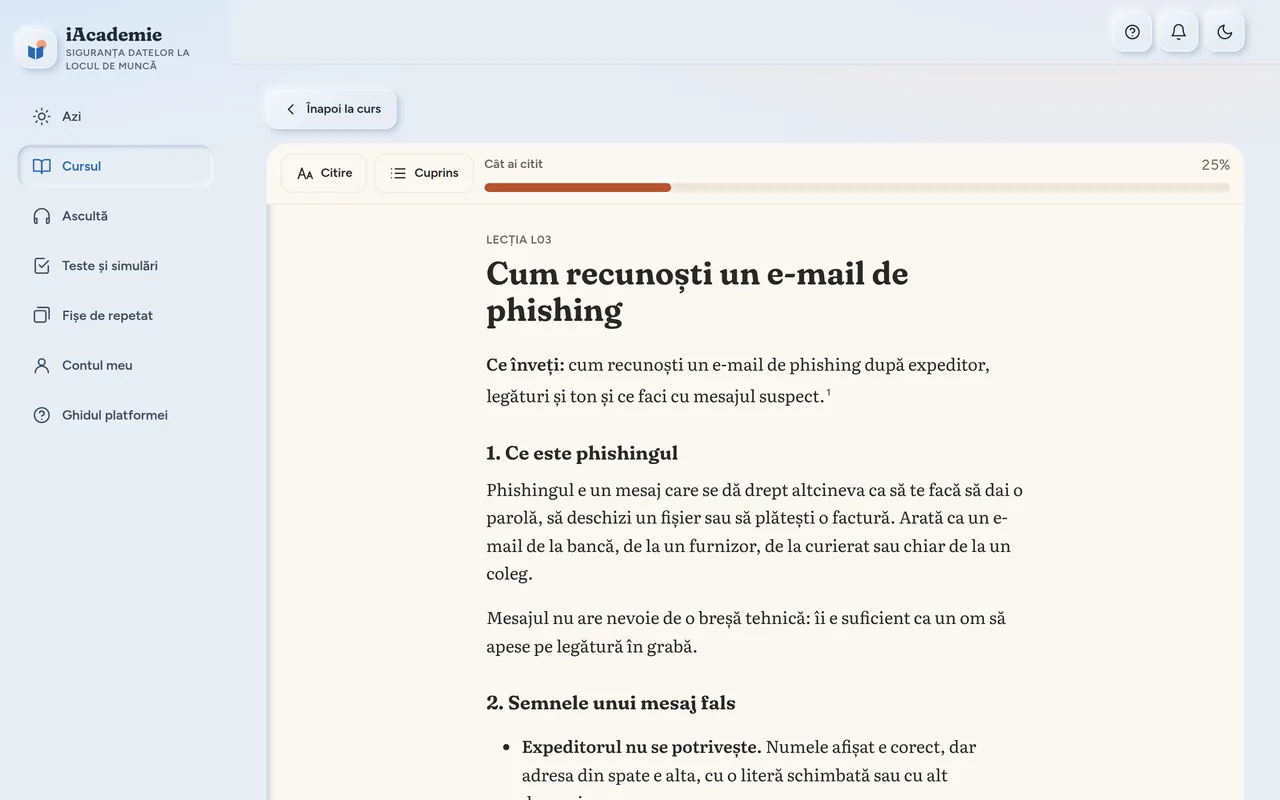
The reader shows how much you have read, has the lesson’s table of contents and remembers where you stopped. Each learner chooses the font size, the line spacing and the reading theme: paper, sepia or night.

iAcademie: the reader of a lesson from the demo course, with the “How much you have read” bar, the table of contents and the reading preferences

AI marking

What the AI grader does and what stays with the instructor

The exact steps in the application, from the learner’s answer to the validated grade.

What it marks
Only open answers: the short essays in tests and the assignments with a marking scheme. Multiple choice, true or false and short answers are marked against the answer key, without AI.
What it receives
The task, the answer, the criteria of the marking scheme and passages from the course lessons. For an assignment it also receives the model solution and the files handed in. The learner’s name is not sent.
Who decides
The AI proposal stays provisional until the instructor validates it. The learner sees the grade only after validation.
What it costs
Each call is counted by the tokens used. A monthly cost cap stops new calls: 50 USD a month by default, changed at installation.
Which model
OpenAI or Anthropic, chosen at installation, with the installation’s own key. Without a key, no request is sent and the work stays with the instructor.
How you check it
With the benchmark set: the instructor confirms the score of some sample answers, and iAcademie compares the AI scores with theirs. The thresholds: mean deviation at most 10%, deviation on a single answer at most 25%.
Internal mode

The internal academy, for the employees in the company portal

When iAcademie runs in internal mode, the learners are the colleagues in the company’s Hypen portal.

Sign-in with the work account
The employee opens iAcademie from the launcher of the company’s Hypen portal. On the first sign-in, the application creates their learner account, with no registration form.
What the learner sees
All published lessons, tests and assignments, with no subscription and no payments.
Roles come from the portal
The administrator, the instructor and the author get their role from the company portal. The portal administrators are also administrators of the academy.
Staff also see the learner side
With the “Enter as a learner” button, the instructor goes through the course like a colleague, then returns to the administration.

Security and data

Who signs in, where assignments are kept and what goes to the AI

Staff sign in through the portal
Administrators, instructors and authors sign in with the portal’s single sign-on. The identity arrives signed, and the role from the portal decides which screens each person sees.
Encrypted assignments
Each assignment file is encrypted with its own key (AES-256-GCM). Photos lose their metadata, including the GPS coordinates of the place where they were taken.
The AI grader does not receive the identity
Only the text to mark, the task and the marking scheme go to the AI, without the learner’s name or address.
The API has a log
Agents and applications use the API with tokens issued by the administrator, valid for 90 days by default. Every request to the content API is written to the log: the token, the person, the route, the response and the duration.

Frequently asked questions

What people choosing an LMS usually ask us

What is a learning management system?

The application in which an organisation keeps its courses, enrols its learners, checks their learning and follows their progress. In short, an LMS. iAcademie is the LMS of the Hypen platform.

Can we add our own courses?

Yes. The course is written as modules and lessons, with its questions and assignments, and imported into the application. The lessons go to review, and the instructor publishes them from the editor. Authors can also write new lessons directly in the editor.

Is AI marking mandatory?

No. It is switched on in the installation settings. When it is off, the instructor marks assignments directly.

Does it work on a phone?

Yes. The learner side installs as an app on iPhone, Android and laptop, and downloaded audio lessons can be played without a network connection.

Which languages is the interface in?

Romanian, English and French. Each learner chooses the language in the application.

Can it connect to other applications?

Yes, through the API. The learner side has a REST API, with a token. AI agents can write lesson drafts through the content API, and approval stays with the instructor.

How do you buy iAcademie?

On quotation. Tell us how many colleagues you want to train and which courses you have, and we will send you the price. If you want to see the application first, request a presentation.

How to start

The first steps to your first course in iAcademie

  1. You request a quote or a presentation

    Tell us how many colleagues you want to train and which courses you have. We send you the quote or show you the application in a discussion with the team.

  2. We install iAcademie

    We install it in the company’s Hypen platform, in internal mode: colleagues sign in with their work account.

  3. We add the first course

    We import the course, with its lessons, questions and assignments. The instructor reviews it and publishes it from the editor.

How to buy

The price, on quotation

iAcademie is sold on quotation, based on the number of learners and the courses you bring. We send you the price by e-mail.

  1. You request the quote
  2. You receive the price
  3. We install iAcademie
  4. We add the first course

Request a quote

We send you the quote by email within at most two working days. If you wish, speak first with the team.